 RedRouter
What RedRouter keeps: request logs, saved chats and Zero Data Retention
| Data | Kept by default | With Zero Data Retention on |
|---|---|---|
| Prompts and completions | Encrypted, up to 30 days, then deleted | Not stored |
| Usage metadata (model, tokens, cost, timing, errors) | Yes, for billing | Yes, for billing |
| Saved chats | Only when you click Save chat, until you delete them | Saving is off |
| Payment records | Purchases, refunds, credit balance, billing country | Same |
| Price | Standard rates | Standard rates plus 20% |
That table is the whole policy. The rest of this post explains how each row works, so you can decide whether it fits a client engagement. The legal text is the privacy policy.
Request logs
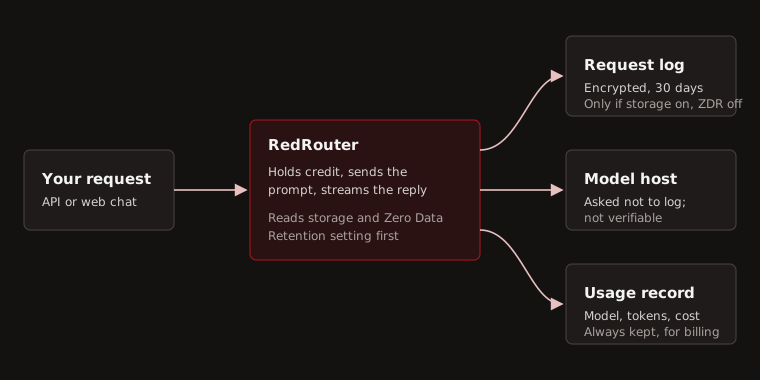
With Zero Data Retention off, RedRouter keeps an encrypted copy of each request and its response. The uses are abuse prevention, support, debugging and billing disputes. Nothing else.
How that copy is handled:
- Each request and response is encrypted separately with AES-256-GCM before it reaches the database. The key is not stored in the database.
- Each copy carries an expiry 30 days after the request. A cleanup job deletes expired copies continuously, not in a monthly sweep.
- A stored response is capped at 4 MiB. Longer output is cut off in the log, not in what you receive.
- Content is never shown to customers, including you. There is no dashboard or export for it.
- An operator can read a copy only through one command that requires their name and a written reason. The access is recorded before anything is decrypted.
Request content does not go into application logs, error reports or analytics. API keys and sign-in links are not stored in readable form anywhere: keys are kept as hashes, and the secret is shown once when you create it.
Access to stored content is restricted and audited, and the content is never shown to customers.
Zero Data Retention
Turn it on in Settings. From then on, RedRouter does not buffer or store the content of your requests. The switch is read when each request starts, so a request already running when you flip it keeps the setting it started with.
What it does not change:
- Usage metadata is still recorded. Billing needs model, token counts and cost for every request.
- RedRouter still sends your prompt to the host that runs the model. RedRouter asks that host not to log requests, but cannot independently verify what it keeps. No inference API can honestly promise more about a third party.
- Saved chats are turned off while it is on.
It adds 20% to every token price, because those requests carry no record for support or dispute handling.
Saved chats
The web chat saves nothing unless you click Save chat. A saved chat is encrypted at rest, tied to your account, and stays until you delete it. Other accounts cannot read it.
Payments, including USDC
Stripe processes card and USDC payments on RedRouter's own pages. RedRouter never sees card numbers or wallet keys. It records each purchase and refund, the resulting credit balance, and the billing country Stripe reports.
USDC is not an anonymous rail here. During the paid beta both card and USDC payments need a US billing address, and Stripe applies its own checks to every payment. Credit is granted only after Stripe confirms the payment server-side; returning from the checkout page grants nothing on its own.
Traffic on the way in
Cloudflare sits in front of RedRouter for delivery and security, so it handles request traffic in transit, including prompts and authentication headers. Public pages use Cloudflare Web Analytics, which counts views without cookies. There is no session recording.
Checklist for a client engagement
- Read the privacy policy and terms with the client's data-handling clause next to them.
- If client data must not be stored by RedRouter, turn on Zero Data Retention before the first request, and budget the extra 20%.
- Use a separate API key per engagement, with a credit limit and an expiry, so spend and usage stay attributable.
- Keep client source code and credentials out of prompts unless the engagement allows sending them to a third-party model host.
What we still don't know
- What the model host retains in practice. RedRouter asks it not to log; it has no audit right to confirm that.
- The privacy policy lists the services RedRouter relies on: AWS for hosting, Stripe for payments, Cloudflare for delivery and analytics, and an email provider for sign-in links. Check it for the current list.
Sources
- RedRouter privacy policy, last updated October 26, 2026.
- RedRouter terms.