 redrouter

The ARTEX pentest framework is an open-source, LLM-driven autonomous testing system. You give it a security objective in natural language, and a planner plus worker agents break that objective into intents, run real tools, and record findings in a dashboard. Security teams looking for an ARTEX LLM setup, ARTEX red team automation, or ARTEX with RedRouter usually want the same three things: which repo to install after the original went dark, how to point its LLM at a custom API, and how to keep the workflow inside authorized bug bounty or lab scope.
This post covers those three. ARTEX facts come from the maintained English fork BaaRai/ARTEX (README, .env.example, agent/provider.go, and release v0.5.1), read on November 9, 2026. RedRouter facts come from docs.redrouter.org and the live catalog, read the same day. Both change. Recheck before you move client work.
Authorized work only. Use ARTEX against systems you own, isolated labs, or bug bounty / vulnerability disclosure targets inside the program's published scope and rules of engagement. That wording is from BaaRai/ARTEX's own README disclaimer. RedRouter's terms say the same about unauthorized testing. An LLM does not create permission.
What the ARTEX pentest framework is (and which repo to use)
ARTEX is a Go backend with an embedded Next.js web console and a PostgreSQL database. The README describes a dual-graph design: a shared asset graph and a per-task exploration graph. A goals agent extracts scope from your objective, a planner dispatches intents, workers claim those intents and run tools (Bash/HTTP, with traffic recording), and a main agent handles human-in-the-loop chat. Concurrency defaults to three workers per task in System Settings.
The original GitHub project, published by Autumn-27, was taken down by its author on October 8, 2026 after public reports of misuse. Threat-intel write-ups from Google Threat Intelligence Group and Mandiant (October 30, 2026), CERT-EU (November 5, 2026), Check Point Research (November 5, 2026), and Datadog Security Labs (November 9, 2026) document opportunistic and targeted abuse of ARTEX-class tooling; Help Net Security (November 9, 2026) recaps that reporting. That history is why this post is narrow: authorized scope first, then integration.
There is no single official upstream anymore. Public copies are forks. For this guide we use BaaRai/ARTEX:
- Description: "ARTEX - AI autonomous penetration testing system (English translation)"
- License: AGPL-3.0
- Latest release checked: v0.5.1, published November 5, 2026 (releases)
- Stars/forks on November 9, 2026: about 1,900 / 700 (GitHub API)
People searching for ARTEX GitHub after the original repository was taken down will find forks, not the author's copy. Other forks exist (localized UIs, commercial rebrands), and their terms differ. The BaaRai README (read November 9, 2026) allows use against systems you own, isolated labs, and scoped bug bounty or vulnerability disclosure targets. The RuoJi6/ARTEX README, read the same day, limits use to personal learning, code research, and local technical verification, and tells readers not to run actual tests against any online system, even with authorization or on their own assets. Both copies are AGPL-3.0; those usage rules are additional maintainer terms in each README, not in the LICENSE file. Read the README and LICENSE of the exact fork and commit you run, and do not use a copy in a way that copy's additional terms forbid.
ARTEX does not ship a model. You supply an LLM through environment variables or the UI's LLM Configuration page.
Install ARTEX (verified commands)
The BaaRai README lists several install paths. The one-click script is the recommended starting point:
git clone https://github.com/BaaRai/ARTEX.git
cd ARTEX
./install.sh
The script detects or installs Docker, then offers all-Docker or a local build. Once it is up, open http://localhost:8787. First visit hits /setup and asks for a one-time setup token printed in the backend log (docker compose logs artex | grep "Setup token", or the terminal running ./start.sh).
Docker Compose (manual), quoted from the same README:
git clone https://github.com/BaaRai/ARTEX.git
cd ARTEX
cp .env.example .env          # set POSTGRES_PASSWORD, optionally ANTHROPIC_API_KEY
docker compose up -d --build  # builds artex from this checkout + starts postgres
# → http://localhost:8787
There is no published image to pull for this fork; the image is built from the checkout. Prebuilt binaries are on the Releases page if you prefer that path: copy config.example.json to config.json, fill in the database connection, and start with ./start.sh (not ./artex directly).
Do not pull a random artex image from Docker Hub. On November 4, 2026, BadByte reported trojanized ARTEX images (tomicdd/artex and congdonglinux/artex) that ran commands from the login form before a password was checked; Docker removed those images the next day, but already-pulled or mirrored copies can still be backdoored. Build from source or from a pinned release you have checked yourself.
Requirements called out in the README: PostgreSQL, plus an LLM (ANTHROPIC_API_KEY or OPENAI_API_KEY, or configure in the UI). Bind address defaults keep the UI on loopback (ARTEX_BIND_ADDR=127.0.0.1 in .env for Docker). Do not expose an ARTEX console to the public internet without authentication hardening you have reviewed yourself.
Point ARTEX at RedRouter (copy-paste)
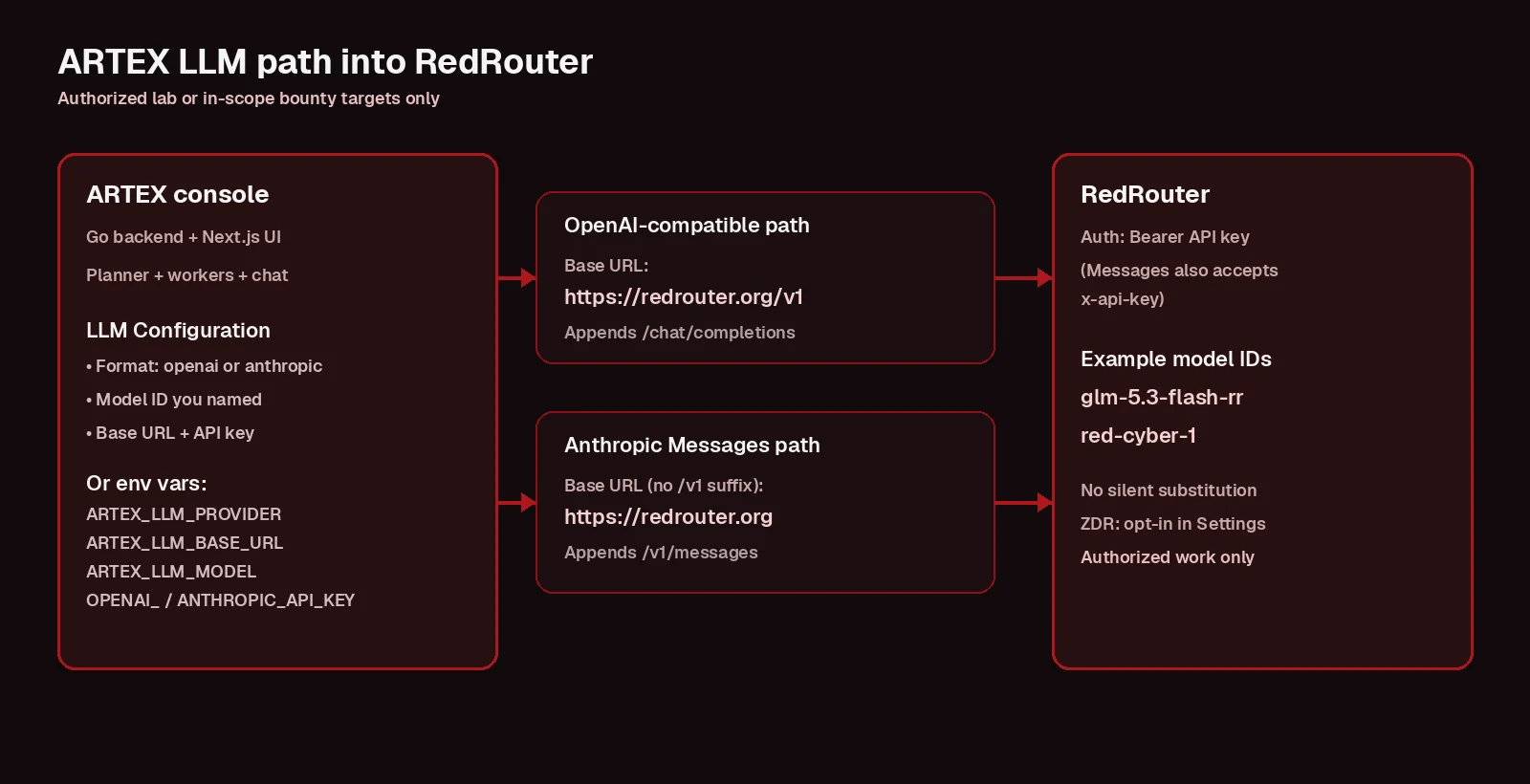
ARTEX accepts custom LLM endpoints. From the README and agent/provider.go (v0.5.1 / current main as of November 9, 2026):
| Setting | Values |
|---|---|
ARTEX_LLM_PROVIDER | anthropic | openai | openai-responses | ollama |
ARTEX_LLM_MODEL | Exact model ID |
ARTEX_LLM_BASE_URL | Provider base URL |
ARTEX_LLM_PROXY | Optional proxy |
| Credentials | ANTHROPIC_API_KEY or OPENAI_API_KEY (also editable in LLM Configuration) |
Base URL rules, from the README: for Anthropic format, enter the host without a /v1 suffix (the provider appends /v1/messages). For OpenAI format, the base does end in /v1 (the provider appends /chat/completions, or /responses for openai-responses).
RedRouter's matching bases, from compatibility and integrations:
| Client | Base URL | Auth |
|---|---|---|
| OpenAI-compatible | https://redrouter.org/v1 | Authorization: Bearer $REDROUTER_API_KEY |
| Anthropic Messages | https://redrouter.org | Bearer, or x-api-key (Authorization wins if both are sent) |
Option A: OpenAI-compatible (Chat Completions)
export OPENAI_API_KEY="$REDROUTER_API_KEY"
export ARTEX_LLM_PROVIDER=openai
export ARTEX_LLM_BASE_URL="https://redrouter.org/v1"
export ARTEX_LLM_MODEL="glm-5.3-flash-red"
You can also set the same fields in the ARTEX UI under LLM Configuration (format openai, base URL https://redrouter.org/v1, model glm-5.3-flash-red, API key = your RedRouter key).
Option B: Anthropic Messages
export ANTHROPIC_API_KEY="$REDROUTER_API_KEY"
export ARTEX_LLM_PROVIDER=anthropic
export ARTEX_LLM_BASE_URL="https://redrouter.org"
export ARTEX_LLM_MODEL="glm-5.3-flash-red"
Do not put /v1 on the Anthropic base URL. That gives a doubled /v1/v1/messages path, which the README flags as wrong.
Models and price to start with
Lead with GLM 5.3 Flash Red (glm-5.3-flash-red): $0.20 / $0.08 / $0.80 per 1M input / cached input / output tokens, verified on the live catalog November 9, 2026. Context is 1,048,576 tokens; max output is 8,192. Tools are supported; image input is not on this ID.
For a security-oriented ID, try red-cyber-1 after you have the loop working. RedRouter does not silently substitute a different model when the one you named is unavailable (models docs).
Create a key in the RedRouter dashboard, store it outside the repo, and confirm it with GET /v1/key before the first real task (authentication). Full first-request walkthroughs are in the API quickstart and the /inference-api page.
Zero data retention
Account zero data retention is an opt-in switch in Settings, off by default, and free on monthly plans (pay-as-you-go token rates rise 20% while it is on, for accounts on those terms). New API keys start with content storage off at no surcharge. Usage metadata is still recorded for billing. Details: what RedRouter keeps and data handling.
ARTEX itself stores task state, traffic, findings and chat in your Postgres and local ./data. Pointing the LLM at RedRouter does not make that local store disappear. Treat the ARTEX host like any other engagement workstation.
Authorized workflow: lab first, then in-scope bounty
1. Scope card before the first agent turn
Before ARTEX plans anything, write down:
- Program or asset owner, policy URL, retrieval time
- Exact asset allowlist (hosts, ports, paths)
- Exclusions (vendors, payment processors, out-of-scope wildcards)
- Allowed accounts and methods
- Whether automated / AI-driven testing is allowed
- Whether prompt content may leave your network
If AI use or third-party inference is unclear, ask the program through its official channel first. Until then, keep work on a local vulnerable app you own (DVWA, Juice Shop, a throwaway lab VPC). Our AI bug bounty workflow and scope-gated broker posts cover the same discipline for agent setups that are not ARTEX.
2. Keep ARTEX's soft scope honest
ARTEX's goals agent extracts scope from your objective, and the dashboard has interception approvals. CERT-EU's public note on ARTEX (November 5, 2026) points out that scope and destructiveness rely on configurable rules and the model itself; there is no hard technical enforcement that makes out-of-scope requests impossible. That matches how most agent harnesses work. You are the enforcement:
- Name only in-scope hosts in the goal text
- Use the interception / approval queue for tool calls you have not pre-cleared
- Pause or stop the task when traffic leaves the allowlist
- Do not paste production secrets into prompts; use lab credentials
3. Run a local lab task first
A safe first task looks like:
Target:
https://juice.lab.example(owned lab). Goal: map authenticated endpoints for the demo shopper account only. Do not attack any host outside juice.lab.example. Do not attempt destructive actions. Stop and ask when unsure.
Watch the exploration graph, traffic recording and findings tabs. Confirm workers stay on the lab host. Only after that loop is boring should you consider a real program.
4. Bug bounty: one feature, not the whole company
For an ARTEX bug bounty run that a program allows:
- Save the current policy and hash it.
- Create a task whose goal names one in-scope feature and the exact assets.
- Prefer owned test accounts and synthetic markers in data.
- Let ARTEX recon and hypothesize; treat every finding as a lead, not a report.
- Reproduce manually with minimal impact before you write anything up.
- Draft the report from verified evidence only (report writing).
ARTEX's retest tab can re-check a finding after a fix. That is useful inside a retainer or a program that allows retests. It is not a substitute for your own reproduction notes.
5. Validate and write up
A finding is not "the model said so." Keep a ledger: observation, hypothesis, negative control, evidence IDs, status. Reject leads that fail a negative control. When you draft, every factual sentence should cite evidence you collected. Platforms have been explicit about AI slop; polished wording does not replace validation. See HackerOne / Bugcrowd AI workflow notes.
Limits and honest caveats
- Fork drift. Commands and UI labels above are from BaaRai/ARTEX around v0.5.1 / main on November 9, 2026. Another fork may differ. We did not run ARTEX end-to-end against RedRouter in this draft; the integration section follows published base-URL and auth contracts on both sides. After you configure a profile, use ARTEX's own LLM connection test in the UI before starting a task.
- Soft scope. ARTEX will try to respect the goal text and approval gates. It will not cryptographically confine traffic to your allowlist. Network controls on the lab host still matter.
- Misuse history. ARTEX moved from niche pentest tool to widely abused agentic framework within months of release. Running an exposed console, or pointing it at systems you are not authorized to test, is how that story continues. Keep the UI on loopback or behind a VPN you control.
- AGPL-3.0. If you modify ARTEX and offer it as a network service, AGPL-3.0 requires you to provide corresponding source to users. Read the LICENSE; we are not your counsel.
- Cost and output caps. Multi-agent loops burn tokens. Start with
glm-5.3-flash-red, set worker concurrency deliberately, and remember RedRouter caps most models at 8,192 output tokens per request. - RedRouter is inference, not a C2. It routes the model calls. It does not enforce bounty scope, own your traffic proxy, or replace program rules. For low-refusal security models and why they exist, see what is abliteration and security.
FAQ
What is the ARTEX pentesting framework?
ARTEX is an LLM multi-agent autonomous penetration testing system: Go backend, embedded Next.js console, PostgreSQL, planner and worker agents that run real tools against a scoped objective. It is open source under AGPL-3.0 in the BaaRai fork discussed here.
Does ARTEX support a custom OpenAI-compatible base URL?
Yes. Set ARTEX_LLM_PROVIDER=openai, ARTEX_LLM_BASE_URL to a /v1 root (for RedRouter: https://redrouter.org/v1), ARTEX_LLM_MODEL to a catalog ID, and OPENAI_API_KEY to your key. The same fields exist on the LLM Configuration page. Anthropic format is also supported with a host that does not end in /v1.
Can I use ARTEX with RedRouter for bug bounty?
Only if the program's published rules allow that kind of automated / AI-assisted testing, and only inside published scope. Start in a lab you own. RedRouter's terms and ARTEX's README disclaimer both rule out unauthorized testing.
Which RedRouter model should I use for an ARTEX LLM profile?
Start with glm-5.3-flash-red ($0.25/$0.10/$1.00 per 1M). Move to red-cyber-1 or another catalog ID once the connection and scope loop are stable. Always send the exact model ID; RedRouter does not silently substitute.
Does RedRouter store prompts from ARTEX?
New API keys store no content by default. Account zero data retention is a separate opt-in switch in Settings, off by default, free on monthly plans. ARTEX's own database on your host still keeps task data, traffic and findings. See what RedRouter keeps.
Related reading
- Inference API and API quickstart
- Claude Code / OpenCode / Cline setup (Anthropic-format clients)
- AI bug bounty workflow
- Howto: recon and attack surface
- Nuclei AI triage
- Security, models, refusals archive