 redrouter


An OpenAI-compatible API lets a security agent built for OpenAI's SDK talk to a different model provider by changing two things: the base URL and the API key. Most AI pentest tools, code-review agents and bug bounty helpers are written against that interface, so "OpenAI-compatible base URL" is usually the only setting that stands between the tool you already run and the model you want behind it. The catch is that "compatible" covers the request shape, not every feature, and most setup failures come from a base URL that is off by one path segment.
This guide covers RedRouter's OpenAI-compatible API for security agents client by client: the OpenAI Python and Node SDKs, LangChain, LiteLLM (library and proxy), Codex CLI, and Strix. It also covers the errors you will actually hit. If you have never sent a request to RedRouter, start with the API quickstart. For Claude Code, OpenCode and Cline, see the client setup guide. For what the API is and who it's for, see the inference API page.
RedRouter facts below come from docs.redrouter.org and the live model catalog, read on November 10, 2026. Client facts come from each project's own docs, read the same day. Both change, so recheck before you wire a client into paid work.
Authorized work only. Point these agents at systems you own, isolated labs, or bug bounty and vulnerability disclosure targets inside the program's published scope. Our terms prohibit unauthorized testing, and a model behind an API does not create permission.
What "OpenAI-compatible API" means here
RedRouter accepts three request shapes and translates each one to the selected model's capabilities (compatibility guide):
| Interface | Endpoint | Base URL your client uses |
|---|---|---|
| Chat Completions | POST /v1/chat/completions | https://redrouter.org/v1 |
| Responses | POST /v1/responses | https://redrouter.org/v1 |
| Anthropic Messages | POST /v1/messages | https://redrouter.org (the SDK adds /v1/messages) |
Four rules from the docs explain most surprises:
- Every endpoint is stateless. Send the full relevant history on every turn. The Responses API rejects
previous_response_idandconversation, and there is no stored response to retrieve. - Unknown request parameters return 400. Don't forward a full request object copied from another provider without checking it first.
- No hosted tools. There's no hosted web search, browser, shell or code execution. Your agent runs its own tools; the model only asks for them.
- No embeddings, audio, image generation, fine-tuning, file upload or batch APIs. If your agent framework needs embeddings for retrieval, configure a separate embeddings provider.
Some fields are accepted and ignored so common clients keep working, such as reasoning effort, cache hints, and Responses store (which always reports false). Function strict is accepted as a hint only, so validate tool arguments yourself.
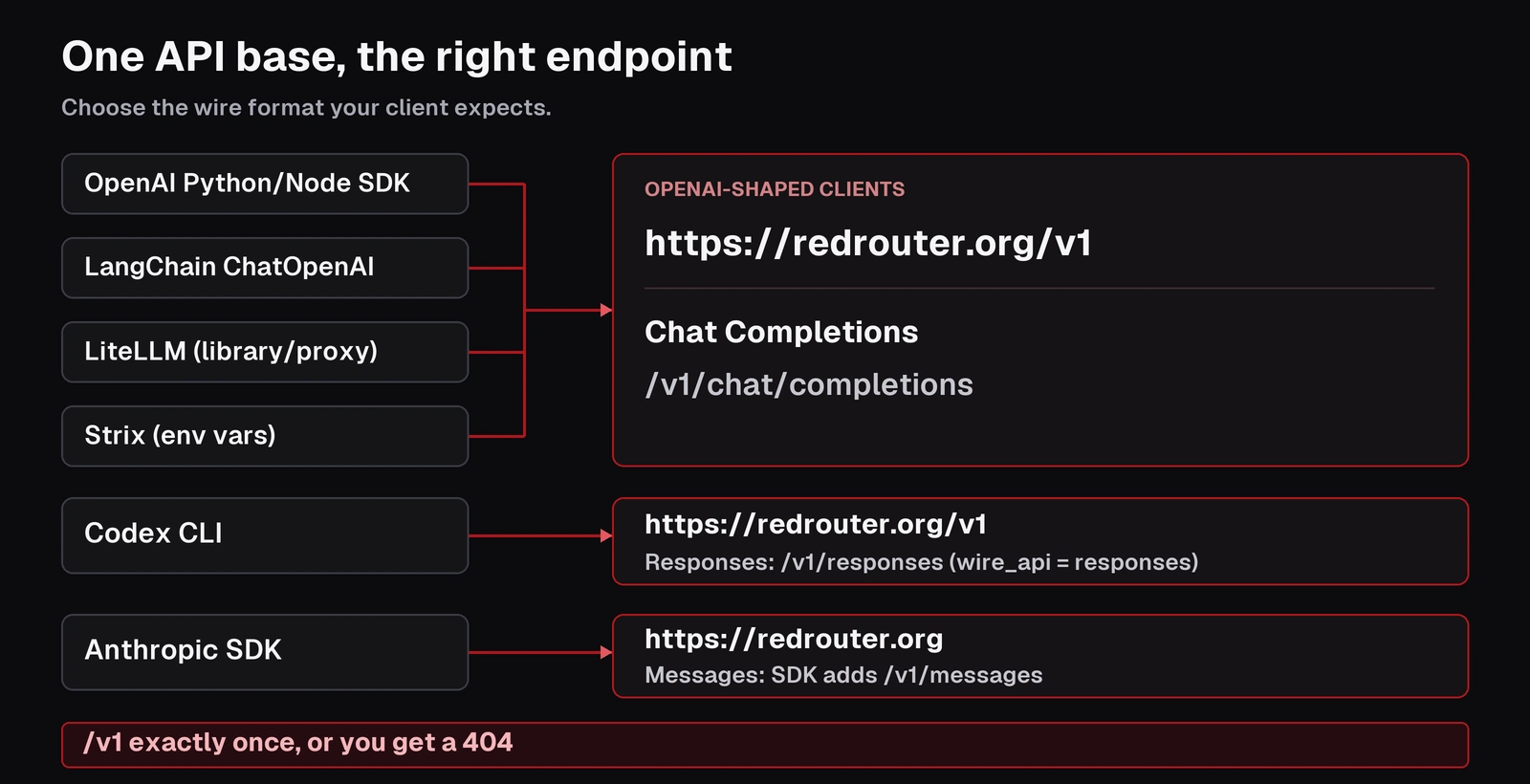
The OpenAI-compatible base URL, in one line
For any OpenAI-shaped client, the base URL is:
https://redrouter.org/v1
The client appends /chat/completions or /responses. The final request path must contain /v1 exactly once (troubleshooting). If you paste https://redrouter.org/v1/chat/completions into a "base URL" field, the client builds /v1/chat/completions/chat/completions and you get a 404. If you paste https://redrouter.org into an OpenAI client, you get /chat/completions with no /v1, and also a 404.
Keep the key in an environment variable or secret store, never in a repo or a transcript:
export REDROUTER_API_KEY="your-redrouter-api-key"
Pick a model ID first
Model IDs come from the catalog, not from the client. List them with GET https://redrouter.org/v1/models, or browse the models page. A wrong or misspelled model ID returns 404, which looks a lot like a base URL problem.
The examples below use glm-5.3-flash-red (GLM 5.3 Flash Red). On November 10, 2026 the catalog listed it at $0.20 per 1M input tokens, $0.08 per 1M cached input tokens and $0.80 per 1M output tokens, with a 1,048,576-token context window and an 8,192-token output cap. It supports tool calling and structured output, and it is text-only, so turn off image features in agents that use it. The catalog also lists a featured beta model, red-cyber-1, which is the one RedRouter's own docs use in their examples. See pricing for the rest of the catalog.
OpenAI Python SDK
The OpenAI Python SDK takes base_url in the constructor and also reads the OPENAI_BASE_URL environment variable (openai-python README). Passing it explicitly is clearer in security tooling, where a stray environment variable can send traffic somewhere you didn't intend:
import os
from openai import OpenAI

client = OpenAI(
    api_key=os.environ["REDROUTER_API_KEY"],
    base_url="https://redrouter.org/v1",
    timeout=120.0,
    max_retries=0,
)

result = client.chat.completions.create(
    model="glm-5.3-flash-red",
    messages=[{"role": "user", "content": "List three checks for a login form in an authorized web test."}],
    max_tokens=1024,
)
print(result.choices[0].finish_reason, result.choices[0].message.content)
Check finish_reason. A value of length means the answer hit the output limit and is incomplete. RedRouter's Python guide sets max_retries=0 so your application decides when to send another billable request. Use AsyncOpenAI for async services.
OpenAI Node SDK
The Node SDK uses baseURL (openai-node README):
import OpenAI from "openai";

const client = new OpenAI({
  apiKey: process.env.REDROUTER_API_KEY,
  baseURL: "https://redrouter.org/v1",
  timeout: 120_000,
  maxRetries: 0,
});

const completion = await client.chat.completions.create({
  model: "glm-5.3-flash-red",
  messages: [{ role: "user", content: "Summarize this scan output in five bullets." }],
  max_tokens: 1024,
});
console.log(completion.choices[0].message.content);
Keep the client and key on the server. RedRouter's Node guide has a streaming version that checks the finish reason before trusting the output.
LangChain (ChatOpenAI)
LangChain's ChatOpenAI accepts a custom base_url (LangChain OpenAI integration). Keep it on Chat Completions:
import os
from langchain_openai import ChatOpenAI

model = ChatOpenAI(
    model="glm-5.3-flash-red",
    api_key=os.environ["REDROUTER_API_KEY"],
    base_url="https://redrouter.org/v1",
    use_responses_api=False,
    max_tokens=1024,
    timeout=120,
    max_retries=0,
)
RedRouter's LangChain guide keeps use_responses_api=False because turning on OpenAI-hosted features (search, files, conversation state) changes the request surface, and a custom base URL does not supply them. model.bind_tools(...) works with tool-capable models. Your agent runtime still executes the tools and sends the results back.
LiteLLM (library and proxy)
LiteLLM's generic OpenAI-compatible adapter uses an openai/ model prefix plus api_base (LiteLLM docs). The prefix picks the adapter and is stripped before the model ID is sent, so it does not route anything to OpenAI:
import os
import litellm

response = litellm.completion(
    model="openai/glm-5.3-flash-red",
    api_base="https://redrouter.org/v1",
    api_key=os.environ["REDROUTER_API_KEY"],
    messages=[{"role": "user", "content": "Explain this stack trace."}],
    max_tokens=1024,
    num_retries=0,
)
For a LiteLLM proxy that several agents share, add a model entry:
model_list:
  - model_name: redrouter-glm-flash
    litellm_params:
      model: openai/glm-5.3-flash-red
      api_base: https://redrouter.org/v1
      api_key: os.environ/REDROUTER_API_KEY
      max_tokens: 1024
Agents then call the proxy's alias with the proxy's own credentials. Two cautions from RedRouter's LiteLLM guide: keep retries in one layer (SDK, gateway and app retries multiply), and don't trust LiteLLM's generic cost numbers for RedRouter billing. Use RedRouter's usage page instead. Never expose an unauthenticated proxy to the internet.
Codex CLI (Responses API)
Codex CLI speaks the Responses API, so it needs wire_api = "responses". A Chat Completions setup can't translate its requests. RedRouter's Codex guide uses a profile in ~/.codex/config.toml:
[profiles.redrouter]
model = "glm-5.3-flash-red"
model_provider = "redrouter"
model_reasoning_summary = "none"
web_search = "disabled"

[model_providers.redrouter]
name = "RedRouter"
base_url = "https://redrouter.org/v1"
env_key = "REDROUTER_API_KEY"
wire_api = "responses"
requires_openai_auth = false
supports_websockets = false
request_max_retries = 0
stream_max_retries = 0
The provider keys (base_url, env_key, wire_api) are defined in OpenAI's Codex configuration reference. RedRouter's guide uses red-cyber-1 as the model and runs Codex with -c features.shell_snapshot=false -c features.view_image=false, because the setup is text-only and shell snapshots can capture environment variables. WebSockets aren't available, so the profile forces HTTP. Hosted tools and stored responses aren't available either. If Codex stops with response.incomplete or a max_output_tokens truncation, the agent turn is unfinished. Shorten the task or reduce tool output.
Strix and other env-var agents
Many security agents take an OpenAI-compatible endpoint through environment variables instead of a config file. RedRouter's security agents page keeps a dated, version-pinned check of Strix 1.7.0 using Chat Completions against an OWASP Juice Shop fixture (October 29, 2026, on a local RedRouter build; not a full assessment). Its settings follow the same pattern:
export STRIX_LLM=openai/<model-id>
export LLM_API_KEY="$REDROUTER_API_KEY"
export LLM_API_BASE=https://redrouter.org/v1
export STRIX_API_TYPE=chat_completions
export STRIX_REASONING_EFFORT=none
export LLM_EXTRA_BODY='{"max_tokens":8192}'
export STRIX_MAX_CONTEXT_IMAGES=0
The tested run used a different catalog model than this guide's examples. Swap in any model whose catalog entry has tool calling, and keep image context at zero for text-only models. The same page records version-pinned checks for OpenCode, Codex CLI and Codex Security, including the failures. Treat any agent recipe as a starting point for your installed version, not a guarantee.
For tools not listed here, look for three settings: a base URL (sometimes called API base or endpoint), an API key, and a model name. Set the base URL to https://redrouter.org/v1 unless the tool asks for an Anthropic-style origin, in which case use https://redrouter.org.
Common OpenAI-compatible API errors and fixes
| Symptom | Likely cause | Fix |
|---|---|---|
| 404 | /v1 missing or doubled in the final path, or a wrong model ID | Base URL https://redrouter.org/v1; copy the ID from GET /v1/models |
| 401 | Missing, revoked or expired key | Check the environment the agent actually runs in |
| 403 | The key has a model allowlist | Use an allowed model or edit the key |
| 400 unsupported field | The client sends a field the endpoint doesn't implement, such as previous_response_id or a hosted tool | Remove or translate the named field; record the client version |
| 400 model rejection | Context too large or another model-side limit | Shorten history, lower the output limit |
| 413 | Request body over 12 MB | Trim history or image payloads |
| 429 | Request-rate or concurrency limit | Read Retry-After, back off with jitter, retry in one layer |
| Output cut off | Output cap reached (8,192 tokens on most models) | Check finish_reason; split the task |
| Stream ends early | Proxy buffering, idle timeout or a dropped connection | Check for the terminal event; check Usage before retrying |
Non-streaming requests have a 110-second total deadline, so long agent turns should stream (troubleshooting). A partial stream can still be billed for the output it produced. Check Usage before you resend.
Tool calls and streaming in agent loops
Security agents live on tool calls, so two details matter more than in a chatbot. First, when you stream, accumulate tool-call argument deltas until the call is complete, then parse and validate the arguments before you execute anything (streaming, tool calling). A malformed call is a failed generation. Don't run partial arguments. Second, RedRouter returns tool calls but never runs your tools or touches your systems. Scope enforcement belongs in your agent: an allowlist of hosts, a cap on tool calls, and a deny on anything outside the program's rules.
Keys, retention and scope
Data controls are set before dispatch, not after. Per RedRouter's data handling docs, each API key has a store_content setting. New keys default to storage off, and you can check the current key with GET /v1/key. Zero data retention for the whole account is a separate opt-in switch in Settings. It is off by default, and eligibility and pricing are on that docs page. It applies to requests sent after you turn it on. Usage metadata such as model, token counts, cost and errors is still recorded either way. For more detail, read what RedRouter keeps.
Your own stack keeps copies too: SDK debug logs, LiteLLM proxy logs, agent transcripts and saved tool output. Scrub credentials and client data you don't need before they reach any of those. For how RedRouter handles authorized security work end to end, see the RedRouter security page.
FAQ
What is an OpenAI-compatible API?
It's an API that accepts the same request and response shapes as OpenAI's Chat Completions or Responses endpoints, so clients built on the OpenAI SDK can use it by changing the base URL, key and model name. Compatible shapes don't guarantee every OpenAI feature. RedRouter, for example, has no hosted tools, embeddings or stored responses.
What is RedRouter's OpenAI-compatible base URL?
https://redrouter.org/v1 for OpenAI-shaped clients (Chat Completions and Responses). Anthropic Messages clients use https://redrouter.org, and the SDK adds /v1/messages.
Why does my security agent get a 404?
Usually the base URL has /v1 twice or not at all, or the model ID doesn't exist in the catalog. Make sure the final request path is /v1/chat/completions or /v1/responses exactly once, and copy the model ID from GET /v1/models.
Does the OpenAI-compatible API support tool calling and streaming?
Yes, on models whose catalog entry lists tool calling. Your client executes the tools and sends the results back on the next turn. Streaming works on all three endpoints. Read streams to the terminal event before trusting them.
Can I use the Responses API with Codex CLI?
Yes. Set wire_api = "responses" and the base URL https://redrouter.org/v1. It's stateless: previous_response_id and server-side conversations are rejected, so the client must send the full history.
Can I use an OpenAI-compatible API for unauthorized testing?
No. Use it only on systems you own, isolated labs, or scoped bug bounty and VDP targets. RedRouter's terms prohibit unauthorized testing.
Sources
All read on November 10, 2026.
- RedRouter Docs: OpenAI and Anthropic API compatibility, Troubleshooting, Python SDKs, Node & TypeScript, LangChain, LiteLLM, Codex CLI, Security agents, Tool calling, Streaming, Data handling
- RedRouter model catalog API (revision 2026-11-05.2)
- openai-python README and openai-node README
- LangChain ChatOpenAI integration
- LiteLLM OpenAI-compatible endpoints
- Codex configuration reference