 redrouter


Pentest Swarm AI is an AGPL-licensed Go tool that runs a group of AI agents through recon, classification, exploitation and reporting against a target you name. Its README says any OpenAI-compatible endpoint works through the openai provider and a /v1 base URL, and that native tool calling is the one hard requirement. This guide shows how to run Pentest Swarm AI with an OpenAI-compatible API such as RedRouter, where the custom base URL has to go, and three things the tool does with a custom LLM API that the README does not mention.
What we checked, on November 20, 2026: the repository at commit c077a76 (November 13, 2026, v0.3.7-48; 3,271 stars that day), its config.example.yaml, the provider factory, the OpenAI-compatible client and the config loader. We built the pentestswarm CLI from source with Go 1.27.3 and ran it against a small web app we wrote, bound to 127.0.0.1. There was no RedRouter API key on our test box, so model traffic went to a local mock server that enforces the request rules in RedRouter's Chat Completions and tool calling docs. We also called RedRouter's live GET /v1/models and sent one chat request with a deliberately invalid key. Only nmap was installed from the external toolchain, so the scans exercised Pentest Swarm AI's built-in probes, not nuclei, sqlmap or ffuf. Treat the RedRouter steps as a recipe; the CLI behavior below is what we saw.
Use Pentest Swarm AI only against systems you own, an isolated lab, or targets you have written permission to test. Its own README warns that it "sends real attack traffic to live targets."
What Pentest Swarm AI is
The README describes the project as "the open-source XBOW alternative," an autonomous API and web-app pentester. It is open core: the Community Edition is licensed AGPL-3.0-only, and the README says post-exploitation and some other capabilities are reserved for paid tiers. GitGuardian's catalog of 45 agentic attack frameworks (published November 9, 2026) files it with the network kill-chain tools and marks it "web UI by default."
The settings that matter for a custom LLM API:
| Setting | Where | Default |
|---|---|---|
| Provider | orchestrator.provider or --provider | claude |
| Model | orchestrator.model or --model | claude-sonnet-4-6 |
| Base URL | orchestrator.endpoint (no CLI flag) | https://api.openai.com/v1 for openai |
| API key | PENTESTSWARM_ORCHESTRATOR_API_KEY or orchestrator.api_key | none |
| Config file | ./config.yaml, then ~/.pentestswarm/, then /etc/pentestswarm/ | none |
Step 1: Install Pentest Swarm AI
The README lists npm (@armurai/pentestswarm), an install script, Homebrew and go install. We built from a clone:
git clone https://github.com/Armur-Ai/Pentest-Swarm-AI.git
cd Pentest-Swarm-AI
go build -o bin/pentestswarm ./cmd/pentestswarm
./bin/pentestswarm doctor
pentestswarm doctor lists which recon and attack tools are on your PATH, and pentestswarm install-tools fetches the Go-based ones. Without them, a scan logs skipped httpx — binary not found in PATH for each missing tool and carries on with what it has.
Step 2: Set the custom base URL in config.yaml
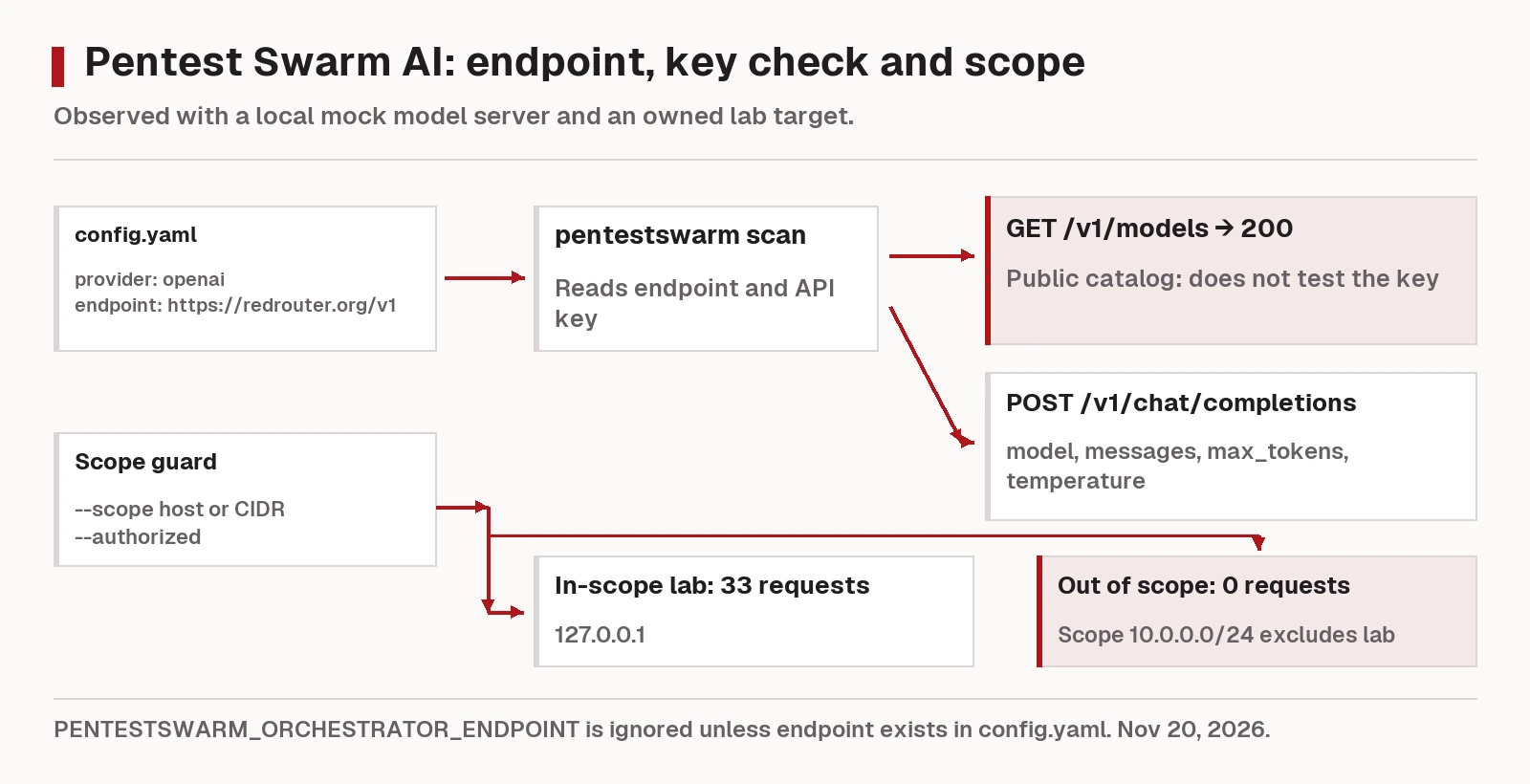
Pentest Swarm AI has one client for every OpenAI-compatible service. Pick openai as the provider and give it a base URL ending in /v1; the client appends /chat/completions and /models. For RedRouter:
# config.yaml
orchestrator:
  provider: "openai"
  model: "glm-5.3-flash-red"
  endpoint: "https://redrouter.org/v1"
  context_window: 1048576
  max_tokens: 8192
  temperature: 0.1
Then export the key and check the file:
export PENTESTSWARM_ORCHESTRATOR_API_KEY="$REDROUTER_API_KEY"
pentestswarm config validate
On our build, config validate printed Config is valid. for this file. https://redrouter.org/v1 is the OpenAI-compatible base URL in RedRouter's compatibility guide.
Why the pentestswarm custom base URL must be in the file
config.example.yaml says "All values can be overridden via environment variables prefixed with PENTESTSWARM_." For the endpoint, that was not true on our build. With no endpoint line in config.yaml, setting PENTESTSWARM_ORCHESTRATOR_ENDPOINT=https://redrouter.org/v1 had no effect, and the preflight went to OpenAI instead. We pointed the proxy at a closed local port so nothing left the box:
Error: provider check failed for 'openai': openai-compatible endpoint not reachable at
https://api.openai.com/v1: Get "https://api.openai.com/v1/models": proxyconnect tcp: ...
The cause is in the config loader: environment variables only override keys that the file or the built-in defaults already define, and orchestrator.endpoint has no default. When we added endpoint: "" to the file, the same variable worked. The shipped config.example.yaml already contains endpoint: "", so if you start by copying it, the variable is honored; the trap hits configs written from scratch or trimmed down. The API key is different: the scan command reads PENTESTSWARM_ORCHESTRATOR_API_KEY directly, so the key does not need a placeholder.
The interactive launcher (pentestswarm run) describes openai as "OpenAI or any OpenAI-compatible endpoint," but we found no base URL field in the launcher code, only the key. Write the endpoint into config.yaml before you use it.
What Pentest Swarm AI sends to an OpenAI-compatible API
Every chat request we captured had the same small body: model, messages, max_tokens (8,192 or 6,144) and, on most calls, temperature. Each was one system message and one user message. All four fields are on RedRouter's accepted list. The client builds its own minimal body, so it never adds OpenAI-only fields such as store, which RedRouter rejects with a 400 like any unknown top-level field. Our mock, which applies that rule, rejected nothing.
Two limits of that result. First, our lab app gave the classifier nothing to work with, so no request in our runs carried tools. The README's tool-calling requirement is real (the classifier, report quality gate and nuclei template author all read a tool call from the reply), but we did not capture a tool-calling turn. Second, the 8,192-token cap matches the default output of both models below; RedRouter caps a higher request rather than rejecting it.
RedRouter's GET /v1/models listed tool_calling: true for both glm-5.3-flash-red and red-cyber-1 on November 20.
The preflight check passes with any RedRouter key
Before a scan, Pentest Swarm AI makes "one tiny request so a bad key fails here, not mid-scan." That request is GET /models. RedRouter's model list is public, so it returned 200 for us without a key and with a made-up one. The same made-up key got a 401 on POST /v1/chat/completions.
Against our mock, a wrong key produced this sequence: the preflight passed, the recon agent's model call got a 401, and the run went on:
[ERR] recon LLM analysis failed — degrading to tool-only surface: LLM analysis failed:
openai returned status 401: {"error": {"type": "authentication_error", ...}}
...
[DONE] Campaign complete in 0s. 0 findings (0 critical, 0 high). Risk: low.
The exit code was 0. Adding --strict ("abort on any LLM error instead of degrading to heuristics") did not change it. In the recon agent's code, --strict covers a failure to parse the model's reply, not a failed model call.
So a typo in the key can give you a clean-looking report that says "Risk: low." Test the key with one chat request before a run, and read the log for [ERR] lines before you trust a zero:
curl -s https://redrouter.org/v1/chat/completions \
  -H "Authorization: Bearer $REDROUTER_API_KEY" \
  -H "Content-Type: application/json" \
  -d '{"model":"glm-5.3-flash-red","messages":[{"role":"user","content":"ok"}],"max_tokens":8}'
Fail-closed scope in a lab you own
We pointed the CLI at our own app on 127.0.0.1:8088 and counted the requests that reached it. These counts are from Pentest Swarm AI's built-in Go probes; with nuclei, sqlmap and the other external tools installed, a run sends far more.
| Run | Requests to the lab | What the CLI said |
|---|---|---|
--scope 127.0.0.1 --authorized | 33 | Campaign complete |
--scope 10.0.0.0/24 --authorized | 0 | Campaign complete, 0 findings |
No --scope | 0 | Scope printed as the target URL |
--scope 127.0.0.1 --dry-run | 33 | "DRY RUN — no exploitation commands will execute" |
No --authorized, fresh home directory | 0 | authorization required, exit 2 |
The in-scope requests were OpenAPI and Swagger discovery paths (/openapi.json, /v3/api-docs, and so on) plus random /nx-... paths used as a not-found baseline.
What this tells you:
- Scope failed closed. An out-of-scope target got nothing. The CLI did not say why, though; the run simply finished with zero findings, so an empty report can mean "blocked," not "clean."
- Pass
--scopeas a host or CIDR. Without it, the scope defaults to the target string. With a URL target, that blocked everything in our run, which is safe but useless. --dry-runis not silent. It stops exploitation commands, not recon. Our lab still got 33 requests. Do not use it to "preview" a target you are not yet cleared to touch.- The authorization gate is a one-time acceptance. The file it wrote,
~/.pentestswarm/authorization.json, held a timestamp, terms version and user name, but no target, and a later run against the same lab without--authorizedwent ahead. Scope is the control that matters per engagement.
The scan command also has --allow-ports, --exclude, --max-rps and --safe-mode guardrails. We did not test them.
For the broader pattern of giving an agent a model without giving it your whole network, see OpenAI-compatible APIs for security agents.
Which model to use for Pentest Swarm AI
Prices are from docs.redrouter.org/models on November 20, 2026:
- GLM 5.3 Flash Red (
glm-5.3-flash-red): $0.25 input, $0.13 cached input, $1.00 output per 1M tokens. Most of a swarm run is short, repeated calls, so this is the sensible default. - red-cyber-1 (
red-cyber-1): $0.28 input, $0.13 cached input, $1.10 output per 1M tokens. The model RedRouter features for authorized penetration testing and red-team work.
Both list a 1,048,576-token context window, an 8,192-token default output and a 32,768-token maximum output, tool calling and structured output. Plans are on /pricing.
In the swarm runner (--swarm), each agent role can override the model while inheriting the endpoint and key, so you can keep recon and reporting on one model and give exploitation another. We read this in the code but did not run it:
agents:
  exploit:
    model: "red-cyber-1"
Two cost notes. Pentest Swarm AI's price table does not know RedRouter model IDs, and unknown models are priced at its Claude Sonnet tier ($3 input, $15 output per 1M tokens). So --estimate and the live cost meter read high, and a --budget cap will stop a run well before you have actually spent that amount. And the swarm meter prices every role at the orchestrator's model.
Using a custom API only when the primary model refuses
The config struct has an orchestrator.fallback block that config.example.yaml does not show. If the primary provider refuses a request, the client retries once with a stricter system prompt, then sends the request to the fallback provider:
orchestrator:
  provider: "claude"
  model: "claude-sonnet-4-6"
  fallback:
    provider: "openai"
    model: "red-cyber-1"
    endpoint: "https://redrouter.org/v1"
    api_key: ""   # placeholder so PENTESTSWARM_ORCHESTRATOR_FALLBACK_API_KEY is read
The same environment-variable rule applies: we confirmed that PENTESTSWARM_ORCHESTRATOR_FALLBACK_API_KEY was only read when api_key existed in the file. The preflight does not check the fallback, and a refused request goes to both providers, so both need to be allowed under your engagement terms.
Keep Pentest Swarm AI inside your scope
- Run it in a VM or container that can reach only the lab or the in-scope hosts. Scope enforcement is in the tool; network isolation is yours.
- The live dashboard that
scanstarts binds to127.0.0.1. The separatepentestswarm serveAPI defaults toserver.host: "0.0.0.0"with no API key. If you use it, setserver.hostto127.0.0.1and setserver.api_key. - Write the scope and rules of engagement down before the run. The scope tool helps.
- Keep the
reports/directory, includingaudit.jsonl, with the engagement record.
If you are comparing tools, the same base-URL questions come up in Strix, a web-app agent, and PentAGI, a self-hosted multi-agent stack.
Troubleshooting Pentest Swarm AI with a custom LLM API
| Symptom | Likely cause | Fix |
|---|---|---|
Preflight error mentions api.openai.com | No endpoint in config.yaml; the env var was ignored | Put endpoint: "https://redrouter.org/v1" in the file |
Preflight passes, then status 401 in recon | Wrong key; GET /models is public | Test the key with one chat request |
| "0 findings, Risk: low" in seconds | Model calls failed, tools missing, or the target is out of scope | Read the [ERR] lines; run pentestswarm doctor; check --scope |
skipped <tool> — binary not found in PATH | External tool not installed | pentestswarm install-tools or the commands doctor prints |
unknown model 400 | Model ID typo | Use an exact ID from /v1/models |
--budget stops early | Unknown model priced at the Sonnet tier | Expected; set the cap with that in mind |
Where the data goes
Pentest Swarm AI keeps reports and its audit log in ./reports on your machine. Every model call carries what the agents saw about the target. On RedRouter's side, zero data retention is an opt-in setting, off by default; the data handling docs explain the controls, and What RedRouter keeps covers the defaults. Send only the client data your engagement terms allow.
FAQ
Does Pentest Swarm AI work with an OpenAI-compatible API?
Yes. Set orchestrator.provider: "openai" and orchestrator.endpoint to the service's /v1 base URL. The model needs native tool calling.
How do I set a custom base URL in pentestswarm?
In config.yaml under orchestrator.endpoint. There is no --endpoint flag, and on our build PENTESTSWARM_ORCHESTRATOR_ENDPOINT was ignored unless the key already existed in the file.
Which environment variable holds the API key?
PENTESTSWARM_ORCHESTRATOR_API_KEY. The scan command reads it directly, so config.yaml does not need the key.
Is Pentest Swarm AI an open-source XBOW alternative? That is how its README describes itself. It is self-hosted, AGPL-3.0, and lets you choose the LLM; the README reserves some capabilities, such as post-exploitation, for paid tiers.
Why did my scan finish with zero findings in a few seconds?
In our tests that happened with a wrong key, an out-of-scope target and missing tools. Check the [ERR] lines before you treat it as a clean result.
Does --dry-run keep traffic off the target?
No. It stops exploitation commands; recon probes still ran against our lab.
Sources
- Pentest Swarm AI repository and README: https://github.com/Armur-Ai/Pentest-Swarm-AI
- Pentest Swarm AI,
config.example.yaml: https://github.com/Armur-Ai/Pentest-Swarm-AI/blob/main/config.example.yaml - Pentest Swarm AI, provider factory: https://github.com/Armur-Ai/Pentest-Swarm-AI/blob/main/internal/llm/factory.go
- Pentest Swarm AI, OpenAI-compatible client: https://github.com/Armur-Ai/Pentest-Swarm-AI/blob/main/internal/llm/openai.go
- Pentest Swarm AI, config loader: https://github.com/Armur-Ai/Pentest-Swarm-AI/blob/main/internal/config/config.go
- Pentest Swarm AI,
scancommand: https://github.com/Armur-Ai/Pentest-Swarm-AI/blob/main/cli/scan.go - Pentest Swarm AI, recon agent: https://github.com/Armur-Ai/Pentest-Swarm-AI/blob/main/internal/agent/recon/agent.go
- Pentest Swarm AI, price table: https://github.com/Armur-Ai/Pentest-Swarm-AI/blob/main/internal/llm/pricing.go
- Pentest Swarm AI, Responsible Use Policy: https://github.com/Armur-Ai/Pentest-Swarm-AI/blob/main/docs/RESPONSIBLE_USE.md
- GitGuardian, "Beyond ARTEX: 45 AI Pentesting Tools and How to Find Them" (November 9, 2026): https://blog.gitguardian.com/ai-pentesting-tools-beyond-artex/
- RedRouter docs, OpenAI and Anthropic API compatibility: https://docs.redrouter.org/compatibility
- RedRouter docs, Chat Completions: https://docs.redrouter.org/chat-completions
- RedRouter docs, Tool calling: https://docs.redrouter.org/tool-calling
- RedRouter docs, Models and pricing: https://docs.redrouter.org/models
- RedRouter docs, Data handling: https://docs.redrouter.org/data-handling
- RedRouter model list: https://redrouter.org/v1/models