 redrouter

You can generate Sigma rules with an LLM, and YARA rules too, much faster than you can write them from a blank file. The draft is the easy part. The hard part is that a model will happily invent a field name, misspell a Sigma modifier, reference a selection that doesn't exist, or put a YARA string at the wrong offset, and the output still looks like a rule. AI detection engineering works when the model drafts and your tools decide: sigma check, a pySigma conversion, a YARA or YARA-X compile, and a lab test against real telemetry and real files.
This guide walks through that loop with two small, checkable examples: a Sigma rule for certutil.exe downloads and a YARA rule for the harmless EICAR test file. Every tool output quoted below comes from running sigma-cli 4.0.0 (pySigma 2.1.0), yara-python 4.5.4 and yara-x 1.23.0 on the rules shown. The model is never the source of truth.
Defensive and authorized work only. Write detections for your own environment or a client who hired you. Test them in an isolated lab with your own or authorized samples and telemetry. Don't paste customer logs, credentials or live malware into any prompt you aren't cleared to share.
Why use an LLM for detection engineering at all
Detection rules are structured, repetitive text with strict grammar, which is exactly what language models draft well. A model can turn a threat report paragraph, a Sysmon event and an ATT&CK technique ID into a first Sigma rule in seconds, propose the false positives you should think about, and convert your team's naming conventions into every new rule.
What it can't do is know your log pipeline. It doesn't know whether your process events carry Image or process.executable, whether OriginalFileName is populated, or how noisy certutil is on your admin hosts. That knowledge comes from your telemetry, and that's why the validation steps below aren't optional.
The loop: evidence in, tools decide
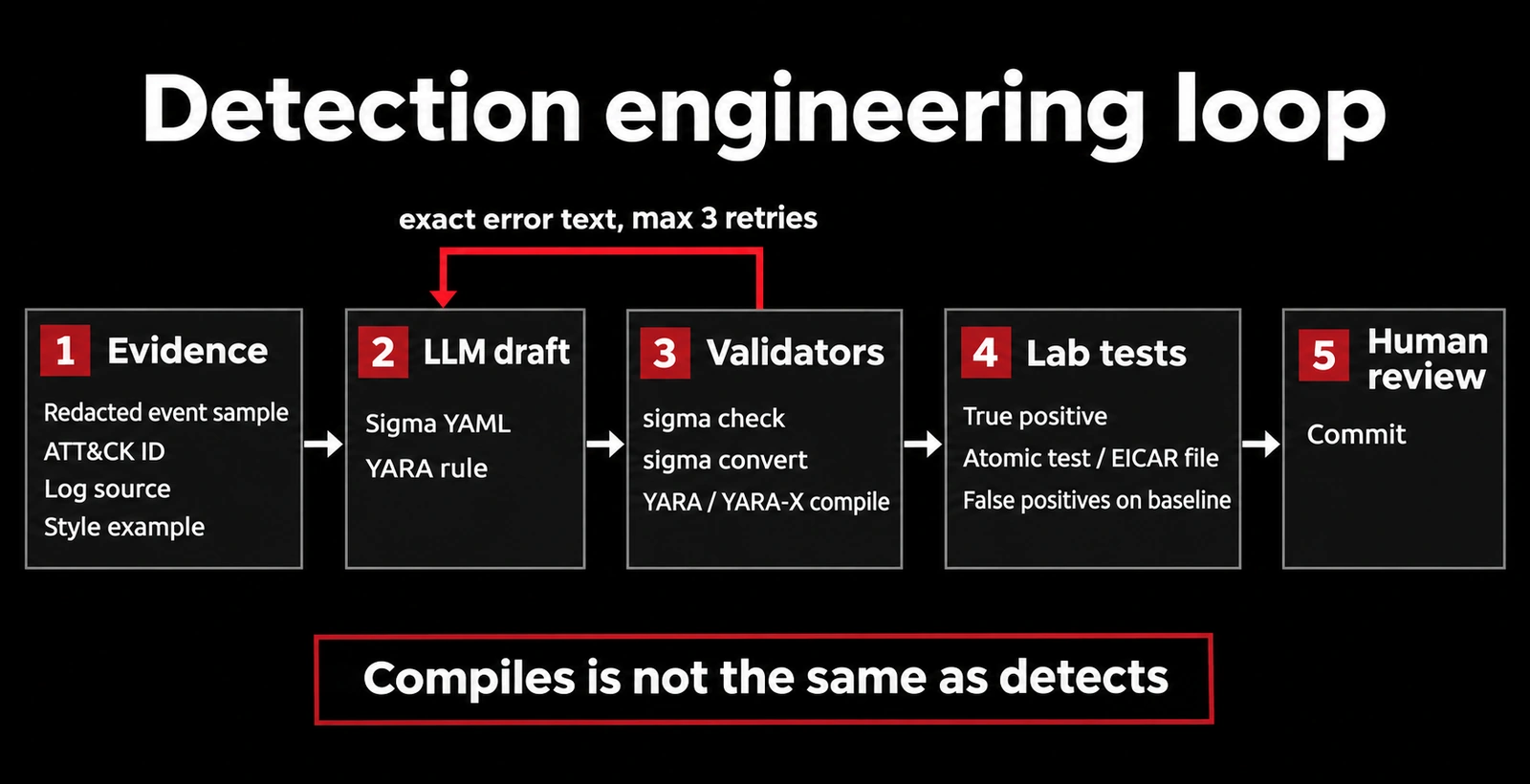
- Give the model evidence, not a vibe. Paste a redacted sample event, the ATT&CK technique, your target log source and backend, and one existing rule from your repo as a style example.
- Ask for one rule and nothing else. Request a single YAML or YARA document so you can pipe it straight into a validator.
- Validate mechanically. Run
sigma checkandsigma convertfor Sigma, and compile YARA rules with YARA or YARA-X. Feed exact error text back to the model and cap the retries. - Test behavior in a lab. A rule that compiles can still match nothing. Generate true-positive telemetry or use a known test file, then run the rule against a normal baseline to measure false positives.
- Human review, then commit. A person who owns the detection reads the logic, the false-positive notes and the test evidence before it ships.
Generate Sigma rules with an LLM
Sigma rules are YAML files that describe suspicious behavior in log data in a vendor-neutral way, which pySigma and sigma-cli then convert into queries for a specific SIEM. That separation is useful for LLM work: the model writes the portable rule, and the converter tells you whether it's valid for your backend.
A prompt that gives the model enough to work with:
Write one Sigma rule as YAML only, no commentary.
Behavior: certutil.exe used to download a file with -urlcache and -f (ATT&CK T1105).
Log source: category process_creation, product windows (Sysmon Event ID 1).
Fields available: Image, OriginalFileName, CommandLine, ParentImage, User.
Handle both - and / flag prefixes. Include falsepositives, level and tags.
Style example from our repo:
<paste one existing rule>
Here is the rule after one round of fixes. It passes sigma check with no errors or issues:
title: Certutil Download With URLCache Flag
id: 6b1c6c3e-2f5e-4a8e-9d3e-7f1b2a9c0d41
status: experimental
description: Detects certutil.exe called with -urlcache and -f, a common way to fetch a remote file with a built-in Windows binary.
references:
    - https://learn.microsoft.com/en-us/windows-server/administration/windows-commands/certutil
author: Detection lab
date: 2026-09-11
tags:
    - attack.command-and-control
    - attack.t1105
logsource:
    category: process_creation
    product: windows
detection:
    selection_img:
        - Image|endswith: '\certutil.exe'
        - OriginalFileName: 'CertUtil.exe'
    selection_cli_urlcache:
        CommandLine|contains: 'urlcache'
    selection_cli_force:
        CommandLine|contains|windash: ' -f '
    condition: all of selection_*
falsepositives:
    - Administrators fetching certificate revocation lists or files by hand
level: high
MITRE ATT&CK T1105 lists certutil among the Windows utilities adversaries use to download tools, which is why it's a sensible first rule. Microsoft's own certutil documentation describes it as a certificate administration tool, which is why the false-positive note matters.
Validate the Sigma rule with sigma-cli
Install the CLI and the backend and pipeline you need. The sigma-cli README documents both pip install sigma-cli and sigma plugin install <backend>:
python3 -m pip install sigma-cli
sigma plugin install splunk
sigma plugin install sysmon
sigma check proc_creation_win_certutil_urlcache_download.yml
sigma check catches two common mistakes in generated rules. We seeded both into copies of the rule to show the output. When the modifier was misspelled as contians, it failed with:
Unknown modifier 'contians' in bad.yml
Found 1 errors, 0 condition errors and 0 issues.
Check failure
When the condition referenced a selection that wasn't defined, it failed with:
Condition error in bad2.yml:Detection 'selection_cmd' not defined in detections in bad2.yml
Found 0 errors, 1 condition errors and 0 issues.
Check failure
Both exit with a non-zero status, so you can gate a script or CI job on them. The checker also flags conventions, not just syntax: saving the same valid rule as final.yml produced a FilenameLengthIssue because SigmaHQ expects descriptive file names.
Convert it and read the query
Conversion is the second check, because it shows what the rule actually becomes in your SIEM. A processing pipeline maps generic Sigma fields to your environment:
sigma convert -t splunk -p sysmon proc_creation_win_certutil_urlcache_download.yml
EventID=1 (Image="*\\certutil.exe" OR OriginalFileName="CertUtil.exe") CommandLine="*urlcache*" (CommandLine="* -f *" OR CommandLine="* /f *" OR CommandLine="* –f *" OR CommandLine="* —f *" OR CommandLine="* ―f *")
Reading the query caught a real logic gap. The first version of this rule used CommandLine|contains|all with ' -f ', which converts to a hyphen-only match. Atomic Red Team's T1105 tests note that /urlcache works too, and Windows tools generally accept slash flags, so a /f invocation would have slipped past. The windash modifier expands the flag to every dash and slash variant, as the converted query shows. No validator flags that kind of gap. You find it by reading the output and testing.
Test Sigma rules against lab telemetry
In an isolated Windows lab with Sysmon, run Atomic Red Team's "certutil download (urlcache)" test against a file you host yourself, confirm the converted query fires, then run it over a week of normal baseline data and count the hits. Paste the false positives back to the model and ask it to propose a filter, then validate the filter the same way.
Generate YARA rules with an LLM
YARA rules match patterns in files. Models are good at the boilerplate (meta, strings, condition) and bad at byte-level facts like offsets and file sizes. Here is a rule for the EICAR test file, a harmless standard string that exists so you can test scanners without real malware:
rule EICAR_Test_File
{
    meta:
        description = "Matches the EICAR antivirus test string"
        reference = "https://www.eicar.org/download-anti-malware-testfile/"
        date = "2026-09-11"
    strings:
        $eicar = "EICAR-STANDARD-ANTIVIRUS-TEST-FILE!"
    condition:
        $eicar at 28 and filesize < 128
}
An earlier draft of this rule said $eicar at 32. It compiled cleanly in both YARA and YARA-X, and it matched nothing. The 68-byte test file puts EICAR at byte 28. A compile check would never catch that, but a scan against a known-positive file did, in about a second. Always scan a known positive and a known negative before trusting a generated YARA rule.
Validate YARA rules with YARA and YARA-X
Compile errors are the easy half. For an undefined string, yara-python reported line 1: undefined string "$b", and YARA-X gave a pointed message:
error[E025]: unknown pattern `$b`
 --> line:1:41
  |
1 | rule bad { strings: $a = "x" condition: $b }
  |                                         ^^ this pattern is not declared in the `strings` section
Those messages are ideal to paste back into the model. YARA-X is VirusTotal's Rust rewrite of YARA; its comparison page calls it the intended replacement, and the YARA-X homepage says it is 99% rule compatible, with most rules working unchanged. The original YARA repository now says it is in maintenance mode. The YARA-X CLI has yr compile, yr scan and yr fmt, so you can compile, test and normalize formatting in one toolchain:
yr compile --output rules.yarc rules/
yr scan rules/eicar_test_file.yar samples/
yr fmt rules/
If you still run classic YARA, its command-line docs warn that compiled rules from untrusted sources can lead to code execution, which is why loading them takes an explicit -C. Treat LLM-written rules as untrusted source text, compile them yourself, and never load someone else's compiled rule files.
A validation loop you can script
The loop below asks a model for a Sigma rule through RedRouter's OpenAI-compatible API, runs sigma check, and feeds failures back up to three times. The same shape works for YARA with yara_x.compile() in place of the subprocess call.
import os, subprocess, tempfile
from openai import OpenAI

client = OpenAI(api_key=os.environ["REDROUTER_API_KEY"],
                base_url="https://redrouter.org/v1", max_retries=0)
FENCE = "`" * 3  # models often wrap YAML in a Markdown code fence

def sigma_check(rule_yaml: str) -> tuple[bool, str]:
    with tempfile.NamedTemporaryFile("w", suffix="_proc_creation_rule.yml", delete=False) as f:
        f.write(rule_yaml)
    r = subprocess.run(["sigma", "check", f.name], capture_output=True, text=True)
    return r.returncode == 0, r.stdout + r.stderr

messages = [{"role": "user", "content": open("prompt.txt").read()}]
for attempt in range(3):
    out = client.chat.completions.create(model="glm-5.3-flash-red",
                                         messages=messages, max_tokens=2048)
    rule = out.choices[0].message.content.strip().removeprefix(FENCE + "yaml").removesuffix(FENCE).strip()
    ok, report = sigma_check(rule)
    if ok:
        print(rule)
        break
    messages += [{"role": "assistant", "content": rule},
                 {"role": "user", "content": "sigma check failed:\n" + report + "\nReturn the fixed rule only."}]
else:
    raise SystemExit("No valid rule after 3 attempts; write it by hand.")
Passing sigma check only gets a rule to the lab stage. It doesn't make it a good detection.
Choosing a model for AI detection engineering
Detection work needs room for long inputs (event samples, reports, an existing rule set) and a model that will discuss attacker tradecraft plainly, because describing what malware does is the job. Public reports show mainstream assistants sometimes interrupting defensive work, including review of a user's own code. If a refusal stalls a legitimate detection task, one option is to keep your main assistant and hand that subtask to a reduced-refusal model, as described in the broker pattern post.
GLM 5.3 Flash Red fits the drafting step well. It costs $0.25 per 1M input tokens, $0.10 per 1M cached input tokens and $1.00 per 1M output tokens, with a 1,048,576-token context window, an 8,192-token output cap, tool calling and structured output support (pricing). It's text-only, which is fine for rules and logs. Its catalog entry describes it as modified to reduce refusals. That changes how often it declines, not how often it's right, so the validation loop stays mandatory.
Keep detection data out of places it shouldn't be
Logs and samples carry hostnames, usernames, internal paths and sometimes secrets. Redact before you prompt. On RedRouter, each API key has a store_content setting, and new keys default to storage off. Account-wide zero data retention is a separate opt-in switch in Settings that's off by default; eligibility and pricing are on the data handling docs. See what RedRouter keeps for the full picture, and the security page for how RedRouter approaches authorized security work.
FAQ
Can an LLM generate Sigma rules that work?
It can draft rules that pass sigma check and convert cleanly, often after one or two rounds of feeding errors back. Whether they detect anything depends on your log fields and data, so test every rule against lab telemetry and a normal baseline before deploying it.
How do I validate an LLM-generated Sigma rule?
Run sigma check for syntax, modifiers, conditions and conventions, then sigma convert with your backend and pipeline and read the resulting query. Finish with a true-positive test in a lab and a false-positive count over baseline data.
Can an LLM write YARA rules?
Yes, and models handle the structure well. They often get byte-level details such as offsets and file sizes wrong, so compile with YARA or YARA-X and scan a known-positive and known-negative file before trusting the rule.
Should I use YARA or YARA-X?
YARA-X is VirusTotal's intended replacement and runs most existing rules unchanged, while the original YARA repository says it's in maintenance mode. If your tooling depends on the classic YARA APIs, check the YARA-X compatibility notes first, because its C, Python and Go APIs differ.
Is it safe to paste logs into an LLM for detection engineering?
Only if you're cleared to share them with that provider. Redact identifiers and secrets first, use a key with content storage off, and turn on account zero data retention if your data requires it.
Which model is best for AI detection engineering?
Pick one with a long context window, structured output and few refusals on security topics, then judge it by how many of its rules pass your validation loop. Test with your own rules and data rather than trusting a benchmark.
Sources
Sources checked November 10, 2026 (PT).
- SigmaHQ: Sigma rules documentation, processing pipelines, sigma-cli, pySigma
- VirusTotal: YARA-X, YARA-X vs YARA, YARA-X CLI commands, YARA repository, YARA command-line docs
- MITRE ATT&CK T1105, Ingress Tool Transfer
- Atomic Red Team T1105 tests
- Microsoft certutil documentation
- EICAR anti-malware test file
- RedRouter: model catalog API, models and pricing docs, data handling