 redrouter


0 is 0sec Labs' open-source AI security harness, and it doesn't ship a model. You bring one. If yours is a custom OpenAI-compatible API, the setup is four environment variables, but one of them is easy to skip and shouldn't be. This guide shows the 0 OpenAI-compatible API setup with RedRouter as the endpoint: the base URL rule, why you should pin the provider instead of trusting the model ID, how to bound a run when 0 can't price your model, and how to keep scans on targets you're authorized to test.
MarkTechPost covered the open-source release on November 8, 2026. The old repository URL, github.com/0sec-labs/0, now redirects to 0sec-labs/0security, and the project calls itself 0security; the command is still 0. Everything below was checked against the live Models docs, the source code and version 0.37.0 of the CLI, released November 15, 2026.
Authorized work only. Run 0 against your own code, your own lab, a client engagement with written scope, or a bug bounty or VDP program that allows automated testing. 0's own docs say the same, and its examples use ./authorized-repo and --scope ./scope.json for a reason.
What 0 is, briefly
0 is a harness around a model and a set of security tools. It reviews source code, scans web apps, APIs, MCP endpoints and packages, and tries to reproduce findings before it reports them. You drive it from a local browser console (run 0 with no arguments), a headless CLI, or an MCP server for coding agents. The README lists the license as MIT OR Apache-2.0, with both license files in the repo.
The project's benchmark claims are self-reported; MarkTechPost's write-up notes that the headline scores are not pass@1. That's worth keeping in mind before you treat a clean 0 report as proof of anything. The docs say it plainly too: "A run with no findings does not show the target is secure."
Install 0
The official install path is a script that downloads a release binary and checks it against the release's checksums.txt:
curl -fsSL https://raw.githubusercontent.com/0sec-labs/0security/main/install.sh | bash
0 --version
Two things the script does that are worth knowing. It installs to ~/.0/bin (set INSTALL_DIR to change that), and it appends a PATH line to ~/.profile and your shell's rc file. It also downloads a companion scanner, FoxGuard, with its own pinned checksum. If you'd rather read before you pipe to bash, the script is about 150 lines. Supported platforms are Apple Silicon macOS and x64 or ARM64 Linux; Windows is experimental.
The 0 OpenAI-compatible API settings
0 treats any OpenAI-compatible Chat Completions server as its "OpenAI" provider with a different base URL. Per the custom providers section of the docs, you can set it up in the browser or in a shell.
In the browser: run 0, open Settings → Models, and under Providers choose OpenAI / Custom AI Provider. Enter the base URL with its version path, the custom model ID and your API key. The model doesn't need to be in 0's catalog.
In a shell:
export OPENAI_API_KEY="$REDROUTER_API_KEY"
export OPENAI_BASE_URL="https://redrouter.org/v1"
export OPENAI_MODEL="glm-5.3-flash-red"
export ZERO_SELECTED_PROVIDER="openai"

0 config doctor
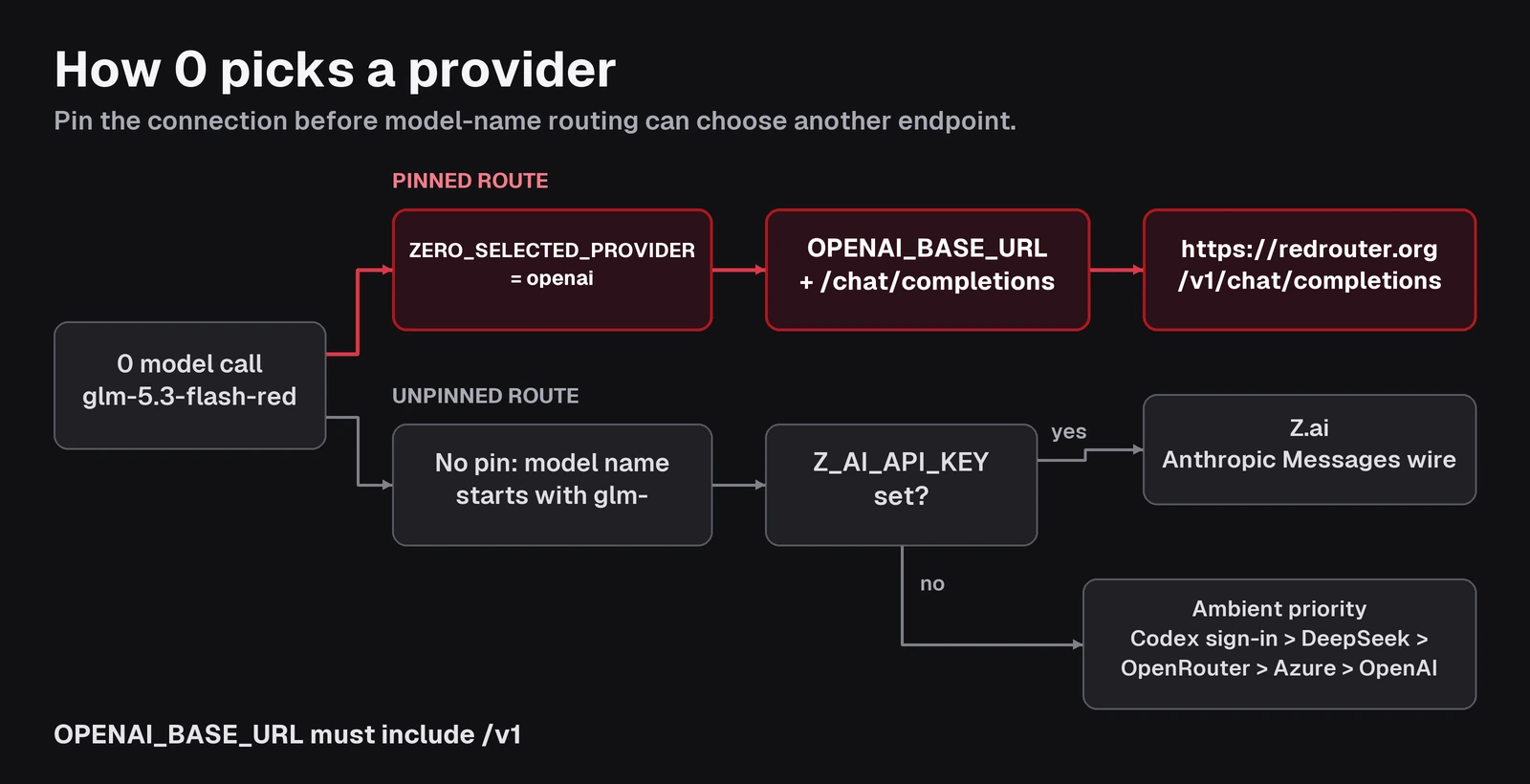
The 0 security harness OpenAI base URL must include /v1, because 0 appends /chat/completions to whatever you give it. https://redrouter.org/v1 becomes https://redrouter.org/v1/chat/completions, which is RedRouter's Chat Completions endpoint. When we left /v1 off in a test, 0 got a 502 back and went into retries with backoff instead of failing fast; we stopped it after 90 seconds. If a run hangs on its first model call, check the path first.
Exported variables override settings saved in the browser, and an explicit --model or ZERO_MODEL overrides OPENAI_MODEL. Keys saved in the browser are stored in plaintext at ~/.0/credentials.json with 0600 permissions, according to the docs. For CI, keep the key in the environment.
0 config doctor only checks local configuration. On our box it reported API provider configured OpenAI-compatible with a placeholder key, which tells you the variables were read, not that the key works. The first model request is the real test.
Why you pin ZERO_SELECTED_PROVIDER
0 can talk to many providers at once, and when you don't pin one it decides per call. The provider order is: a pin first, then routing by model name, then "ambient priority," meaning the first configured credential in a fixed list.
Both of the unpinned steps can send a RedRouter model ID somewhere else:
- Routing by model name. The routing table sends
glm-*IDs, and any ID containingglm, to Z.ai, as long asZ_AI_API_KEYis set. In the source, Z.ai calls go over the Anthropic Messages wire to Z.ai's own endpoint, not to your base URL.glm-5.3-flash-redmatches that rule. - Ambient priority. Without a pin or a matching model rule, 0 picks the first credential it finds in this order: a ChatGPT Codex sign-in (including
~/.codex/auth.json), DeepSeek, OpenRouter, Azure OpenAI, then OpenAI. If you've ever runcodex loginon that machine, an unpinned run may never reach your OpenAI-compatible endpoint.
We ran 0.37.0 against a one-file test repo with a placeholder RedRouter key and ZERO_RUNTIME_TRACE=1, which prints the provider and model 0 chose for each call:
| Setup | What the trace showed | Where the request went |
|---|---|---|
ZERO_SELECTED_PROVIDER=openai, OPENAI_MODEL=glm-5.3-flash-red | provider=openai model=glm-5.3-flash-red on every call | RedRouter, which returned 401 invalid_api_key (expected with a placeholder key) |
No pin, --model glm-5.3-flash-red, only OPENAI_API_KEY set | provider=openai for the scan calls, plus one call with 0's default model gpt-6-luna | RedRouter, 401 |
No pin, same model, plus a placeholder Z_AI_API_KEY | provider=z-ai model=glm-5.3-flash-red | Z.ai, which returned its own 401 |
The third row is the failure mode: with a Z.ai key in your environment, an unpinned run sends your source context to a different provider than the one you configured. The second row shows a quieter problem: without OPENAI_MODEL or ZERO_MODEL, some calls fall back to 0's default OpenAI model ID. The fix for both is the same. Set ZERO_SELECTED_PROVIDER=openai and set the model explicitly, either OPENAI_MODEL or ZERO_MODEL. The docs agree: "Pin when you need a predictable bill."
One edge case from the 0.37.0 source: if you set ZERO_MODEL and also pass a different --model, the pin is skipped for that call and model-name routing applies again. Keep the two the same, or do what the example above does: set the model with OPENAI_MODEL and leave ZERO_MODEL unset, so the pin always applies.
Also leave ZERO_LLM_FALLBACK unset unless you mean it. Failover "changes who receives your context and who bills you," in the docs' words.
The test returned 401s, not findings, because we used a placeholder key. That's enough to confirm where each request went. It is not a claim about how well any model performs inside 0.
Responses API, optional
0 uses Chat Completions by default. Set OPENAI_WIRE_API=responses to switch the OpenAI provider to the Responses API, and 0 calls {OPENAI_BASE_URL}/responses instead. RedRouter serves both shapes at the same /v1 base URL. In our test with ZERO_MODEL=red-cyber-1 and the Responses wire, the trace showed provider=openai model=red-cyber-1 and the request reached RedRouter. You don't need it for a basic setup; it's there if your workflow depends on Responses-style tool calls. Our OpenAI-compatible API guide for security agents covers the differences between the two shapes in more detail.
Bound the run: cost ceilings don't price custom models
0's --cost-ceiling stops a run when estimated spend passes a dollar limit. It estimates from a bundled price table, and a model that isn't in that table is "unknown, not zero," per the costs and budgets docs. With a custom model ID, 0 printed this on every run:
[0] Warning: model openai/glm-5.3-flash-red has no pricing entry, so its cost is unknown and not counted against any cost cap. Use a time cap to bound this run.
So on a custom endpoint, --cost-ceiling 2 doesn't bound anything. Use the limits that don't depend on price:
env ZERO_MAX_TURNS_REVIEW=30 ZERO_MAX_TURNS_VERIFY=12 \
  0 scan ./authorized-repo --runtime api --depth quick
--depth quick|default|deep sets the investigation budget, and the ZERO_MAX_TURNS_* variables in the turn limits section cap model round trips for source and package scans. Web scans cap the attack stage at 20, 40 or 100 turns by depth. Then check actual spend in your RedRouter account, since that's the bill that counts.
One related setting: 0 requests up to 8,192 completion tokens per call by default (ZERO_MAX_COMPLETION_TOKENS). RedRouter caps output at 8,192 tokens per request for most models, so raising 0's value won't get you longer answers. Leave it at the default.
Which model to use
Any model you use needs tool calling, since 0's agents run tools in a loop. Both RedRouter models below support tool calling, Chat Completions and the Responses API.
- GLM 5.3 Flash Red (
glm-5.3-flash-red): $0.25 per 1M input tokens, $0.10 cached, $1.00 output, with a 1M-token context window. It's RedRouter's default for agent work. See pricing. - red-cyber-1 (Beta): $0.28 input, $0.10 cached, $1.10 output per 1M tokens, built for authorized penetration testing and red-team work.
0 can also assign models per role (discovery, attack, verify, report, audit, review). According to the docs, role models stay on the parent's connection, so with a pinned OpenAI provider every role still goes to RedRouter. For URL scans, --task-model verify=red-cyber-1 and similar flags set them; --single-model keeps one model for everything.
Keep 0 scans in scope
A model connection doesn't authorize a target. 0's scope docs put it this way: "A scope file encodes that authorization; it does not grant it, and it is not a sandbox." For anything live, write a scope file for hosts you're allowed to test:
{
  "in_scope": ["staging.your-company.example"],
  "out_of_scope": []
}
0 scan https://staging.your-company.example --scope ./scope.json --runtime api --depth quick
Scope enforcement is on by default once a scope is set, and to require a scope for every live target, run 0 skills extensions enable scope in the project. For bug bounty work, copy the program's in-scope assets into the file and read the program's rules on automated scanning first; many limit request rates or ban automated tools outright. Our AI bug bounty workflow covers where a tool like this fits and where it doesn't.
Keep in mind that 0 runs as your user with shell access. The docs describe the defenses as scope, approvals and an optional sandbox. Run it in a VM or container for anything you don't fully trust.
What leaves your machine
0 runs locally, but the context it sends to the model leaves, along with some other lookups. The docs list the GitHub API, OSV, package registries, Microsoft Graph, web search and out-of-band testing services. Pinning the provider and leaving failover off keeps the model traffic on one endpoint; it doesn't make 0 offline.
On the RedRouter side, new API keys default to content storage off, per the data handling docs. Account-wide Zero Data Retention is a separate, opt-in setting that's off until you turn it on in Settings. What RedRouter keeps explains both in plain terms. Don't put production secrets or customer data into a scan you aren't cleared to share with a model provider.
Troubleshooting
| Symptom | Likely cause | Fix |
|---|---|---|
| First model call retries and hangs | OPENAI_BASE_URL missing /v1 | Use https://redrouter.org/v1 |
| Error mentions Z.ai or GLM API | glm-* ID routed to Z.ai because Z_AI_API_KEY is set | Set ZERO_SELECTED_PROVIDER=openai |
| Calls go to ChatGPT Codex | Ambient priority picked a Codex sign-in | Pin the provider |
401 invalid_api_key from RedRouter | Wrong or revoked key | Check the key; see the API quickstart |
| "no pricing entry" warning | Custom model not in 0's price table | Use --depth and ZERO_MAX_TURNS_* instead of --cost-ceiling |
ZERO_SELECTED_PROVIDER requires an explicit model | Pin set without a model | Set OPENAI_MODEL or ZERO_MODEL |
ZERO_RUNTIME_TRACE=1 is the fastest way to see what 0 actually picked. It prints the client, provider and model for each call to stderr.
If you're wiring several tools to the same endpoint, the Strix OpenAI-compatible API guide runs into a similar custom-model pricing problem from the other direction.
FAQ
Does 0 work with any OpenAI-compatible API?
Yes, as long as the server speaks Chat Completions (or the Responses API with OPENAI_WIRE_API=responses) and the model supports tool calling. Set OPENAI_BASE_URL to the base including the version path, plus OPENAI_API_KEY, a model ID and ZERO_SELECTED_PROVIDER=openai.
What is the 0 security harness OpenAI base URL for RedRouter?
https://redrouter.org/v1. 0 appends /chat/completions, so don't include that part yourself.
Why does 0 send my glm model to Z.ai?
0 routes model IDs that start with glm- or contain glm to Z.ai when a Z_AI_API_KEY is in the environment. Pinning ZERO_SELECTED_PROVIDER=openai overrides model-name routing.
Can I set up a 0sec 0 custom LLM provider in the browser instead?
Yes. Run 0, open Settings → Models, choose OpenAI / Custom AI Provider under Providers, and enter the base URL, model ID and key. Environment variables still win over saved settings, so clear stale OPENAI_* values if the browser setting seems ignored.
Does --cost-ceiling work with a custom model?
Not by itself. 0 can't price a model that isn't in its table, so it warns and doesn't count that spend. Use --depth and the ZERO_MAX_TURNS_* limits, and watch spend on the provider side.
Can I point 0 at a target I don't own?
No. Use 0 on systems you own or are authorized to test, with a scope file for live targets. A configured model doesn't authorize anything.
Sources
- MarkTechPost, "0sec Labs Open-Sources 0, an AI Security Harness With Web UI, CLI and MCP," November 8, 2026: https://www.marktechpost.com/2026/11/08/0sec-labs-open-sources-0-ai-security-harness/
- 0security repository and README: https://github.com/0sec-labs/0security
- 0 release v0.37.0: https://github.com/0sec-labs/0security/releases/tag/v0.37.0
- 0 install script: https://raw.githubusercontent.com/0sec-labs/0security/main/install.sh
- 0 Models docs (custom providers, provider order, routing table, failover): https://docs.0.security/models/
- 0 configuration docs (scope, costs and budgets, turn limits): https://docs.0.security/configuration/
- 0 provider routing source: https://github.com/0sec-labs/0security/blob/main/packages/engine/src/runtime/llm-api/provider-detect.ts
- 0security site: https://0.security/
- RedRouter API compatibility: https://docs.redrouter.org/compatibility
- RedRouter data handling: https://docs.redrouter.org/data-handling
- RedRouter quickstart: https://docs.redrouter.org/quickstart