 redrouter


You can write Burp BChecks with an LLM in a few seconds, and the drafts look convincing: a metadata block, a given ... then, a report issue. Then Burp won't load the check, or it loads and reports every single-page app on your target list as leaking secrets. An LLM-written BCheck is a draft until a parser has accepted it and a lab you control has shown you exactly which hosts it reports.
This guide runs that loop on one common job: a host-level BCheck that finds an exposed .env file. Every parse error below comes from PortSwigger's own BCheckChecker (version 1.9, the jar their repository uses to validate pull requests) on Java 21. Every lab result comes from four small HTTP servers on 127.0.0.1. The drafts were written for this guide to show mistakes models commonly make; they are not a captured model transcript. The tool output is the evidence, not the model's explanation.
It sits next to our Claude Code and Burp workflow for bug bounty, which is about driving Burp with an agent, and our guide to AI triage of Nuclei findings. This one is about writing the scan check itself.
Authorized work only. Run BChecks only against applications you own or are explicitly in scope to test. A BCheck sends real requests, and some send payloads. Keep client hostnames, cookies and tokens out of prompts; see what to send the model.
Why write Burp BChecks with an LLM
BChecks are Burp Scanner's custom scan check language. You describe when a check runs (once per host, path, request, response or insertion point), what it sends, and what in the response counts as an issue. The BCheck definition reference lists every keyword, and PortSwigger's BChecks repository has hundreds of community checks to learn from. According to that repository, BChecks can be imported into Burp Suite Professional and Burp Suite DAST; it doesn't list Community Edition.
The language is small and regular, which makes it a good fit for a model. It is also new and niche, which is where models slip: they mix in syntax from Nuclei templates or older BCheck versions, put fields in the wrong order, or use an action in a context where it isn't allowed. And a check that parses can still be wrong in the way that matters most for scanning: it reports things that aren't there.
Before writing one, search the repository. Many common exposures already have a check, and the repo's example checks, such as the exposed git directory check, are good few-shot material for the model.
Step 1: Set up the BCheck validator
You don't need Burp open to catch syntax errors. PortSwigger publishes BCheckChecker in the root of the BChecks repository. It needs Java 21 or newer, checks syntax, populated metadata fields and the .bcheck extension, and exits with code 0 when every check in the folder parses.
git clone --depth 1 https://github.com/PortSwigger/BChecks
cp BChecks/BCheckChecker-1.9.jar ~/bcheck-lab/
# Expected SHA-256, from the repo's pull request workflow:
# a4e1ebffc0dabcea7e93778b86ab053b406a15782e4ffb0da48e3638a23f077d
sha256sum ~/bcheck-lab/BCheckChecker-1.9.jar

cd ~/bcheck-lab/checks          # a folder holding your .bcheck files
java -jar ../BCheckChecker-1.9.jar; echo "exit $?"
It checks every .bcheck file under the current directory, so keep drafts in their own folder. We used an Eclipse Temurin 21 JRE. A stock check from the repo confirms the setup:
Starting BCheckChecker...
BCheck ./exposed-git-directory.bcheck parsed correct.
BCheckChecker processed 1 BChecks.
Step 2: Prompt for one narrow check
A narrow prompt gets a better first draft. Name the trigger, the request, the evidence and the severity. Ask for the check only.
Write a Burp Suite BCheck (current BCheck language, v2-beta) that:
- runs once per host
- sends GET /.env
- reports a high-severity, firm-confidence issue named "Exposed .env file"
  when the file is readable
Return only the .bcheck file, no explanation.
Step 3: Validate the draft and feed back the exact errors
A typical first draft looks like this. It reads well and fails three ways.
metadata:
    language: v2
    name: "Exposed .env file"
    description: "Looks for a readable .env file at the web root"
    author: "lab"

given host then
    send request called env_check:
        method: "GET"
        path: "/.env"

    if {env_check.response.status_code} is "200" then
        report issue:
            severity: high
            confidence: firm
            name: "Exposed .env file"
            detail: "A .env file was returned at /.env."
            remediation: "Remove .env files from the web root."
    end if
BCheckChecker's output:
Starting BCheckChecker...
Error parsing ./exposed-dotenv.bcheck: BCheckParseException{encounteredString='v2', lineNo=2, colNo=15}
Error parsing ./exposed-dotenv.bcheck: BCheckParseException{encounteredString='name', lineNo=16, colNo=13}
Error parsing ./exposed-dotenv.bcheck: BCheckParseException{encounteredString='end if', lineNo=19, colNo=5}
BCheckChecker processed 1 BChecks.
The errors are terse: a token, a line and a column, with no explanation. That is enough for a model if you send the offending lines with them. Read them against the reference:
v2on line 2.languagemust be a version the parser knows. The reference listsv2-beta. Models often shorten it.nameon line 16. Insidereport issue, the properties must come in a fixed order:name,severity,confidence,remediation,detail. The reference says a different order fails validation. Herenamecame afterseverity.end ifon line 19. This one follows from the brokenreport issueblock above it. Fix the real error first and rerun before chasing the rest.
Another mistake we tested: using send payload under given host then. Payloads only work with insertion points, and BCheckChecker rejects it (encounteredString='payload', lineNo=8). If a model wants to inject into parameters, the check needs given insertion point then, not a host trigger.
With language: v2-beta, the properties in order and tags added, the draft parses:
Starting BCheckChecker...
BCheck ./exposed-dotenv.bcheck parsed correct.
BCheckChecker processed 1 BChecks.
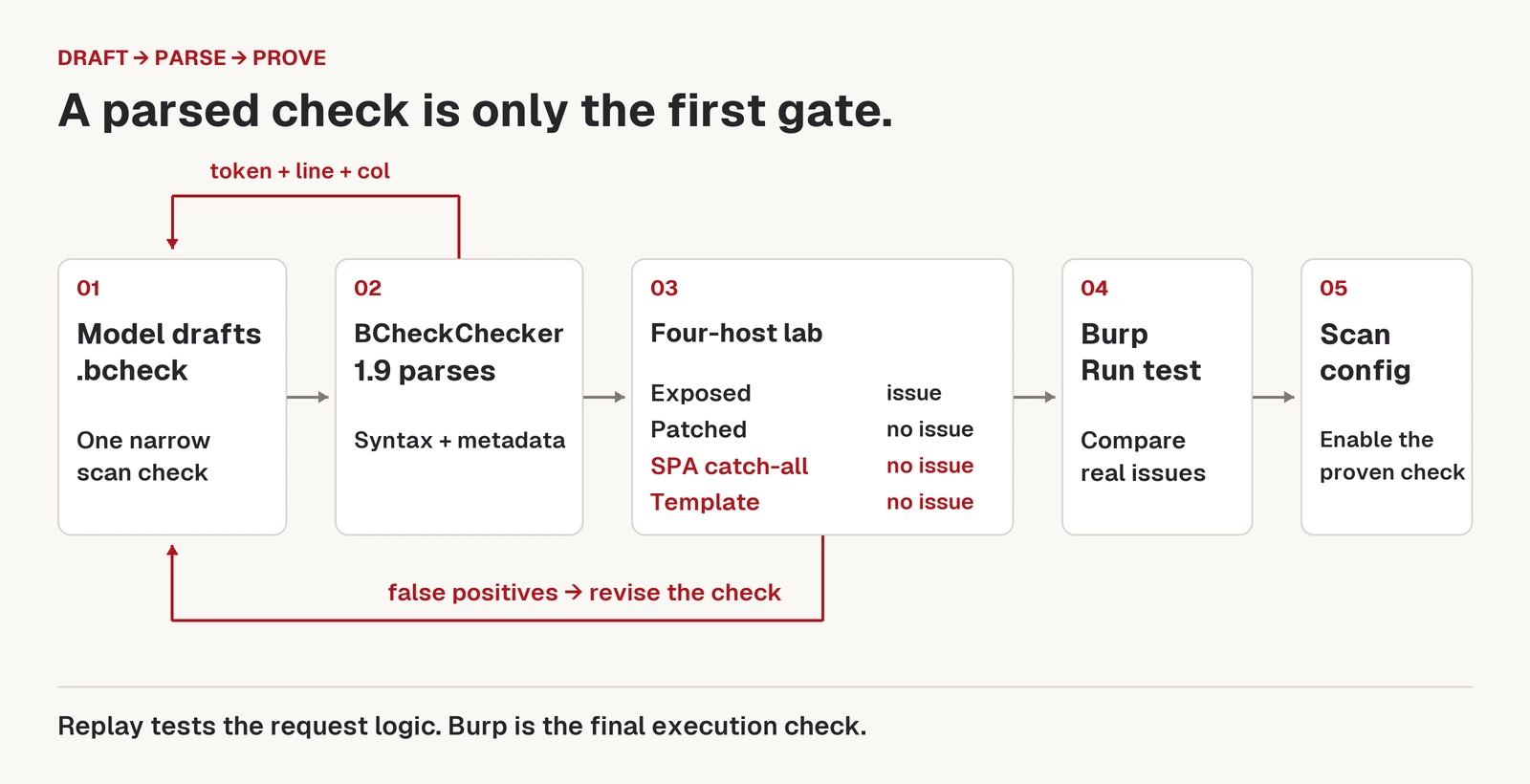
Parsing proves the grammar. It says nothing about whether the check reports the right hosts.
Step 4: Build a lab that tries to fool the check
A check for exposed files is only as good as its false-positive handling. Build a lab with one host per behavior you care about. Ours has four Python HTTP servers on 127.0.0.1, all with fake secrets:
| Port | Host | GET /.env returns |
|---|---|---|
| 8101 | exposed | 200, real-looking KEY=value lines |
| 8102 | patched | 404 |
| 8103 | SPA with a catch-all route | 200, the app's HTML shell, for every path |
| 8104 | template server | 200, a sample config, for any path ending in .env |
Hosts 8103 and 8104 are the point. Single-page apps and some frameworks answer every path with 200, so a status-code check reports them all.
BChecks only run inside Burp, so before a Burp test we replayed the exact requests the check sends with a short Python script and applied the check's conditions to each response. That is a logic check of the check, not a Burp run. The parsed draft from Step 3 reports three of four hosts:
host                    GET /.env  v2 reports
exposed                 200        ISSUE
patched                 404        no
spa (catch-all 200)     200        ISSUE
template (any *.env)    200        ISSUE
Two false positives out of three reports. On a real target list, that's a check people learn to ignore.
Step 5: Add body evidence and a control request
Send those results back to the model with the lab table and ask for a fix that needs evidence in the body and rules out catch-all responses. The fixed BCheck:
metadata:
    language: v2-beta
    name: "Exposed .env file"
    description: "Reports a readable .env file at the web root, with a control request to rule out catch-all 200s"
    author: "lab"
    tags: "exposure", "config", "secrets"

define:
    control_path = `/{random_str(12)}.env`

given host then
    send request called env_check:
        method: "GET"
        path: "/.env"

    if {env_check.response.status_code} is "200" and {env_check.response.body} matches "(?m)^[A-Z][A-Z0-9_]{2,}=" then
        send request called control:
            method: "GET"
            path: {control_path}

        if not({control.response.body} matches "(?m)^[A-Z][A-Z0-9_]{2,}=") then
            report issue:
                name: "Exposed .env file"
                severity: high
                confidence: firm
                detail: "/.env returned 200 with KEY=value lines; a random control path did not."
                remediation: "Remove .env files from the web root and rotate every secret they contained."
        end if
    end if
Three things changed. The body has to contain at least one KEY=value line, which rules out HTML shells. A second request to a random .env path acts as a control: if that also looks like a config file, the server is answering every .env path and the hit means nothing. And the status code is checked first, before any regex or extra request, which is the order PortSwigger's contribution guidelines recommend. Those guidelines also ask for a control request when behavior changes are your evidence.
BCheckChecker accepts it, and the replay now reports one host:
host                    GET /.env  v2 reports  control    v3 reports
exposed                 200        ISSUE       404        ISSUE
patched                 404        no          -          no
spa (catch-all 200)     200        ISSUE       -          no
template (any *.env)    200        ISSUE       200        no
Step 6: Run the final test in Burp
The last gate is Burp itself. In Burp Suite Professional, open Extensions > Custom scan checks, paste the check into the editor, send lab requests to it, and click Run test, as described in PortSwigger's testing guide. The editor shows requests sent, issues raised and errors, plus a Logger tab with every request the check made. For several checks at once, run a test scan with built-in checks disabled and only your custom checks enabled.
Compare Burp's issues with your lab table. If Burp reports anything the table doesn't predict, the check isn't done. Then add it to real scans through custom checks in the scan configuration.
Automate the parse loop
The parse step is mechanical, so let a script handle it. This loop uses the OpenAI Python SDK against RedRouter's OpenAI-compatible endpoint, writes each draft to a scratch folder, runs BCheckChecker, and sends back the errors with the lines they point at.
import os, re, subprocess
from pathlib import Path
from openai import OpenAI

client = OpenAI(base_url="https://redrouter.org/v1", api_key=os.environ["REDROUTER_API_KEY"])
work = Path("drafts"); work.mkdir(exist_ok=True)
check = work / "exposed-dotenv.bcheck"
messages = [{"role": "user", "content": Path("prompt.txt").read_text()}]

for attempt in range(4):
    reply = client.chat.completions.create(model="glm-5.3-flash-red", messages=messages)
    text = reply.choices[0].message.content.strip()
    if text.startswith("`"):  # drop a Markdown code fence if the model added one
        text = text.split("\n", 1)[1].rsplit("`" * 3, 1)[0]
    check.write_text(text + "\n")
    run = subprocess.run(["java", "-jar", "../BCheckChecker-1.9.jar"],
                         cwd=work, capture_output=True, text=True)
    if run.returncode == 0:
        print("Parses. Now run it against your lab.")
        break
    lines = text.splitlines()
    feedback = []
    for m in re.finditer(r"encounteredString='(.*?)', lineNo=(\d+), colNo=(\d+)", run.stdout + run.stderr):
        n = int(m.group(2))
        feedback.append(f"line {n}, col {m.group(3)}, unexpected '{m.group(1)}': {lines[n-1].strip() if n <= len(lines) else ''}")
    messages += [{"role": "assistant", "content": text},
                 {"role": "user", "content": "BCheckChecker failed:\n" + "\n".join(feedback)
                  + "\nFix only these errors. Return the .bcheck file only."}]
Stop the automation at "parses". Whether the check reports the right hosts is a judgment against your lab table, so keep a person on Steps 4 to 6.
What to send the model
Send the check, the parser errors, the lab table and placeholder values. Don't send client hostnames, session cookies, API tokens or real response bodies with secrets in them. If a real response shaped your check, redact it down to the structure the condition needs, like KEY=value with fake keys.
Choosing a model
Use any model that follows a "file only" instruction and holds a few rounds of errors. On RedRouter, GLM 5.3 Flash Red (glm-5.3-flash-red) costs $0.25 per 1M input tokens, $0.10 per 1M cached input tokens and $1.00 per 1M output tokens, with a 1,048,576-token context window. red-cyber-1 (Beta), the featured model for authorized penetration testing and red-team work, is $0.28 / $0.10 / $1.10 per 1M tokens. Current token rates are on the models docs. Plan options are on /pricing.
Scan checks run into refusals more than most code: a useful check names the vulnerability, the payload and the response that proves it. RedRouter is built for that kind of authorized security work. The same draft-then-prove loop works for static analysis in our Semgrep rules guide and for network checks in our Nmap NSE scripts guide. For where BChecks fit in a full hunt, see our AI bug bounty workflow.
Common BCheck mistakes in LLM drafts
- Wrong language version.
v2orv3instead ofv2-beta. Older community checks usev1-beta; the current reference listsv2-beta. - Report fields out of order.
name,severity,confidence,remediation,detail, in that order, or validation fails. - Payloads outside insertion points.
send payloadneedsgiven insertion point then(or a typed variant likegiven query insertion point then). - Nuclei habits.
matchers,wordsandstatus:blocks belong to Nuclei templates, not BChecks. - Trusting a 200. Status code alone reports every catch-all app. Require body evidence and use a control request.
- Double quotes vs backticks. Double-quoted strings are literal. Use backticks when you need
{variables}or functions interpolated, as in thecontrol_pathabove. - Trusting the explanation. A model's summary of what its check detects is not evidence. The lab run is.
FAQ
Can an LLM write Burp BChecks?
Yes, as a first draft. In our lab, a draft failed BCheckChecker on the language version and the order of its report fields. The fixed draft parsed and then reported two false positives out of four lab hosts. Each fix took one round once the model saw the exact error or the wrong result.
How do I validate a BCheck without opening Burp?
Run PortSwigger's BCheckChecker jar (Java 21+) in the folder that holds your .bcheck files. Exit code 0 means every file parsed. It checks syntax and metadata, not detection logic.
Do BChecks work in Burp Suite Community Edition?
PortSwigger's BChecks repository names Burp Suite Professional and Burp Suite DAST as the editions that import BChecks, and recommends Professional for writing and testing them in its built-in editor. Community Edition isn't listed. BCheckChecker itself runs anywhere Java 21 does.
What's the difference between given host and given insertion point?
given host then runs once per host, which suits file exposure checks. given insertion point then runs once per insertion point and is the only context where send payload works, which suits injection checks.
How do I reduce false positives in a BCheck?
Check the base response before sending anything, match status before body, require specific evidence in the body, and send a control request that should not trigger the issue. If the control also matches, don't report.
Is it safe to paste Burp traffic into an LLM?
Not raw client traffic. Send the check, the error lines and placeholder values instead. On RedRouter, Zero Data Retention is opt-in and off by default; the data handling docs explain what's stored, and our post on what RedRouter keeps covers it in plain terms.
Sources
- PortSwigger docs: BCheck definition reference, BCheck worked examples, Custom scan checks, Testing custom scan checks, Adding custom scan checks to scans. Checked November 19, 2026.
- PortSwigger BChecks repository, its README and CONTRIBUTING guide, commit 3489b87 (October 26, 2026).
- Lab outputs: BCheckChecker 1.9 on Eclipse Temurin 21.0.13.1, and a Python replay of the check's requests against four HTTP servers on 127.0.0.1, November 19, 2026.
- OpenAI Python SDK.
- RedRouter Docs: Quickstart, Models and pricing, Data handling. Checked November 19, 2026.