 redrouter


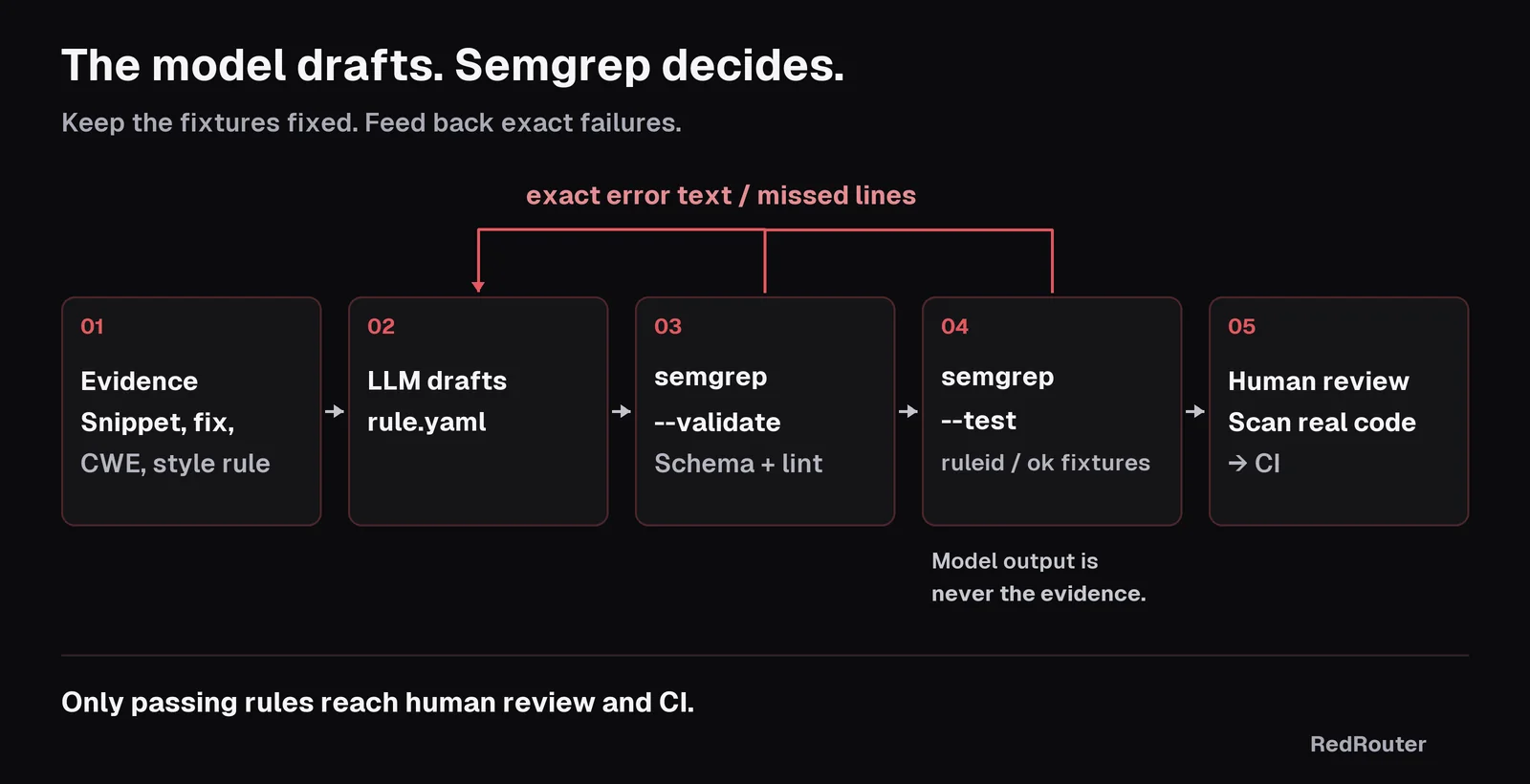
You can generate Semgrep rules with an LLM in seconds, and most of them will look right. That's the problem. A model will misspell languages, forget the one string-formatting style your codebase actually uses, or write a pattern that also flags harmless constants, and the YAML still reads like a real rule. Using an LLM for Semgrep rule writing works when the model drafts and Semgrep decides: semgrep --validate for the rule schema, semgrep --test for true positives and true negatives, and a scan of your own code before anything reaches CI.
This guide walks through that loop on one small, checkable example: a Python rule for SQL queries built with string formatting. Every tool output quoted below comes from running Semgrep 1.185.0 on the rules and fixtures shown. The rule drafts were written for this guide to show the mistakes models commonly make; they are not a captured model transcript. Model output is never the evidence. Semgrep's output is.
It's the static-analysis sibling of our guide to generating Sigma and YARA rules with an LLM. Same idea, different validator.
Defensive and authorized work only. Write rules for your own code or a client who hired you. Don't paste proprietary source, secrets or customer data into any prompt you aren't cleared to share, and see the data handling docs.
Why use an LLM for Semgrep rules
Semgrep rules are short YAML documents with a strict schema and a pattern language that looks like the code it matches. According to the Semgrep rule syntax reference, every rule needs an id, a message, a severity (LOW, MEDIUM, HIGH or CRITICAL, with the older INFO, WARNING and ERROR still accepted), a languages list, and a pattern operator such as pattern, patterns, pattern-either or pattern-regex.
That shape suits a model. Give it a vulnerable snippet, a fixed version and a CWE, and it can draft an AI SAST rule faster than you can open the docs. What it can't know is your codebase: which database driver you call, which wrappers sanitize input, and which f-strings are harmless table-name constants. That knowledge lives in your repo, which is why the test fixture matters more than the prompt.
Semgrep itself is LGPL-2.1 and describes itself as "lightweight static analysis for many languages." The latest release at the time of this update is v1.185.0, published November 10, 2026.
The loop: the model drafts, Semgrep decides
- Give the model evidence. Paste a vulnerable snippet, the fixed version, the CWE and one existing rule from your repo as a style example. Ask for exactly one YAML document and nothing else, so you can pipe it straight into Semgrep.
- Validate the schema. Run
semgrep --validate --config rule.yaml. Per Semgrep's testing docs, this runs Semgrep lint rules (pulled fromp/semgrep-rule-lints) and internal checks for problems such as missing fields and duplicate patterns. It does not scan your code. - Test against fixtures. Write a test file next to the rule with
# ruleid: <id>comments above lines that must match and# ok: <id>comments above lines that must not. Runsemgrep --test. - Feed back exact errors. Paste Semgrep's error text and the missed or incorrect line numbers back to the model. Ask for a corrected rule, not an explanation.
- Scan real code, then review. Run the passing rule on your own repo, read every finding, and only then commit it to your rules directory and CI.
Step 1: Write the test fixture first
Write the fixture before you ask for the rule. It's your spec, and it stops the model from grading its own homework. Semgrep finds tests by filename, so python-sqli-string-built-query.yaml is tested against python-sqli-string-built-query.py in the same directory.
import sqlite3
from flask import Flask, request

app = Flask(__name__)
db = sqlite3.connect("app.db", check_same_thread=False)


@app.route("/user")
def get_user():
    name = request.args.get("name")
    cur = db.cursor()
    # ruleid: python-sqli-string-built-query
    cur.execute(f"SELECT * FROM users WHERE name = '{name}'")
    # ruleid: python-sqli-string-built-query
    cur.execute("SELECT * FROM users WHERE name = '%s'" % name)
    # ruleid: python-sqli-string-built-query
    cur.execute("SELECT * FROM users WHERE name = '{}'".format(name))
    # ruleid: python-sqli-string-built-query
    cur.execute("SELECT * FROM users WHERE name = '" + name + "'")
    # ok: python-sqli-string-built-query
    cur.execute("SELECT * FROM users WHERE name = ?", (name,))
    # ok: python-sqli-string-built-query
    cur.execute("SELECT count(*) FROM users")
    return "ok"
Four ways to build SQL from user input, one parameterized query and one constant query. This maps to CWE-89, SQL injection.
Step 2: Validate the first LLM draft
A typical first draft looks plausible:
rules:
  - id: python-sqli-string-built-query
    message: SQL query built from a string with user input
    severity: HIGH
    langauges: [python]
    pattern-either:
      - pattern: $CUR.execute(f"...")
      - pattern: $CUR.execute("..." % $X)
    pattern-not: $CUR.execute("...", $PARAMS)
One transposed letter. Semgrep catches it immediately:
$ semgrep --validate --config python-sqli-string-built-query.yaml --metrics=off
Configuration is invalid - found 3 configuration error(s), and 0 rule(s).
semgrep error: Invalid rule schema
  --> python-sqli-string-built-query.yaml:2
...
One of these properties is missing: 'languages'

[ERROR] Semgrep match found at line python-sqli-string-built-query.yaml:2:
 Please include a 'languages' field for your rule!
[ERROR] Rule parse error in rule python-sqli-string-built-query:
 missing languages
The exit code was 2. Paste those lines back to the model. You don't need to explain the typo; the error text does it.
Step 3: A valid rule can still be wrong
With languages fixed, the same rule validates cleanly:
$ semgrep --validate --config python-sqli-string-built-query.yaml --metrics=off
Configuration is valid - found 0 configuration error(s), and 1 rule(s).
Then the fixture runs:
$ semgrep --test . --metrics=off
0/1: 1 unit tests did not pass:
--------------------------------------------------------------------------------
	✖ python-sqli-string-built-query
	missed lines: [17, 19], incorrect lines: []
This is the failure that matters. The draft only covered f-strings and % formatting, so it missed .format() on line 17 and concatenation on line 19. --validate can't see that; only a fixture can. This is also where a model is most confidently wrong, because it will happily tell you the rule "covers string-built queries."
Send the missed line numbers and the fixture back. A corrected rule:
rules:
  - id: python-sqli-string-built-query
    message: >-
      SQL text passed to $CUR.execute() is built with string formatting or
      concatenation. Use a parameterized query and pass values separately.
    severity: HIGH
    languages: [python]
    metadata:
      cwe: "CWE-89: Improper Neutralization of Special Elements used in an SQL Command"
      category: security
    pattern-either:
      - pattern: $CUR.execute(f"...", ...)
      - pattern: $CUR.execute("..." % $X, ...)
      - pattern: $CUR.execute("...".format(...), ...)
      - pattern: $CUR.execute("..." + $X + ..., ...)
$ semgrep --test . --metrics=off
1/1: ✓ All tests passed
No tests for fixes found.
A scan of the fixture with semgrep scan --config python-sqli-string-built-query.yaml fixture.py --error reported 4 findings, on lines 13, 15, 17 and 19, and exited with code 1, which Semgrep's CLI reference defines as "found issues in your code (while using the --error flag)." That's the exit code you want CI to act on.
Step 4: Add a false-positive fixture, then try taint mode
Passing tests only prove what the fixture covers. Add the case your codebase actually has. Many Python apps build SQL with an f-string around a constant table name:
TABLE = "users"
# ok: ...
cur.execute(f"SELECT count(*) FROM {TABLE}")
The pattern rule above flags that line. On a second fixture it reported lines 14, 16 and 20, and line 20 is the constant. The rule matches the shape of the code, not where the data came from.
That's what Semgrep's taint mode is for. A taint rule sets mode: taint and requires pattern-sources; sinks, sanitizers and propagators are optional. Ask the model for a taint version and give it both fixtures:
rules:
  - id: python-flask-sqli-taint
    mode: taint
    message: >-
      Flask request data reaches $CUR.execute() as SQL text. Use a
      parameterized query and pass request values as parameters.
    severity: HIGH
    languages: [python]
    pattern-sources:
      - pattern: flask.request.$ATTR.get(...)
      - pattern: flask.request.$ATTR[...]
    pattern-sinks:
      - patterns:
          - pattern-inside: $CUR.execute($SQL, ...)
          - focus-metavariable: $SQL
With # ruleid: on the f-string and concatenation lines that use request.args, and # ok: on the parameterized query and the constant-table f-string, Semgrep 1.185.0 reported 1/1: ✓ All tests passed. The focus-metavariable line matters. When we replaced the sink with a plain $CUR.execute(...), the test failed with incorrect lines: [18]: the parameterized query was flagged because a tainted value was passed as a parameter.
Taint rules aren't automatically better. They miss sources you didn't list, such as a custom request wrapper. Keep the pattern rule if you want a strict style check, and the taint rule if you want fewer findings to triage. Your fixtures decide.
Automating the loop with an OpenAI-compatible API
The loop is easy to script. This sketch sends the fixture and any Semgrep errors to a model through an OpenAI-compatible API and stops when semgrep --test passes. It points the OpenAI Python SDK at RedRouter's https://redrouter.org/v1 base URL, as described in our OpenAI-compatible API guide and the RedRouter quickstart.
import pathlib, subprocess
from openai import OpenAI

client = OpenAI(base_url="https://redrouter.org/v1")  # reads OPENAI_API_KEY
rule_id = "python-sqli-string-built-query"
rule = pathlib.Path(f"rules/{rule_id}.yaml")
fixture = pathlib.Path(f"rules/{rule_id}.py").read_text()

feedback = "No previous attempt."
for attempt in range(4):
    resp = client.chat.completions.create(
        model="glm-5.3-flash-red",
        messages=[
            {"role": "system", "content": "Return exactly one Semgrep rule as YAML. No prose, no code fences."},
            {"role": "user", "content": f"Rule id: {rule_id}\nFixture:\n{fixture}\nSemgrep feedback:\n{feedback}"},
        ],
    )
    rule.write_text(resp.choices[0].message.content)
    check = subprocess.run(
        ["semgrep", "--validate", "--config", str(rule), "--metrics=off"],
        capture_output=True, text=True)
    if check.returncode == 0:
        check = subprocess.run(
            ["semgrep", "--test", "rules/", "--metrics=off"],
            capture_output=True, text=True)
    if check.returncode == 0:
        print(f"passed on attempt {attempt + 1}")
        break
    feedback = (check.stdout + check.stderr)[-4000:]
Two rules for the script. It never edits the fixture, because a model that can change the test will make the test pass. And a passing run still goes to a human, because the fixture is only as good as the cases you wrote.
Which model to use
Rule drafting is short structured output, so a fast model with a large context is usually enough. GLM 5.3 Flash Red (glm-5.3-flash-red) is $0.25 input, $0.10 cached input and $1.00 output per 1M tokens, with a 1,048,576-token context window, which leaves room to paste a large file and several example rules. red-cyber-1 (Beta) is $0.28, $0.10 and $1.10 per 1M tokens and is the model RedRouter's docs feature for authorized security work. See pricing and the model catalog for current rates and limits.
Refusals matter here more than you'd expect. Writing a detection rule means describing the vulnerable pattern precisely, and some assistants interrupt defensive work on your own code; see this own-code review safeguard report for one public example. RedRouter is built for authorized security work, and if you'd rather keep your agent and swap only the model, our agent broker post covers that pattern.
What to send the model
Send the smallest snippet that shows the bug, not the whole repo. Strip secrets, hostnames and customer identifiers first. On RedRouter, account Zero Data Retention is an opt-in setting and is off by default; the data handling docs explain it alongside per-key content storage, and what RedRouter keeps covers the rest.
Also note that semgrep --validate pulls lint rules from the Semgrep Registry. Semgrep's metrics page explains what it reports when you pull registry config; pass --metrics=off if you don't want that.
Common mistakes when an LLM writes Semgrep rules
- Misspelled or missing keys.
langauges,patterns-either, a missingmessage.--validatecatches these. - Coverage gaps. One or two string-building styles instead of all four. Only
ruleidfixtures catch these. - Shape-only matches. Flagging constants and safe wrappers. Only
okfixtures catch these. - Invented operators or options. If a key isn't in the rule syntax reference, treat it as made up until Semgrep accepts it.
- Trusting the explanation. A model's summary of what its rule covers is not evidence. The test output is.
FAQ
Can an LLM write Semgrep rules that work?
Yes, if you treat each draft as untested. In the example above, the first draft failed --validate and the second passed validation but missed two of four cases in --test. The third passed both. The fixture made the difference, not the prompt.
What's the difference between semgrep --validate and semgrep --test?
--validate --config rule.yaml checks the rule itself for schema problems, missing fields and lint issues. --test runs the rule against annotated test files and reports missed ruleid lines and incorrect ok lines. You need both.
How do I write a Semgrep test file?
Put a file with the same base name as the rule next to it, such as rule.yaml and rule.py. Add # ruleid: <rule-id> on the line above code that must match and # ok: <rule-id> above code that must not. Semgrep also supports todoruleid and todook for known gaps.
Should I use a pattern rule or a taint rule for SQL injection?
Start with a pattern rule if you want to ban a coding style everywhere. Use mode: taint when you want findings only where untrusted input reaches the sink. In our test, the taint rule ignored a constant-table f-string that the pattern rule flagged.
Which model should I use to generate Semgrep rules?
Any model that follows a "YAML only" instruction and handles your fixture size. GLM 5.3 Flash Red is a low-cost default on RedRouter, and red-cyber-1 (Beta) is the featured model for authorized security work. Judge either by whether its rules pass your tests.
Is it safe to paste my code into an LLM?
Only code you're cleared to share, with secrets removed. Check your provider's retention settings first. On RedRouter, Zero Data Retention is opt-in and off by default; the data handling docs explain what's stored.
Sources
- Semgrep: repository, v1.185.0 release, rule syntax, testing rules, taint mode, CLI reference and exit codes, metrics. Checked November 12, 2026.
- MITRE: CWE-89. Checked November 12, 2026.
- OpenAI: openai-python. Checked November 12, 2026.
- RedRouter Docs: Quickstart, Models and pricing, Data handling. Checked November 12, 2026.
- Tool outputs: Semgrep 1.185.0 (pip), run November 12, 2026 on the rules and fixtures shown.