 redrouter


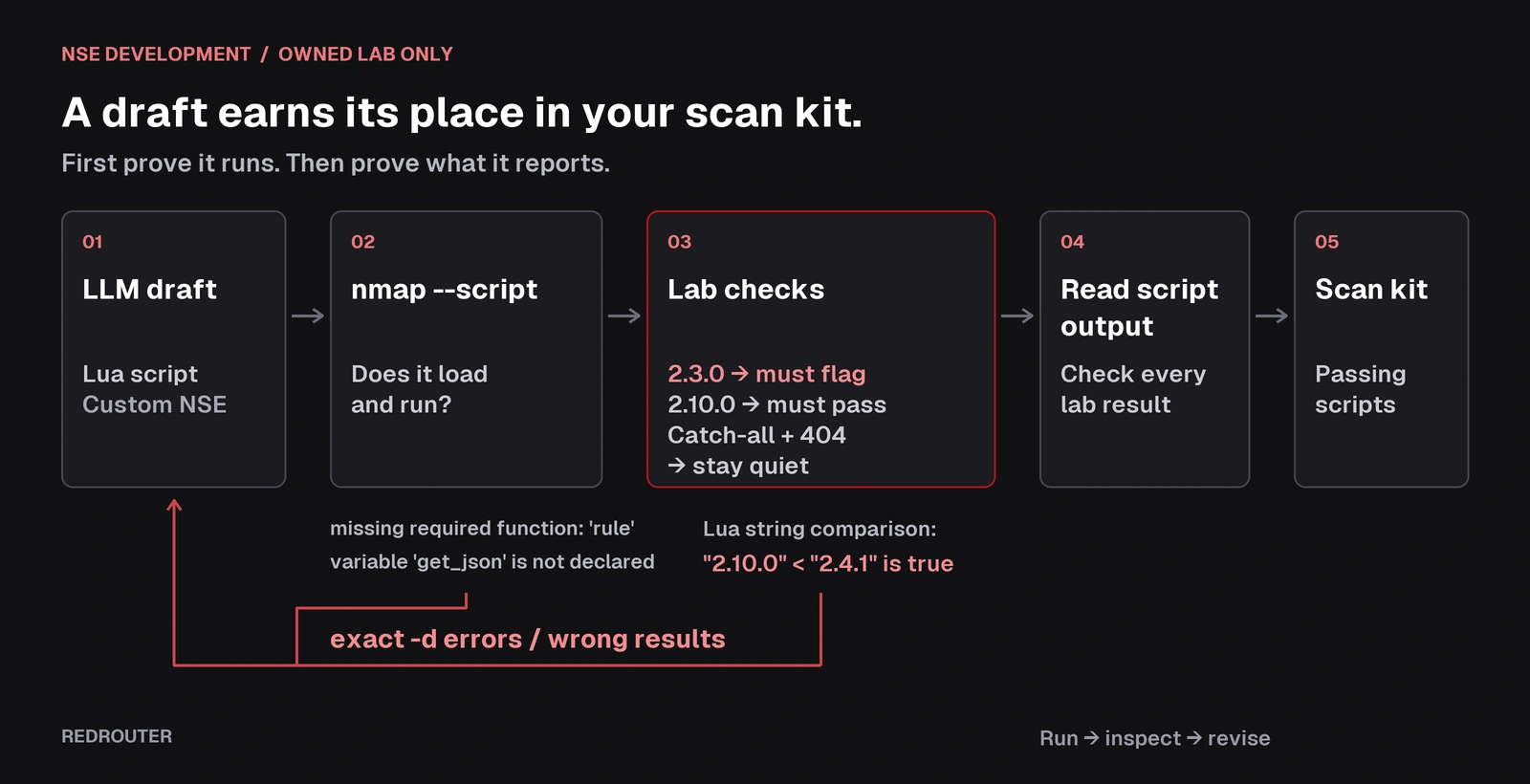
You can write Nmap NSE scripts with an LLM in seconds, and the drafts look right: a description, some require lines, an action function. Then Nmap refuses to start, or every port prints ERROR: Script execution failed, or the script runs cleanly and reports the wrong hosts as vulnerable. An LLM-written NSE script is only a draft until Nmap has loaded it and a lab you control has shown you exactly what it reports.
This guide runs that loop on one realistic job: a version check for an internal web app (we call it labapp) that exposes its version at /api/health, flagging anything older than the fixed release, 2.4.1. Every error and result below comes from running Nmap 7.95 (the Debian 13 package) against four lab servers on 127.0.0.1. The drafts were written for this guide to show mistakes models commonly make; they are not a captured model transcript. Nmap's output is the evidence, not the model's.
It's the scanning sibling of our recon and attack surface workflow and our guide to AI triage of Nuclei findings. Those cover what to do with scan output. This one is about writing the check itself.
Authorized work only. Run NSE scripts only against hosts you own or are explicitly in scope to test. Even a "safe" script sends real requests. Keep hostnames, IP addresses and credentials out of prompts; see what to send the model.
Why write NSE scripts with an LLM
The Nmap Scripting Engine runs Lua scripts during a scan. Each script has a small set of required fields, a rule that decides where it runs, and an action that does the work, as the script format chapter explains. Most real value comes from the bundled libraries: http, shortport, stdnse, json and dozens more, documented in the NSE library reference.
That's a good fit for a model and a poor fit for trusting one. Models have read a lot of NSE scripts and know the shape. They are much less reliable on which library function exists, what it returns, and whether a check that runs is a check that's correct. Those are exactly the places a script breaks.
Before writing anything, check whether a stock script already does the job. Nmap ships hundreds; ls /usr/share/nmap/scripts or the NSEDoc portal will show you. Custom NSE pays off for things no public script knows about, like your own app's version endpoint.
How to test an LLM-generated NSE script
Ask two separate questions:
- Does it load and run? Point
--scriptat the file and scan a lab port. Load errors stop Nmap before the scan. Runtime errors printERROR: Script execution failed (use -d to debug)on each port; rerun with-dto see the Lua error and line number. - Does it report the right hosts, and only those? Running cleanly says nothing about this. Build a small lab with one target that must be flagged and a few that must not.
# Run one script file against lab ports
nmap -Pn -n -p 8000,8080,8088,8180 --script ./labapp-version.nse 127.0.0.1

# Same, with debug output to see Lua errors
nmap -d -Pn -n -p 8000 --script ./labapp-version.nse 127.0.0.1
--script accepts a file path as well as script names and categories, per the NSE usage docs.
Step 1: Build the lab before you prompt
Decide what should and shouldn't be reported first. We ran four tiny Python HTTP servers on 127.0.0.1, on ports that Nmap's shortport.http rule already treats as likely HTTP:
| Port | What it serves at /api/health | Should the script report it? |
|---|---|---|
| 8000 | {"app": "labapp", "version": "2.3.0"} | Yes, vulnerable |
| 8080 | {"app": "labapp", "version": "2.10.0"} | Yes, but as patched |
| 8088 | A 200 HTML page for every path (catch-all) | No |
| 8180 | 404 | No |
Each port tests one decision. The 2.10.0 server is the important one, as Step 5 shows.
Step 2: Give the model the version and the libraries
A prompt that works well:
Write an Nmap NSE script for Nmap 7.95 named labapp-version. Use portrule = shortport.http. Fetch /api/health with http.get, parse the body with the json library (json.parse returns a status and the object), and only report when the JSON has app == "labapp". Compare dotted versions numerically against a fixed version that defaults to 2.4.1 and can be set with a script argument. Return a stdnse.output_table. Use only functions documented in NSEDoc. Return the script only.
Naming the Nmap version, the libraries and the return shape of json.parse removes most of the errors below before they happen.
Step 3: Run the draft and read the error
A typical first draft without those hints:
description = [[Reports the labapp version from /api/health and flags versions before 2.4.1.]]
author = "lab"
license = "Same as Nmap--See https://nmap.org/book/man-legal.html"
categories = {"safe", "discovery"}

local http = require "http"
local json = require "json"

action = function(host, port)
  local data = http.get_json(host, port, "/api/health")
  if data.version < "2.4.1" then
    return "labapp " .. data.version .. " is VULNERABLE (fixed in 2.4.1)"
  end
end
Nmap 7.95 won't start the scan:
NSE: failed to initialize the script engine:
/usr/bin/../share/nmap/nse_main.lua:657: ./rev1/labapp-version.nse is missing required function: 'rule'
...
QUITTING!
There's no portrule. The script format docs are explicit: "A script must contain one or more of the following functions that determine when the script will be run: prerule(), hostrule(host), portrule(host, port), postrule()". Add local shortport = require "shortport" and portrule = shortport.http, and the scan runs, but every port says:
8000/tcp open  http-alt
|_labapp-version: ERROR: Script execution failed (use -d to debug)
With -d:
./rev2/labapp-version.nse:13: variable 'get_json' is not declared
stack traceback:
	[C]: in function 'error'
	/usr/bin/../share/nmap/nselib/strict.lua:80: in metamethod 'index'
http.get_json doesn't exist. The http library docs list get, get_url, generic_request and others, but nothing that fetches and parses JSON in one call. The odd wording comes from NSE's strict library, which the library chapter says "will raise a runtime error on any access or modification of a global variable which was undeclared". Replace it with http.get plus json.parse, and the next run fails differently:
./rev3/labapp-version.nse:15: attempt to index a boolean value (local 'data')
The draft wrote local data = json.parse(response.body). The json library docs say parse returns two values: "status true if ok, false if bad" and then the object. So data held the status, not the JSON. Paste each error back to the model verbatim; it fixes them reliably once it sees Nmap's exact message.
Step 4: A script that runs can still be wrong
With local ok, data = json.parse(response.body) and a guard on ok, the script runs on every port without errors:
PORT     STATE SERVICE
8000/tcp open  http-alt
|_labapp-version: labapp 2.3.0 is VULNERABLE (fixed in 2.4.1)
8080/tcp open  http-proxy
|_labapp-version: labapp 2.10.0 is VULNERABLE (fixed in 2.4.1)
8088/tcp open  radan-http
8180/tcp open  unknown
Two findings, one of them true. data.version < "2.4.1" is a Lua string comparison, character by character, and "1" sorts before "4", so 2.10.0 looks older than 2.4.1. Nothing in the run hints at this. On a real engagement it becomes a false finding in a client report. This is the step people skip when they write Nmap NSE scripts with an LLM, and it's the one that matters most.
The catch-all server on 8088 stayed quiet only because its HTML failed to parse as JSON. A catch-all that returned someone else's JSON would have been reported too. The final version checks app == "labapp" so it only speaks about the app it knows.
Step 5: Fix the logic and rerun the lab
The final script compares versions numerically, takes the fixed version and path as script arguments, checks the HTTP status, and returns structured output:
local http = require "http"
local json = require "json"
local shortport = require "shortport"
local stdnse = require "stdnse"

description = [[
Reads the version from labapp's /api/health JSON endpoint and flags
versions older than the fixed release (default 2.4.1). Lab use only.
]]

---
-- @usage nmap -p 8000 --script labapp-version <target>
-- @args labapp-version.fixed first fixed release (default: 2.4.1)
-- @args labapp-version.path health endpoint path (default: /api/health)

author = "lab"
license = "Same as Nmap--See https://nmap.org/book/man-legal.html"
categories = {"safe", "discovery", "version"}

portrule = shortport.http

-- Compare dotted numeric versions part by part: 2.10.0 is newer than 2.4.1.
local function older_than(v, fixed)
  local a, b = {}, {}
  for n in v:gmatch("%d+") do a[#a + 1] = tonumber(n) end
  for n in fixed:gmatch("%d+") do b[#b + 1] = tonumber(n) end
  for i = 1, math.max(#a, #b) do
    local x, y = a[i] or 0, b[i] or 0
    if x ~= y then return x < y end
  end
  return false
end

action = function(host, port)
  local fixed = stdnse.get_script_args(SCRIPT_NAME .. ".fixed") or "2.4.1"
  local path = stdnse.get_script_args(SCRIPT_NAME .. ".path") or "/api/health"

  local response = http.get(host, port, path)
  if not response or response.status ~= 200 or not response.body then
    return nil
  end

  local ok, data = json.parse(response.body)
  if not ok or type(data) ~= "table" or data.app ~= "labapp"
      or type(data.version) ~= "string" then
    return nil
  end

  local out = stdnse.output_table()
  out.version = data.version
  out.fixed_in = fixed
  out.vulnerable = older_than(data.version, fixed)
  return out
end
The lab run now matches the table from Step 1:
PORT     STATE SERVICE
8000/tcp open  http-alt
| labapp-version:
|   version: 2.3.0
|   fixed_in: 2.4.1
|_  vulnerable: true
8080/tcp open  http-proxy
| labapp-version:
|   version: 2.10.0
|   fixed_in: 2.4.1
|_  vulnerable: false
8088/tcp open  radan-http
8180/tcp open  unknown
To prove the script argument works, we reran with --script-args labapp-version.fixed=2.11.0. Both app servers then reported vulnerable: true, and the other two stayed quiet. The usage docs cover --script-args and --script-args-file.
A few details worth keeping from the final version:
stdnse.output_table()returns "a table that keeps elements in order of insertion", per the stdnse docs, so the fields print in a stable order and show up as structured elements in-oXXML output.nmap --script-help ./labapp-version.nseprinted the description and categories, a quick check that the header fields parse.- Return
nilwhen unsure. A script that stays quiet on ports it doesn't recognize is easier to trust than one that guesses.
What to send the model
Keep prompts to the parts that make a script correct:
- Send: the goal in plain words, your Nmap version, the libraries you want used, the exact error lines from
-d, and the output lines that were wrong. - Scrub: real hostnames, IP addresses, client names, credentials and session tokens. Use placeholders, or reproduce the response shape in a lab server and send that.
- Don't send: full scan results from a client network. A model doesn't need them to fix a script.
- Check retention. On RedRouter, Zero Data Retention is an opt-in setting and off by default. The data handling docs explain what is stored and how to turn it on. Our post on what RedRouter keeps covers the same ground in plain terms.
Automating the loop
The run-and-retry part is easy to script. With -d, a load error still ends in QUITTING!, and a runtime error prints threw an error! followed by the Lua error line, so the loop looks for those two strings and sends the error lines back. This sketch uses the OpenAI Python SDK with RedRouter's https://redrouter.org/v1 base URL, as covered in our OpenAI-compatible API guide and the RedRouter quickstart.
import os, subprocess
from openai import OpenAI

client = OpenAI(base_url="https://redrouter.org/v1", api_key=os.environ["REDROUTER_API_KEY"])
messages = [{"role": "user", "content": open("prompt.txt").read()}]
scan = ["nmap", "-d", "-Pn", "-n", "-p", "8000,8080,8088,8180",
        "--script", "./labapp-version.nse", "127.0.0.1"]  # lab only

for attempt in range(4):
    reply = client.chat.completions.create(model="glm-5.3-flash-red", messages=messages)
    script = reply.choices[0].message.content.strip()
    if script.startswith("`"):  # drop a Markdown code fence if the model added one
        script = script.split("\n", 1)[1].rsplit("`" * 3, 1)[0]
    open("labapp-version.nse", "w").write(script + "\n")
    out = subprocess.run(scan, capture_output=True, text=True)
    text = out.stdout + out.stderr
    if "QUITTING!" not in text and "threw an error!" not in text:  # -d wording
        print("Runs cleanly. Now compare the output with your lab table.")
        break
    errors = "\n".join(l for l in text.splitlines() if "labapp-version.nse" in l and "traceback" not in l)
    messages += [{"role": "assistant", "content": script},
                 {"role": "user", "content": "Nmap failed:\n" + errors + "\nReturn the fixed script only."}]
Stop the automation at "runs cleanly". Whether it reports the right hosts is a judgment against your lab table, so keep a person on Steps 4 and 5. Point the loop only at lab hosts.
Choosing a model
Use any model that follows a "script only" instruction and can hold a few rounds of errors. On RedRouter, GLM 5.3 Flash Red (glm-5.3-flash-red) costs $0.25 per 1M input tokens, $0.10 per 1M cached input tokens and $1.00 per 1M output tokens, with a 1,048,576-token context window. red-cyber-1 (Beta), the featured model for authorized penetration testing and red-team work, is $0.28 / $0.10 / $1.10 per 1M tokens. The models docs list current rates for every model.
Scanner work has a practical refusal problem: a useful check has to describe the vulnerable behavior precisely, and prompts mention exploits, versions and attack paths. RedRouter is built for that kind of authorized security work; our post on agent brokers and abliterated models explains the approach. The same draft-then-prove loop works for detection content too, as in our Suricata rules guide.
Common NSE mistakes in LLM drafts
- No rule function. Without
portrule,hostrule,preruleorpostrule, Nmap quits before scanning. - Invented library functions.
http.get_jsonis a typical one. Check every call against NSEDoc. - Ignoring multiple return values.
json.parsereturns a status first. Many NSE functions return a status and a result. - String version comparisons.
"2.10.0" < "2.4.1"is true in Lua. Compare numeric parts. - Trusting any 200. Check the status code and something specific to the target, not just that a page exists.
- Missing or wrong categories.
safe,intrusiveand the rest tell other testers what a script does. Pick honestly. - Trusting the explanation. A model's description of what its script detects is not evidence. The lab run is.
FAQ
Can an LLM write Nmap NSE scripts?
Yes, as a first draft. In our lab, a draft without version and library hints failed three times (no portrule, an invented http.get_json, a misread json.parse return) and then ran cleanly while flagging a patched 2.10.0 server as vulnerable. Each fix took one round once the model saw Nmap's exact error or the wrong result.
How do I debug an NSE script?
Run it with -d. Instead of Script execution failed, you get the Lua error with the file and line number. --script-trace shows all traffic the script sends and receives, which helps when a request isn't what you expected.
How do I pass arguments to an NSE script?
Read them with stdnse.get_script_args(SCRIPT_NAME .. ".name") and pass them with --script-args scriptname.name=value, or put many in a file with --script-args-file.
Where do custom NSE scripts go?
You can run one by path with --script ./myscript.nse. To run it by name with other scripts, copy it into Nmap's scripts directory and run nmap --script-updatedb.
Will a script written for Nmap 7.95 work on newer Nmap?
Probably, but don't assume. Our outputs come from the Debian 7.95 package; the Nmap changelog lists newer releases. Rerun your lab against the exact build you scan with.
Is it safe to paste scan results into an LLM?
Not raw client data. Send the script, the error lines and placeholder values instead. On RedRouter, Zero Data Retention is opt-in and off by default; the data handling docs explain what's stored.
Sources
- Nmap docs: Nmap Scripting Engine, Script format, Usage and examples, NSE libraries, NSEDoc for http, json, shortport and stdnse, Changelog. Checked November 18, 2026.
- Lab outputs: Nmap 7.95 (Debian 13 package) against four Python HTTP servers on 127.0.0.1, November 18, 2026.
- OpenAI Python SDK.
- RedRouter Docs: Quickstart, Models and pricing, Data handling. Checked November 18, 2026.