 redrouter

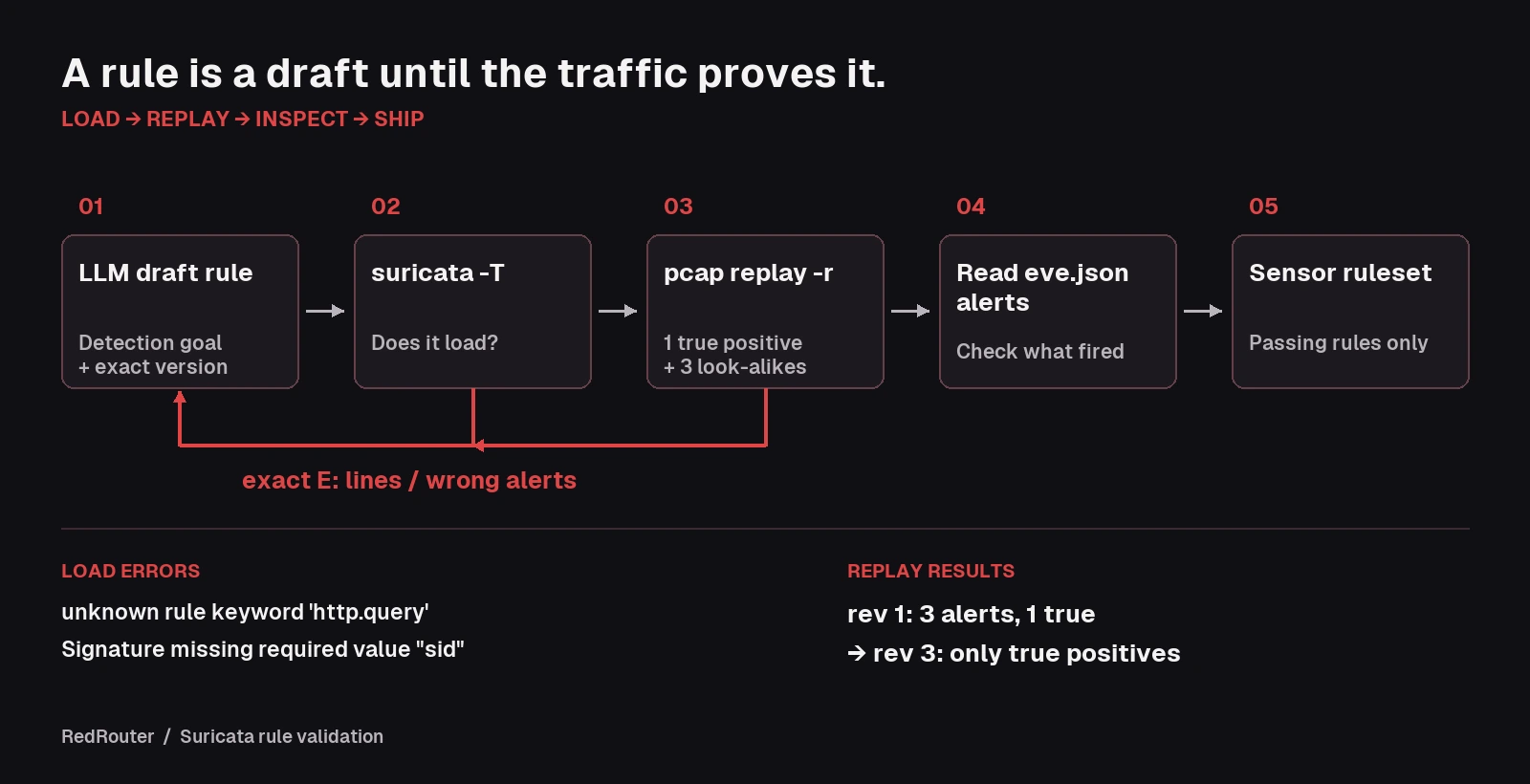
You can generate Suricata rules with an LLM in a few seconds, and most drafts will look like real signatures. Some won't load: the model invents a keyword, mixes old and new syntax, or forgets the sid. Worse, some load cleanly and fire on traffic you didn't mean to catch. An LLM-written Suricata rule is only a draft until Suricata itself has parsed it and a pcap has shown you exactly what it alerts on.
This guide runs that loop on one network detection: a request that passes a cmd parameter to a PHP file under /uploads/, the shape of a webshell being used on a server you protect. Every error message and alert below comes from running Suricata 7.0.10 (the Debian 13 package) in test mode (-T) and in pcap replay mode (-r) against lab traffic we generated on a single box. The drafts were written for this guide to show mistakes models commonly make; they are not a captured model transcript. Suricata's output is the evidence, not the model's.
It's the network sibling of our guides to generating Sigma and YARA rules with an LLM, Semgrep rules and Falco rules. Same loop, different validator.
Defensive and authorized work only. Write rules for networks you own or are hired to defend, and replay only lab traffic or captures you are cleared to handle. Strip IP addresses, hostnames, cookies and tokens from anything you paste into a prompt. See what to send the model below.
Why use an LLM for Suricata rules
Suricata rules have three parts: an action, a header (protocol, addresses, ports, direction) and options in parentheses. The rules introduction walks through each one. Most of the work is in the options: sticky buffers such as http.uri, payload keywords such as content, startswith and distance, a pcre when content matches aren't enough, and the meta keywords msg, sid, rev and classtype.
That is a good fit for a model and a bad fit for trusting one. Models have read a lot of Snort and Suricata rules, from many versions. They know the general shape well. They are much less reliable on which keyword exists in which version, on Suricata's sticky-buffer order, and on how one content relates to the next. Those are exactly the places a rule breaks.
How to validate an LLM-generated Suricata rule
Ask two separate questions:
- Does it load? Run Suricata in test mode with only your rule file. The command-line docs describe
-Tas "Test configuration", and-Sloads a rule file exclusively. A bad rule produces anE:line naming the problem, and the process exits non-zero (exit 1 in our runs). - Does it fire on the right traffic, and only that? Loading says nothing about this. Replay a pcap with
-r(pcap offline mode) that holds one request you want to catch and a few look-alikes you don't, then read the alerts ineve.json.
# 1. Does it load?
suricata -T -c suricata.yaml -S rules/draft.rules -l ./out

# 2. What does it fire on?
suricata -c suricata.yaml -S rules/draft.rules -r lab.pcap -l ./out -k none \
  --set vars.address-groups.HOME_NET="[127.0.0.0/8]"
-k none turns off checksum checks, which loopback captures fail. The --set points $HOME_NET at the lab, since our traffic ran over 127.0.0.1. On a real sensor, use your own HOME_NET.
Step 1: Build a small lab pcap first
Decide what should and shouldn't alert before you ask the model for anything. We served a static directory with Python's http.server on 127.0.0.1:8080, captured the loopback interface with tcpdump, and sent five requests with curl:
| Request | Should alert? | Why it's in the pcap |
|---|---|---|
GET /uploads/shell.php?cmd=id | Yes | The behavior we want to catch |
GET /uploads/gallery.php?subcmd=next | No | A parameter that merely contains cmd= |
GET /admin/tools.php?cmd=status | No | A cmd parameter outside /uploads/ |
GET /uploads/avatar.png?cmd=crop | No | A cmd parameter on an image, not a script |
GET /index.html | No | Plain background traffic |
Five requests is small on purpose. Each look-alike tests one decision in the rule. The file names are lab placeholders; no real webshell was involved.
Step 2: Give the model the goal and the version
A prompt that works well:
Write one Suricata 7 rule (it should also load on Suricata 8). Alert on HTTP requests to a .php file under /uploads/ that pass a parameter named exactly
cmd. Use sticky-buffer syntax (http.uri), not content modifiers. Include msg, flow, classtype, sid in the 1000000-1999999 local range, and rev. Return the rule only.
Naming the version and the syntax style removes a whole class of errors. Asking for a parameter "named exactly cmd" matters too, as Step 4 shows.
Step 3: Run the draft through suricata -T
A typical first draft without those constraints:
alert http any any -> any any (msg:"Webshell command in URI"; content:"cmd="; http.query; content:"/uploads/"; http_uri; classtype:web-application-attack;)
Suricata 7.0.10 refuses it:
E: detect-parse: Signature missing required value "sid".
The meta keywords docs say sid "gives every signature its own id". Add sid:1000001; rev:1; and the next error appears:
E: detect-parse: unknown rule keyword 'http.query'.
There is no http.query keyword in Suricata 7.0.10, and the HTTP keywords page for 8.0.8 doesn't list one either. The query string is part of http.uri. Swap it in and the third error appears:
E: detect-parse: "http_uri" keyword seen with a sticky buffer still set. Reset sticky buffer with pkt_data before using the modifier.
That draft mixes two syntaxes. http.uri; is a sticky buffer: it goes first, and every keyword after it applies to that buffer. http_uri; is the older content modifier that goes after a content. The rules format docs describe the sticky buffer this way: "It places the buffer name first and all keywords following it apply to that buffer". Paste each error back to the model verbatim. It fixes them reliably once it sees Suricata's exact message.
Step 4: A rule that loads can still be wrong
Rewritten with the sticky buffer first, this version passes -T ("Configuration provided was successfully loaded"):
alert http any any -> any any (msg:"Webshell command in URI"; http.uri; content:"/uploads/"; content:"cmd="; classtype:web-application-attack; sid:1000001; rev:1;)
Replaying the lab pcap shows what it actually does:
ALERT 1000001 /uploads/shell.php?cmd=id
ALERT 1000001 /uploads/avatar.png?cmd=crop
ALERT 1000001 /uploads/gallery.php?subcmd=next
Three alerts, one of them true. The rule matches cmd= inside subcmd=, and it doesn't care whether the file is a script. Only /admin/tools.php stayed quiet, and only because it's outside /uploads/. Neither problem shows up in test mode. This is the step people skip when they generate Suricata rules with an LLM, and it's where most of the noise comes from.
Step 5: Tighten it and replay again
The fix anchors /uploads/ to the start of the URI, requires .php? after it, and uses a pcre so cmd must be a whole parameter name: right after ? or &.
alert http any any -> $HOME_NET any (msg:"LAB Webshell-style cmd parameter on PHP file under /uploads/"; flow:established,to_server; http.uri; content:"/uploads/"; startswith; content:".php?"; nocase; distance:0; pcre:"/\.php\?(?:[^&]*&)*cmd=/i"; classtype:web-application-attack; sid:1000001; rev:3;)
startswith "modifies the content to match exactly at the start of a buffer", per the payload keywords docs. distance:0 keeps .php? after /uploads/. The content matches stay in the rule so the cheap string checks run before the regex.
Replaying the first pcap gives one alert:
ALERT 1000001 3 /uploads/shell.php?cmd=id
Then we built a second pcap with three variants an attacker could plausibly send, and replayed it:
ALERT 1000001 3 /uploads/shell.PHP?cmd=whoami
ALERT 1000001 3 /uploads/shell.php?%63md=id
ALERT 1000001 3 /uploads/shell.php?page=1&cmd=uname
All three fire, and each one taught us something:
- Case. rev 2 of this rule had no
nocaseon.php?and no/ion the regex, and it missedshell.PHP. Our Linux lab server returned 404 for that request, but servers on case-insensitive file systems may run it. That's whynocaseis in rev 3. - Encoding.
%63mdiscmdURL-encoded. It matched becausehttp.uriis the normalized URI; the docs give//index.htmlbecoming/index.htmlas one example. Theurlfield ineve.jsonstill shows the raw%63md. If you need the bytes exactly as sent, that'shttp.uri.raw. - Parameter position.
page=1&cmd=unamematched because the regex allows earlier parameters beforecmd.
What to send the model
Keep prompts to the parts that make a rule correct:
- Send: the detection goal in plain words, your Suricata version, the exact
E:lines from-T, and the URL or field values from alerts that shouldn't have fired. - Scrub: real IP addresses, hostnames, internal paths, cookies, session tokens and anything else that identifies your network or users. Replace them with placeholders, or replay your traffic pattern in a lab and send that.
- Don't send: full production pcaps. A model doesn't need them to fix a rule.
- Check retention. On RedRouter, Zero Data Retention is an opt-in setting and off by default. The data handling docs explain what is stored and how to turn it on. Our post on what RedRouter keeps covers the same ground in plain terms.
Automating the loop
The load-and-retry part is easy to script, because suricata -T exits non-zero when a rule fails to parse. This sketch asks a model for a rule, tests it, and sends any E: lines back until it loads. It uses the OpenAI Python SDK with RedRouter's https://redrouter.org/v1 base URL, as covered in our OpenAI-compatible API guide and the RedRouter quickstart.
import os, subprocess
from openai import OpenAI

client = OpenAI(base_url="https://redrouter.org/v1", api_key=os.environ["REDROUTER_API_KEY"])
messages = [{"role": "user", "content": open("prompt.txt").read()}]

for attempt in range(4):
    reply = client.chat.completions.create(model="glm-5.3-flash-red", messages=messages)
    rule = reply.choices[0].message.content.strip().strip("`").strip()
    open("rules/draft.rules", "w").write(rule + "\n")
    test = subprocess.run(
        ["suricata", "-T", "-c", "suricata.yaml", "-S", "rules/draft.rules", "-l", "out"],
        capture_output=True, text=True,
    )
    if test.returncode == 0:
        print("Loads. Now replay your lab pcap with -r and read eve.json.")
        break
    errors = "\n".join(l for l in (test.stdout + test.stderr).splitlines() if l.startswith("E:"))
    messages += [{"role": "assistant", "content": rule},
                 {"role": "user", "content": "Suricata -T failed:\n" + errors + "\nReturn the fixed rule only."}]
Stop the automation at "it loads". Whether it alerts on the right traffic is a judgment against your pcap, so keep a person on Step 4 and Step 5.
Choosing a model
Use any model that follows a "rule only" instruction and can hold a few rounds of errors. On RedRouter, GLM 5.3 Flash Red (glm-5.3-flash-red) costs $0.25 per 1M input tokens, $0.10 per 1M cached input tokens and $1.00 per 1M output tokens, with a 1,048,576-token context window. red-cyber-1 (Beta), the featured model for authorized penetration testing and red-team work, is $0.28 / $0.10 / $1.10 per 1M tokens. The models docs list current rates for every model.
Detection work has a practical refusal problem: a useful rule has to describe the attack precisely, and the prompt often includes exploit strings or webshell parameters. RedRouter is built for that kind of authorized security work; our post on agent brokers and abliterated models explains the approach.
Common Suricata mistakes in LLM drafts
- Missing
sidorrev. The rule won't load without asid. Use your local range and bumprevon every change. - Invented keywords.
http.queryis a typical one. Check every keyword against the docs for your version. - Mixed syntax. A sticky buffer (
http.uri;) and a content modifier (http_uri;) in the same rule. Pick the sticky-buffer style. - Bare substrings.
content:"cmd="matchessubcmd=. Anchor parameter names with apcreor a preceding?/&. - Case sensitivity.
contentis case-sensitive unless you addnocase. - Wrong direction or variables.
any any -> any anyalerts on both directions and every network. Useflow:established,to_serverand$HOME_NETonce the logic is right. - Trusting the explanation. A model's description of what its rule matches is not evidence. The replay is.
FAQ
Can an LLM write Suricata rules?
Yes, as a first draft. In our lab, a draft that skipped the version and syntax hints failed suricata -T three times (missing sid, an invented keyword, mixed syntax) before it loaded, and then over-fired on two of four look-alike requests. Each fix took one round once the model saw Suricata's exact error or the wrong alert.
How do I test a Suricata rule?
Load it alone with suricata -T -c suricata.yaml -S your.rules, then replay a pcap with -r and read the alerts in eve.json. The pcap should contain at least one request that must alert and a few that must not.
Does suricata -T catch false positives?
No. Test mode only checks that the configuration and rules parse. Our over-broad rev 1 rule passed -T and still fired on subcmd=next and on an image URL.
Should I use http.uri or http.uri.raw?
Use http.uri for most detections. It is normalized, so an encoded %63md still matched our cmd= rule. Use http.uri.raw when the raw bytes as sent are what you need to see.
Will rules written for Suricata 7 work on Suricata 8?
Rules using the sticky-buffer keywords shown here are documented in the 8.0.8 docs, but don't assume. Run -T on the exact build your sensors use; our outputs come from 7.0.10.
Is it safe to send packet captures to an LLM?
Not raw ones, unless you're cleared to. Send the rule, the error lines and scrubbed field values instead. On RedRouter, Zero Data Retention is opt-in and off by default; the data handling docs explain what's stored.
Sources
- Suricata 8.0.8 docs: Rules format, Meta keywords, HTTP keywords, Payload keywords, Command line options. Checked November 18, 2026.
- Lab outputs: Suricata 7.0.10 (Debian 13 package),
-Tand-rruns on generated loopback traffic, November 18, 2026. - OpenAI Python SDK.
- RedRouter Docs: Quickstart, Models and pricing, Data handling. Checked November 18, 2026.