 redrouter

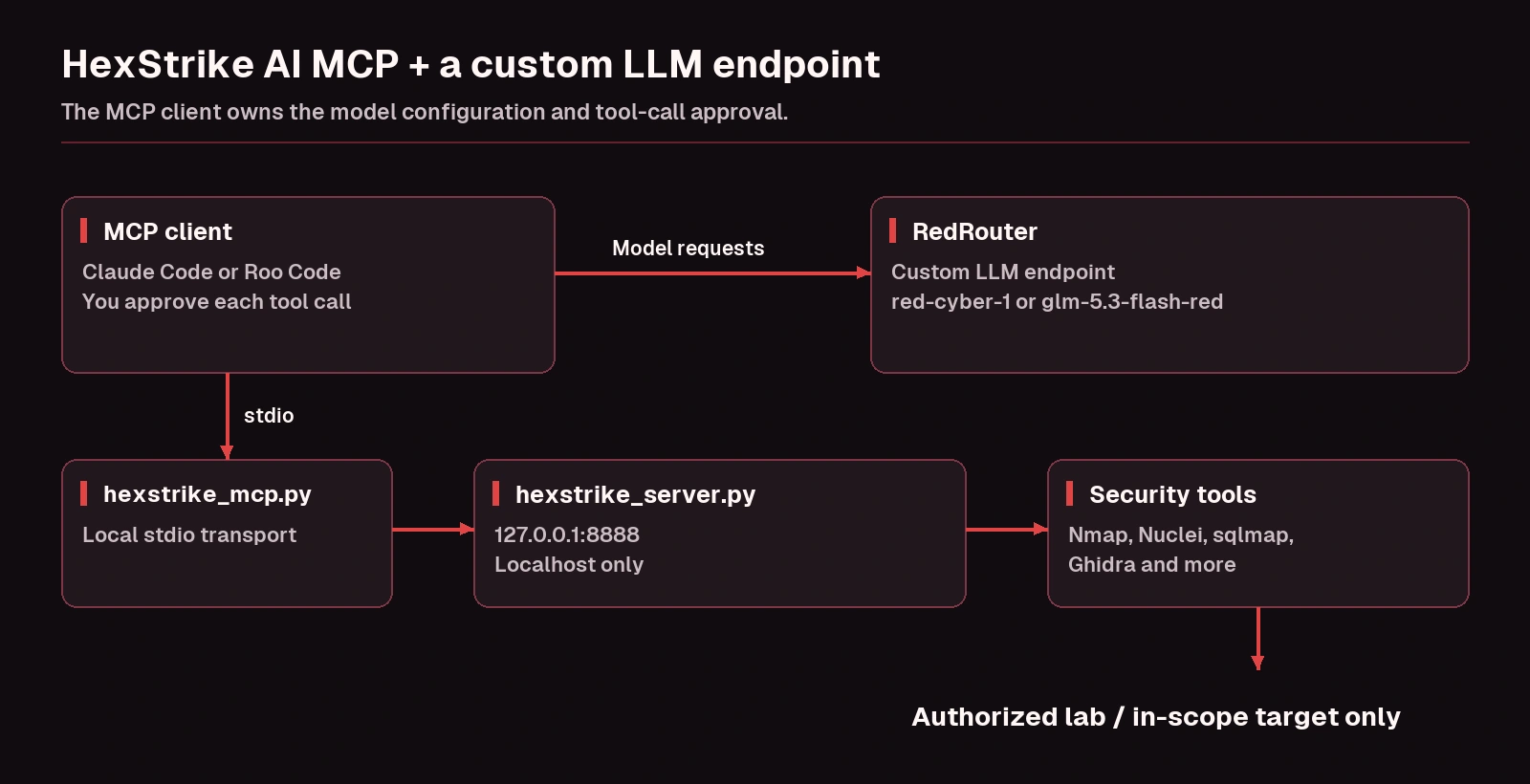
HexStrike AI is an MCP server, so it has no model setting of its own. The model lives in the MCP client you attach it to. To run the HexStrike AI MCP server with a custom LLM endpoint, you pick a client that lets you change its base URL, point that client at the endpoint, and then add HexStrike as a local MCP server. This guide walks through that HexStrike AI MCP setup with RedRouter as the endpoint, using Claude Code or Roo Code as the client.
HexStrike is in the news for the wrong reasons this month. Google's threat intelligence team reported on October 30, 2026 that it had seen threat actors abusing ARTEX, HexStrike and CAIRN during incident response work, and Help Net Security repeated that on November 9. That makes it worth understanding for defenders, and worth locking down for anyone who runs it.
Use HexStrike only on systems you own, isolated labs, or targets you have written authorization to test, such as an engagement with a signed scope or an in-scope bug bounty or VDP asset. The project's own README says the same.
What HexStrike AI is
According to the official HexStrike AI repository (checked November 12, 2026), HexStrike AI MCP Agents v6.0 is an MIT-licensed MCP server that lets AI agents run more than 150 security tools: Nmap, ffuf, Nuclei, sqlmap, Ghidra, radare2, Prowler, Trivy and many more. It has about 13,500 GitHub stars. The README also announces a v7.0 as "coming soon"; the steps here follow the current v6.0 instructions.
It has two parts:
hexstrike_server.py, a local API server that actually runs the tools. It listens on port 8888 by default.hexstrike_mcp.py, the MCP bridge your client launches. It exposes tools such asnmap_scan(),nuclei_scan()andghidra_analyze()to the model and forwards each call to the server.
The README says Claude, GPT and other MCP-compatible agents connect to it, and lists 5ire, VS Code Copilot, Roo Code, Cursor and Claude Desktop as supported clients.
Why the model is set on the client
MCP (Model Context Protocol) splits the job in two. The client talks to the model. MCP servers give that client tools. HexStrike never calls a model itself, so there is no OPENAI_API_BASE or similar variable in its official setup. Some unofficial guides suggest one; the official README doesn't.
So "HexStrike with a custom LLM endpoint" really means "an MCP client with a custom LLM endpoint, plus HexStrike." Two clients document both halves:
- Claude Code supports a custom Anthropic-compatible base URL and local stdio MCP servers.
- Roo Code has an OpenAI Compatible provider with a custom base URL, and reads MCP servers from a JSON file.
If you use another client, check its own docs for a custom base URL setting before you start.
Step 1: Install HexStrike in a lab VM
Do this in a dedicated testing VM, not on your daily machine. The README's own security notes say HexStrike gives AI agents powerful system access and should run in isolated environments.
The official quick setup:
git clone https://github.com/0x4m4/hexstrike-ai.git
cd hexstrike-ai
python3 -m venv hexstrike-env
source hexstrike-env/bin/activate
pip3 install -r requirements.txt
HexStrike wraps tools rather than bundling them, so install the security tools you plan to use from their official sources (the README lists them by category). A Kali or similar VM already has many of them.
Step 2: Start the server and keep it on localhost
python3 hexstrike_server.py
curl http://localhost:8888/health
The health check reports which tools the server can find. Two details matter for safety:
- The server binds to
127.0.0.1by default (set byHEXSTRIKE_HOSTinhexstrike_server.py). Leave it that way. The README's API reference includes a/api/commandendpoint that executes arbitrary commands, and the README suggests adding authentication for any production deployment. Exposing it on a network interface hands that to anyone who can reach the port. - The MCP bridge expects the server at
http://127.0.0.1:8888unless you pass--server.
Step 3: Point your client at a custom LLM endpoint
RedRouter serves an Anthropic-style Messages API and an OpenAI-compatible API. Per the RedRouter docs, the OpenAI-compatible base URL is https://redrouter.org/v1 and the Messages base URL is https://redrouter.org. If you haven't made a key or a first request yet, the API quickstart covers it.
Claude Code
From the RedRouter Claude Code docs, the core settings are:
export REDROUTER_API_KEY="your-redrouter-api-key"
export ANTHROPIC_BASE_URL="https://redrouter.org"
export ANTHROPIC_AUTH_TOKEN="$REDROUTER_API_KEY"
export ANTHROPIC_API_KEY=""
export ANTHROPIC_MODEL="red-cyber-1"
export ANTHROPIC_DEFAULT_OPUS_MODEL="red-cyber-1"
export ANTHROPIC_DEFAULT_SONNET_MODEL="red-cyber-1"
export ANTHROPIC_DEFAULT_HAIKU_MODEL="red-cyber-1"
export ANTHROPIC_DEFAULT_FABLE_MODEL="red-cyber-1"
The docs also map each Claude Code model tier and subagent model to the same catalog ID, so check the page for the full list. Use the origin without /v1, because Claude Code adds /v1/messages itself. Our Claude Code, OpenCode and Cline setup guide covers the client side in more depth.
Roo Code
In Roo Code's settings, choose the OpenAI Compatible provider, set the base URL to https://redrouter.org/v1, paste your API key, and enter a model ID such as glm-5.3-flash-red or red-cyber-1. Roo Code's docs note that it uses native tool calling only, so the model must support tool calls. Both models above do. For other OpenAI-compatible clients, see OpenAI-compatible API for security agents.
Step 4: Attach the HexStrike MCP server
Use the Python inside the HexStrike virtual environment so the bridge finds its dependencies. Replace /path/to/hexstrike-ai with your clone.
Claude Code
Claude Code adds local stdio servers with claude mcp add, and everything after -- is the command that starts the server (Claude Code MCP docs):
claude mcp add --transport stdio hexstrike-ai -- \
  /path/to/hexstrike-ai/hexstrike-env/bin/python3 \
  /path/to/hexstrike-ai/hexstrike_mcp.py --server http://127.0.0.1:8888
This writes to local scope. Run /mcp inside Claude Code to confirm the server connected.
Roo Code
Roo Code reads a global mcp_settings.json or a project-level .roo/mcp.json, both with an mcpServers object (Roo Code MCP docs). HexStrike's README uses the same shape for Claude Desktop and Cursor:
{
  "mcpServers": {
    "hexstrike-ai": {
      "command": "/path/to/hexstrike-ai/hexstrike-env/bin/python3",
      "args": [
        "/path/to/hexstrike-ai/hexstrike_mcp.py",
        "--server",
        "http://127.0.0.1:8888"
      ],
      "disabled": false
    }
  }
}
Roo Code also supports an alwaysAllow list for tools. Leave it empty for HexStrike, so every scan needs your approval.
Step 5: Write a scoped first prompt
The HexStrike README warns that you generally can't open with "penetration test site X" because mainstream models push back, and suggests first explaining your role and your relationship to the target. That advice is good practice anyway: written scope in the prompt keeps the agent on target. A first prompt for a lab might be:
I'm testing my own lab VM at 10.10.20.5 under the attached scope. Use the hexstrike-ai MCP tools. Start with a service scan of that single host only, summarize open ports and versions, and propose next steps. Don't run anything against other hosts, and ask before any intrusive test.
With a model built for authorized security work, the scope statement is there to keep the agent on target, not to argue past a refusal. Keep manual approval on either way. RedRouter's docs note that your local client executes the tools and RedRouter does not provide server-side tool safety classification, so the approval step in your client is the control that matters.
Which model to use
You need tool calling and a long context, because scan output piles up quickly.
- GLM 5.3 Flash Red (
glm-5.3-flash-red) costs $0.25 per 1M input tokens, $0.10 per 1M cached input tokens and $1.00 per 1M output tokens, with a 1,048,576-token context window and tool calling. It suits long agent loops where many tool results go back to the model. See its model page and pricing. - red-cyber-1 (Beta) costs $0.28 input, $0.10 cached input and $1.10 output per 1M tokens, also with a 1M-token context and tool calling. The models docs call it the featured model for authorized penetration testing and red-team work, and the Claude Code docs use it as the example. See the red-cyber-1 page.
Both are text-only, so paste tool output as text rather than screenshots. Prices can change, so check the model pages before a long engagement.
Data handling during an engagement
Scan results can include client hostnames, credentials and other engagement data, so decide on retention before you start. Each RedRouter API key has a store_content setting, and new keys default to storage off. Account-wide zero data retention (ZDR) is a separate opt-in setting that is off by default. The data handling docs cover eligibility and details, and what RedRouter keeps explains it in plain terms. Check your engagement contract for rules about sending client data to third-party services, and scrub local transcripts and logs, which RedRouter's settings don't touch.
Troubleshooting
- The MCP server shows as failed in the client. Start
hexstrike_server.pyfirst, confirmcurl http://localhost:8888/healthworks, and check that the client launches the venv's Python. The README suggests runninghexstrike_mcp.py --debugto see errors. - Tools report as missing. HexStrike only wraps tools installed on the machine. Install them, then re-run the health check.
- 401 from the model endpoint. The key is missing or wrong. In Claude Code, the RedRouter key goes in
ANTHROPIC_AUTH_TOKEN. - 404 from the model endpoint. Usually a doubled
/v1. Claude Code takeshttps://redrouter.org; OpenAI-compatible clients takehttps://redrouter.org/v1. - The model describes a scan instead of calling the tool. Pick a model with tool calling and mention the hexstrike-ai MCP tools by name in the prompt.
Other frameworks follow the same idea with different settings. ARTEX and PentAGI call a model directly, so their guides set a base URL in the framework itself: see ARTEX with RedRouter and PentAGI with an OpenAI-compatible API.
FAQ
What is HexStrike AI MCP?
HexStrike AI is an open-source, MIT-licensed MCP server that lets an AI client run more than 150 security tools, including Nmap, Nuclei, sqlmap and Ghidra. A local server runs the tools and an MCP bridge exposes them to the client.
Can I use HexStrike AI with a custom LLM endpoint or OpenAI-compatible API?
Yes, through the client. HexStrike has no model setting, so you set the custom endpoint in an MCP client that supports one, such as Claude Code (Anthropic-compatible base URL) or Roo Code (OpenAI Compatible provider), then attach HexStrike as an MCP server.
How do I add HexStrike AI to Claude Code?
Start hexstrike_server.py, then run claude mcp add --transport stdio hexstrike-ai -- /path/to/hexstrike-ai/hexstrike-env/bin/python3 /path/to/hexstrike-ai/hexstrike_mcp.py --server http://127.0.0.1:8888. Check /mcp to confirm it connected.
Is HexStrike AI safe to run?
Treat it like any tool that executes commands for an AI agent. Run it in an isolated VM, keep the server bound to localhost, keep manual approval on in your client, and test only systems you're authorized to test.
Why does my AI model refuse HexStrike tasks?
General-purpose models often can't tell an authorized lab scan from an attack, which is why the HexStrike README tells users to explain their role first. State the scope either way. A model built for authorized security work refuses legitimate in-scope tasks less often; see RedRouter for security work.
Sources
All read on November 12, 2026 (PT).
- HexStrike AI: official GitHub repository and README (v6.0)
- Google Threat Intelligence Group: ARTEX and friends enter agentic offensive frameworks (October 30, 2026)
- Help Net Security: ARTEX goes from pentesting tool to attacker staple in three months (November 9, 2026)
- Model Context Protocol: introduction
- Anthropic: Connect Claude Code to tools via MCP
- Roo Code: OpenAI Compatible providers and Using MCP in Roo Code
- RedRouter Docs: Compatibility, Claude Code, Models and pricing, Data handling