 redrouter

r2ai is the LLM plugin for radare2. It adds an r2ai command to the radare2 shell that sends the current function, or any radare2 output you choose, to a language model and prints back a decompilation, an explanation, better names or a list of suspicious spots. Out of the box it talks to Ollama, OpenAI, Anthropic and more than a dozen other providers, but the useful part for most reverse engineers is the r2ai.baseurl setting: point r2ai at any OpenAI-compatible endpoint and pick the model yourself.
This guide shows the r2ai radare2 LLM setup for a custom base URL, using RedRouter as the example endpoint. Every setting below comes from the r2ai plugin README and the r2ai 1.5.4 source, checked November 13, 2026. We don't claim a captured session; run it on your own lab box and trust radare2's output over the model's.
Authorized work only. Analyze binaries you own, crackmes and CTF files, or samples you are cleared to handle, inside an isolated VM with no route to production or the internet. Never interact with live command-and-control infrastructure.
What r2ai is
The r2ai repository (MIT license, "LLM-based reversing for radare2") holds two plugins:
- r2ai, a native C plugin that adds the
r2aicommand, a chat REPL, predefined query prompts and an auto mode that lets the model call radare2 commands as tools. - decai, an r2js plugin focused on decompilation, with its own
decai -esettings. This guide covers r2ai only.
The project's latest release at the time of this update is 1.5.4, from early November 2026. If you want a written case study first, Malware analysis assisted by AI with R2AI on arXiv walks through real samples, and the r2 book has an r2ai chapter.
Install r2ai
The README recommends r2pm, radare2's package manager:
$ r2pm -Uci r2ai
That adds the r2ai command inside radare2 (r2 -qc r2ai) and a standalone wrapper you can run with r2pm -r r2ai. To build from source instead, the plugin README lists make and make user-install in src/, with a C compiler and a recent radare2. If streaming HTTP isn't available in your radare2 build, r2ai can fall back to curl when the R2_CURL environment variable is set to 1.
Point r2ai at an OpenAI-compatible base URL
r2ai needs four things: a provider type, a base URL, a model ID and an API key. For any OpenAI-compatible service, the provider is openai and the base URL is the provider's API root.
[0x00000000]> r2ai -e api=openai
[0x00000000]> r2ai -e baseurl=https://redrouter.org/v1
[0x00000000]> r2ai -e model=glm-5.3-flash-red
[0x00000000]> r2ai -e max_tokens=8192
What each line does, per the README's settings table and the source:
| Setting | Value here | Why |
|---|---|---|
r2ai.api | openai | Uses the Chat Completions request shape. List providers with r2ai -e r2ai.api=?. |
r2ai.baseurl | https://redrouter.org/v1 | "Provider API root. Use /v1 for OpenAI-compatible chat." r2ai posts to <baseurl>/chat/completions. |
r2ai.model | glm-5.3-flash-red | An exact model ID from the catalog. r2ai -e r2ai.model=? lists what the endpoint returns from /models. |
r2ai.max_tokens | 8192 | r2ai's default is 4096. RedRouter caps output at 8,192 tokens per request for most models (compatibility docs). |
Two details from the r2ai source save time. First, if you leave /v1 off the base URL, r2ai appends it for the openai provider, so https://redrouter.org also resolves to https://redrouter.org/v1; writing /v1 explicitly matches the docs and avoids surprises. Second, a trailing slash is stripped, so https://redrouter.org/v1/ works too.
RedRouter's compatibility page lists https://redrouter.org/v1 as the OpenAI-compatible base URL and POST /v1/chat/completions as the Chat Completions endpoint, which is exactly what r2ai calls.
Where r2ai reads the API key
r2ai looks for a key in this order (from apikeys.c):
- An environment variable named after the provider, upper-cased, plus
_API_KEY. Withapi=openai, that isOPENAI_API_KEY. - The file
~/.config/r2ai/apikeys.txt, whichr2ai -Kopens in an editor. A line likeopenai=YOUR_KEYmatches theopenaiprovider.
Because the variable name follows the provider type, not the host, your RedRouter key goes in OPENAI_API_KEY. Scope it to the radare2 session so it doesn't leak into other tools that also read that variable:
$ export REDROUTER_API_KEY="YOUR_REDROUTER_API_KEY"   # placeholder, use a secret store
$ OPENAI_API_KEY="$REDROUTER_API_KEY" r2 ./crackme
Keep the real key out of shell history, shared terminal recordings and prompts, as the RedRouter quickstart also advises.
Save the settings
r2ai -E opens r2ai's rc file at ~/.config/r2ai/rc, which r2ai loads on start. Each line is an r2ai command:
r2ai -e api=openai
r2ai -e baseurl=https://redrouter.org/v1
r2ai -e model=glm-5.3-flash-red
r2ai -e max_tokens=8192
The standalone wrapper takes the same values as flags: -p openai -b https://redrouter.org/v1 -m glm-5.3-flash-red, plus -f <file> to load a binary and -q <name> to run a predefined prompt.
Use r2ai on a function
Analyze first so radare2 knows the functions, then seek and ask:
[0x000010a0]> aa
[0x000010a0]> s main
[0x00001303]> r2ai -d
[0x00001303]> r2ai -d what is the input buffer size?
[0x00001303]> r2ai -q explain
[0x00001303]> r2ai -q vulns
r2ai -ddecompiles the current function.-dokeeps source offsets,-drfollows one level of calls.r2ai -d <question>asks about the current function.r2ai -qlists the predefined prompts (autoname,decompile,devices,dlopen,explain,libs,signature,varnames,vulns). They live as.r2ai.mdfiles, so you can write your own.r2ai -ropens a chat REPL.
By default, the README notes, the context is reset between direct queries. Set r2ai -e history=true to keep them in one conversation, inspect it with r2ai -L and clear it with r2ai -R. r2ai.cmds controls which radare2 command's output is sent as context, and r2ai.lang sets the target language for -d.
Auto mode and tool calling
r2ai -a <task> runs r2ai's auto mode: the model can call an r2cmd tool to run radare2 commands, read the output and keep going until it answers or hits r2ai.auto.max_runs. That needs a model that supports tool calling. On RedRouter, both GLM 5.3 Flash Red and red-cyber-1 list tool calling on their model pages.
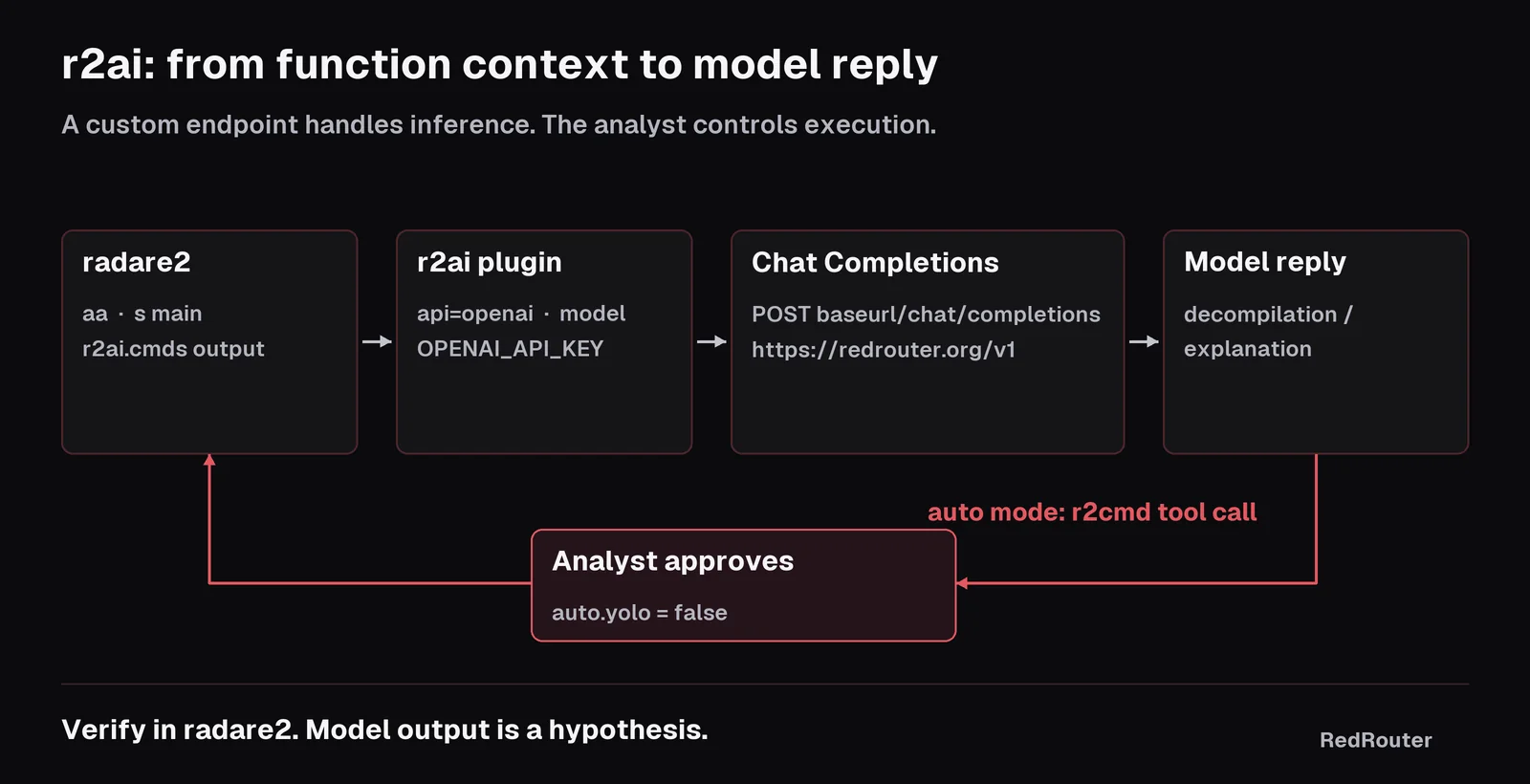
Leave r2ai.auto.yolo set to false. With it off, r2ai asks before running each command the model proposes. The README calls turning it on "dangerous", and on a malware sample a careless ! shell escape or a debugger command that runs the binary is the last thing you want. Turn on r2ai.auto.verbose if you want to see each tool's output.
Why a reduced-refusal model helps for RE
Reverse engineering malware or writing a keygen for a crackme reads, to a general-purpose model, a lot like the thing it was trained to refuse. You ask it to explain a decryption routine pulled from a ransomware sample and get a lecture instead of the XOR key. That's wasted time on work you are allowed to do.
RedRouter serves models modified to reduce refusals for authorized security work. Our refusal archive collects public reports of refusals during authorized work, and the broker pattern for abliterated models shows how to hand refused subtasks to one with scope files and logs. The model still gets things wrong. Treat every decompilation as a hypothesis and check it against pdf, the strings and the dynamic trace in your sandbox.
Pricing, from the live models docs on November 13, 2026: GLM 5.3 Flash Red is $0.20 per 1M input tokens, $0.08 cached and $0.80 output, with a 1M-token context window. red-cyber-1, the Beta model the docs feature for authorized penetration testing and red-team work, is $0.25 / $0.08 / $1.00. See pricing and the models list for current rates.
What leaves your lab
Whatever r2ai sends is what the provider sees: disassembly, decompiled pseudo-code, strings and anything else in the context. For a client's proprietary binary, that may be more than your engagement allows.
- Send only what you're cleared to share. Trim
r2ai.cmdsto the function you're asking about. - RedRouter's Zero Data Retention is an opt-in setting, off by default. Read the data handling docs for what it covers and who is eligible, and what RedRouter keeps for the plain-English version.
- Extra headers go in
r2ai.http.headers(or theR2AI_HEADERSenvironment variable) if your setup needs them. Don't paste keys into prompt text.
Prefer MCP? Use r2mcp instead
If you'd rather drive radare2 from Claude Code or another MCP client, the radare2 project ships radare2-mcp (MIT), an MCP stdio server. Its README installs it with r2pm -Uci r2mcp and registers it like this:
{
  "mcpServers": {
    "radare2": {
      "command": "r2pm",
      "args": ["-r", "r2mcp"]
    }
  }
}
It supports a read-only mode, a sandbox lock and restricted tools, which are worth turning on for samples. The model then lives in your MCP client, not in radare2. To point Claude Code at RedRouter, follow our Claude Code, OpenCode and Cline setup. If your team uses Ghidra, the same pattern is covered in GhidraMCP and Claude Code for malware analysis.
Troubleshooting
| Symptom | Likely cause | Fix |
|---|---|---|
| 401 or "missing key" | Key is in REDROUTER_API_KEY only | r2ai reads OPENAI_API_KEY for api=openai, or openai= in apikeys.txt. |
| Model not found | ID typo or old name | Use the exact catalog ID, for example glm-5.3-flash-red. Run r2ai -e r2ai.model=?. |
| Answer cut off | Output limit | Set max_tokens up to 8192. Ask about one function at a time. |
| "Argument list too long" from curl | Large context passed on the command line | r2ai -e http.use_files=true. |
| Auto mode never calls tools | Model without tool support | Pick a model whose page lists tool calling. |
Lab checklist
- Snapshot an isolated VM with no network, or a host-only network you control.
- Confirm you're allowed to analyze the sample and to send its disassembly to a third-party API.
- Load it in radare2 without running it: analysis, not debugging, unless you've planned for execution.
- Configure r2ai as above, with
auto.yolooff. - Verify every model claim in radare2 before it goes in a report or a detection rule. When it does become a rule, our guide to generating Sigma and YARA rules with an LLM covers validating it.
For crackmes and CTF binaries, the same setup fits the workflow in LLM for CTF challenges. For other tools that take a custom base URL, see using an OpenAI-compatible API with security agents.
FAQ
Does r2ai work with any OpenAI-compatible API?
r2ai's openai provider sends Chat Completions requests to <baseurl>/chat/completions with a Bearer key, so any endpoint that implements that shape should work. Set r2ai -e api=openai, r2ai -e baseurl=<root ending in /v1> and an exact model ID.
What is the r2ai baseurl for RedRouter?
https://redrouter.org/v1. The r2ai settings table says to use /v1 for OpenAI-compatible chat, and RedRouter's compatibility docs list the same root.
Which environment variable holds the key?
OPENAI_API_KEY when r2ai.api is openai. r2ai builds the variable name from the provider name, then falls back to ~/.config/r2ai/apikeys.txt.
Is r2ai the same as decai or r2mcp?
No. r2ai is the native radare2 plugin covered here. decai is a separate r2js plugin in the same repo focused on decompilation. r2mcp (radare2-mcp) is an MCP server that lets an outside agent such as Claude Code drive radare2.
Can r2ai analyze malware safely?
r2ai only sends text to a model. The risk is in what radare2 does with the sample and what you send out. Keep the sample in an isolated VM, don't execute it unless you've planned for it, keep r2ai.auto.yolo off, and only send disassembly you're cleared to share.
Which model should I use with r2ai?
Any catalog model with tool calling works for auto mode. GLM 5.3 Flash Red is the low-cost option, and red-cyber-1 is the Beta model RedRouter features for authorized pentest and red-team work. See RedRouter for security work for the rest.