 redrouter

Running Strix with Ollama or another local model keeps every prompt, HTTP response and source snippet on your own hardware, which matters for internal networks, air-gapped labs and client code you can't send out. Strix supports it, but the setup has more sharp edges than a hosted API: two different routes depending on the STRIX_LLM prefix, an API key the docs' LM Studio example leaves out, and tool calls that fail quietly when the server isn't configured for them.
This guide covers how to run Strix with Ollama, LM Studio and vLLM, what each route actually sends, and when a local model is the wrong choice.
What we checked, on November 20, 2026: the Strix repository at commit a1ccf77 (November 19, 2026, after the v1.7.1 release) with its locked dependencies (LiteLLM 1.101.0, OpenAI Agents SDK 0.19.0), and the live Strix local models guide. We ran Strix's own model-preflight function against a mock server that logs each request, once per configuration below. We did not run a full scan on a real local model, so model quality claims come from the Strix docs and the users quoted.
Only scan systems you own, isolated labs, or targets you have written permission to test. A local model doesn't change what you're allowed to touch.
Two ways to run Strix with a local model
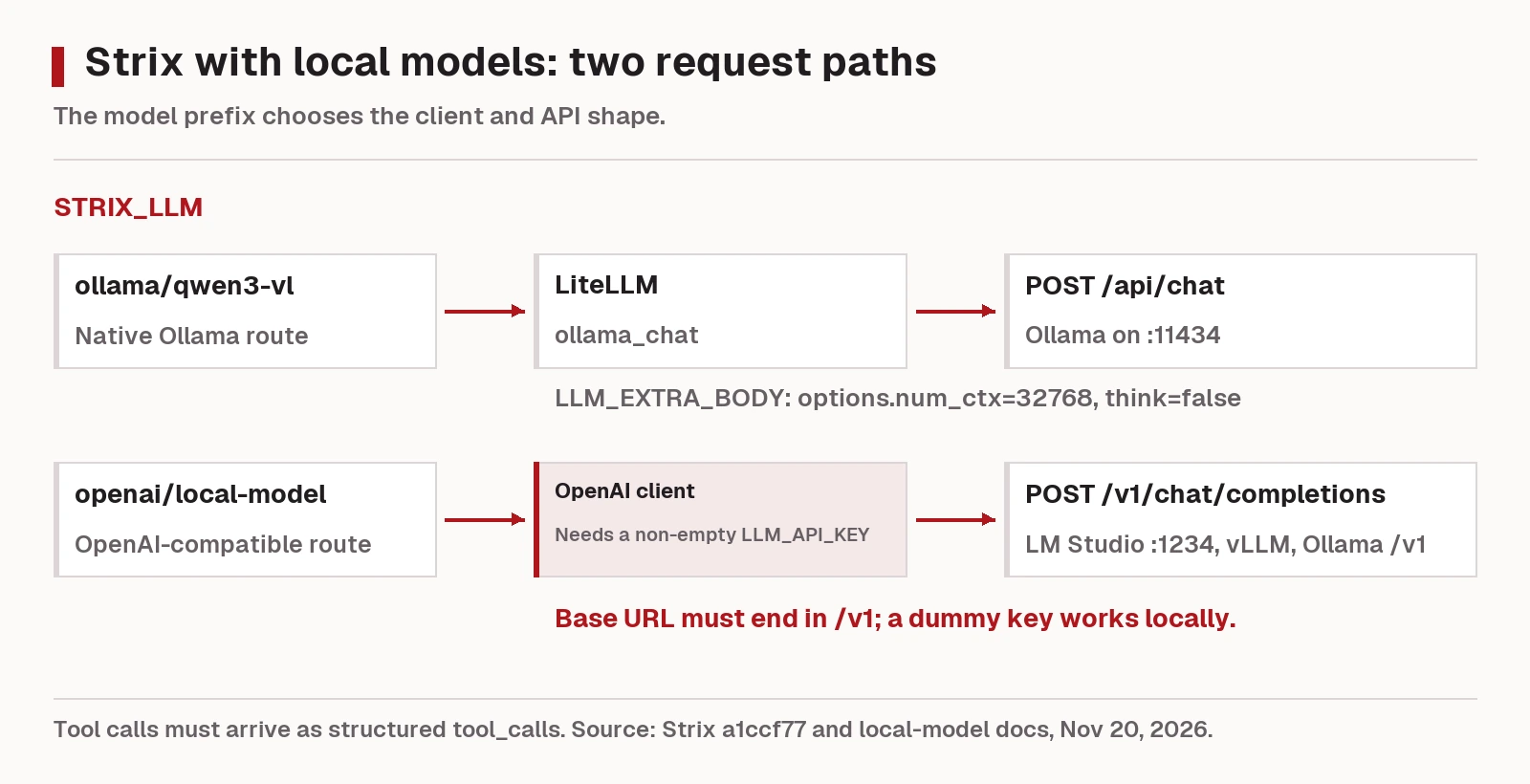
Strix picks a client from the prefix in STRIX_LLM. Here's what our preflight runs showed:
STRIX_LLM | LLM_API_BASE | Client | Request Strix sent |
|---|---|---|---|
ollama/qwen3-vl | http://localhost:11434 | LiteLLM (ollama_chat) | POST /api/chat with model, messages, options, stream |
openai/qwen3-vl | http://localhost:11434/v1 | OpenAI Agents SDK client | POST /v1/chat/completions with a bearer token |
openai/local-model | http://localhost:1234/v1 (LM Studio) | OpenAI Agents SDK client | POST /v1/chat/completions with a bearer token |
The ollama/ prefix is rewritten to LiteLLM's ollama_chat/ provider in StrixProvider, so you get Ollama's native chat API. The openai/ prefix skips LiteLLM entirely and uses the OpenAI client, with the prefix stripped from the model name. If you set no base URL with ollama/, LiteLLM tries localhost:11434.
Strix with Ollama
ollama pull qwen3-vl

export STRIX_LLM=ollama/qwen3-vl
export LLM_API_BASE=http://localhost:11434
export LLM_EXTRA_BODY='{"options":{"num_ctx":32768},"think":false}'

strix --target ./app --scan-mode quick --max-turns 60
Strix's docs recommend Qwen3 VL, DeepSeek V3.1 and Devstral 2 for Ollama, and give three fixes for runs that stall. We checked how the first two reach Ollama:
- Raise
num_ctxto at least 16k to 32k. Strix sends a large system prompt plus every tool schema, and at Ollama's small default context "the tool definitions are truncated out of the prompt." Strix doesn't set it for you: theoptionsobject in our captured request was empty.LLM_EXTRA_BODY='{"options":{"num_ctx":32768}}'put it insideoptions, where Ollama reads it. A top-level"num_ctx"key was also forwarded, but outsideoptions, so don't rely on that. Settingnum_ctxin a Modelfile works too. - Turn thinking off for reasoning models. The docs say thinking "frequently pushes the tool call into the text content" instead of a structured call.
"think": falseinLLM_EXTRA_BODYarrived as a top-level field, which is where Ollama's chat API takes it. A non-thinking model variant does the same job. - Use a recent Ollama and a model whose template supports tools. Otherwise Ollama rejects the request with
tools param requires --jinja flag.
Strix doesn't send an Authorization header on this route unless you set LLM_API_KEY, which is what a local Ollama expects.
Strix with LM Studio or Ollama's OpenAI-compatible endpoint
The Strix local models guide shows this for LM Studio, vLLM and similar servers:
export STRIX_LLM="openai/local-model"
export LLM_API_BASE="http://localhost:1234/v1"
With only those two variables and no OPENAI_API_KEY in the environment, Strix's preflight failed in our run with OpenAIError: Missing credentials. Please pass an api_key .... The OpenAI client refuses to start without a key, even if your server ignores it. Add any non-empty value:
export STRIX_LLM=openai/local-model
export LLM_API_BASE=http://localhost:1234/v1
export LLM_API_KEY=lm-studio
export STRIX_API_TYPE=chat_completions
With the key set, the request went to POST /v1/chat/completions as expected. The same pattern works for Ollama's OpenAI-compatible endpoint at http://localhost:11434/v1, and it's the route a 2025 Strix GitHub issue used before native support landed. On this route num_ctx has to be set on the Ollama side, since options is an Ollama-native field.
LLM_API_BASE must end in /v1 here. Without it, Strix sent the request to /chat/completions at the server root.
Strix with vLLM or llama.cpp
Use the openai/ route with your server's /v1 URL and a dummy key, then configure the server so tool calls come back structured. From the Strix docs:
- vLLM: start with
--enable-auto-tool-choice, a matching--tool-call-parser(hermes,qwen3_xmlorllama3_json), and a matching--reasoning-parserfor reasoning models. - llama.cpp (
llama-server): run with--jinjaand the model's tool-use chat template, and align or disable reasoning (--reasoning-format,-rea off). - Sampling: a low temperature, roughly 0.2 to 0.6 depending on the model family, "measurably reduces malformed tool calls on open-weight models."
Why Strix stalls on local models
Strix is "entirely tool-driven." If the server returns a tool call as text, such as <tool_call>{"name": "exec_command", ...}</tool_call>, Strix sees a text-only turn, sends the model a recovery prompt asking for a real tool call, and gives up after its recovery limit: 3 attempts in interactive mode, and up to --max-turns in headless mode. The Strix docs say this "is almost always an inference-server configuration problem, not a model or Strix problem."
Other local-model settings worth knowing, all from Strix's settings at commit a1ccf77:
| Setting | Default | Why it matters locally |
|---|---|---|
LLM_STREAM_FIRST_EVENT_TIMEOUT | 120 s | A large prompt on slow hardware can take longer than this to start streaming |
LLM_TIMEOUT | 300 s | Per-request timeout |
LLM_DISABLE_STREAMING | false | Set true if your server drops tool-call deltas or stalls mid-stream; Strix then makes one non-streaming request per turn |
STRIX_MAX_CONTEXT_IMAGES | 3 | Strix assumes an unknown model accepts images; set 0 for text-only models |
STRIX_CONTEXT_FALLBACK_TOKENS | 200,000 | Context size Strix assumes when LiteLLM can't look the model up, which is the case for most IDs on the openai/ route; lower it to your server's real context so compaction starts in time |
The last row is our inference from the code, not a Strix doc recommendation. Strix compacts history against the window it believes the model has, so a 32k local model with a 200k assumption can overflow before compaction kicks in. On the ollama/ route LiteLLM queried Ollama's /api/show during our preflight, so it may read the model's details from the server instead; when Strix falls back, it writes "No LiteLLM model info for ... using configured fallbacks" to strix.log.
How well do local models work with Strix?
Strix's own guide is frank: "Most local models, especially those under 70B parameters, struggle with these complex tasks," and it recommends cloud models "for critical assessments." Users report the same. In Strix issue #580 (opened June 19, 2026, still open), a tester on an Nvidia DGX found deepseek-r1:70b didn't support tool calling and qwen3.6:35b crashed at start with a JSON decoding error inside LiteLLM's Ollama transform. An 18-model test found the smallest model it tried, gemma-4-31b-it, "not bad at all" for its size but well behind the leaders.
So a local model is a privacy decision, not a cost saving. Budget for the hardware to run a large model with a long context, and expect thinner reports than a strong hosted model gives.
A middle path: hosted, but for security work
If the reason you went local is that hosted frontier models refuse offensive work, there's another option. RedRouter serves models for authorized security testing through an OpenAI-compatible API, so the Strix setup is the same openai/ route with a different base URL:
export STRIX_LLM=openai/glm-5.3-flash-red      # or openai/red-cyber-1
export LLM_API_KEY="$REDROUTER_API_KEY"
export LLM_API_BASE=https://redrouter.org/v1
export STRIX_API_TYPE=chat_completions
export STRIX_MAX_CONTEXT_IMAGES=0
GLM 5.3 Flash Red costs $0.25 / $0.13 cached / $1.00 per 1M tokens (model page). red-cyber-1 (Beta) is the featured model for authorized pentesting, with reduced refusals, at $0.28 / $0.13 / $1.10 (model page). Both have a 1,048,576-token context window. New API keys default to content storage off, and Zero Data Retention is an opt-in account setting; check the current eligibility terms (zero data retention). It still leaves your machine, so if your rules say data can't, stay local.
You can also mix the two. Strix's deduplication judge has its own settings (STRIX_DEDUPE_MODEL, DEDUPE_LLM_API_BASE, DEDUPE_LLM_API_KEY), so the main agent and the dedupe step can run on different endpoints. The Strix OpenAI-compatible API guide covers those variables and pricing for --max-budget.
Related Strix guides
- Why Strix models refuse, and how to fix it
- Best LLM for Strix, and what a scan costs
- Strix vs Shannon, PentestGPT and CAI
- Run Strix in GitHub Actions against staging
FAQ
Can Strix run fully offline?
The model can. Set STRIX_LLM=ollama/<model> and point LLM_API_BASE at your Ollama server. Strix also needs its Docker sandbox image, pulled on first run, and telemetry is on by default, so set STRIX_TELEMETRY=0 and pre-pull the image for an air-gapped host.
Should I use ollama/ or openai/ for Ollama in Strix?
ollama/ uses Ollama's native /api/chat and lets you pass options such as num_ctx through LLM_EXTRA_BODY. openai/ with /v1 uses Ollama's OpenAI-compatible endpoint and needs a dummy LLM_API_KEY. Try ollama/ first.
Why does Strix say "Missing credentials" with LM Studio?
The openai/ route uses the OpenAI client, which requires an API key. Set LLM_API_KEY to any non-empty string.
Why does my local model print tool calls as text?
The inference server isn't parsing the model's tool tokens. Fix the chat template or tool parser on the server (--jinja for llama.cpp, --enable-auto-tool-choice and --tool-call-parser for vLLM), and turn off thinking mode.
What's the best local model for Strix?
Strix's docs recommend Qwen3 VL, DeepSeek V3.1 and Devstral 2 on Ollama, and say most models under 70B struggle. Pick the largest tool-calling model your hardware runs with at least a 32k context.
Sources
- Strix: repository (commit
a1ccf77), local models guide, LLM providers overview, configuration, issue #20, issue #580. Checked November 20, 2026. - TheArtificialQ, Strix with 18 LLM models (April 14, 2026).
- RedRouter Docs: Models and pricing, Data handling. Checked November 20, 2026.