 redrouter

An OWASP ZAP custom LLM API takes three fields: pick the OpenAI Compatible provider in the LLM Support add-on, put your endpoint's base URL in Endpoint Base URL, and list the model IDs you want. The harder part is knowing what ZAP will send to that endpoint, which features use it, and what the Trusted box changes. This guide covers the desktop settings, the Automation Framework llm-config job for headless runs, and a lab run that captured every request ZAP made to an OpenAI-compatible server.
Everything below was checked on November 24, 2026, against ZAP 2.17.0 with LLM Support 0.3.0 (still an alpha add-on), Authentication Helper 0.44.0 and Automation Framework 0.62.0. Field names and defaults come from the ZAP LLM Support docs and the add-on source. For the lab we pointed ZAP at a small mock server on localhost that logs each request and returns scripted replies. It is not a model, and it is labelled that way everywhere below. We also ran the same plan against https://redrouter.org/v1 without a valid API key to confirm the URL wiring. No model answered any request in this post.
Authorized targets only. Use ZAP and its LLM features against your own apps or targets covered by written scope. Keep client data out of prompts unless your engagement terms allow it.
If you work in Burp instead, see driving Burp with Claude Code for bug bounty or writing Burp BChecks with an LLM. The OpenAI-compatible API guide for security agents covers the same base-URL idea for other tools.
What the ZAP LLM support add-on does
The LLM Support add-on was announced on August 7, 2026. It connects ZAP to one or more model providers and gives other add-ons a shared hook. It's opt-in: ZAP shares nothing with an LLM until you install the add-on and configure a provider. Five features use it today:
| Feature | Where it lives | Headless? | What an untrusted provider receives |
|---|---|---|---|
| LLM Chat | LLM Chat panel | No (desktop) | Your messages, plus anything you append from ZAP |
| MCP tools in chat | LLM Chat + MCP add-on | No (desktop) | Nothing. Tools are only added for trusted providers |
| Alert review | Right-click an alert, "Review using LLM/AI" | No (desktop) | Alert title, description, evidence and other info |
| OpenAPI import | Import menu, "LLM/AI OpenAPI Importer" | No (desktop) | The OpenAPI definition you choose |
| AI Assisted Authentication | Authentication Helper, method: "ai" | Yes (Automation Framework or API) | Page URL, title, visible text and form elements, with credential placeholders |
The provider choice matters most for the last row. AI Assisted Authentication arrived in Authentication Helper 0.44.0 on November 3, 2026. It's the one LLM feature that runs without the GUI, so it's also the one we could test end to end.
Set up an OWASP ZAP custom LLM API in the desktop
Install LLM Support from the Marketplace, or from the command line:
./zap.sh -cmd -addonupdate -addoninstall llm
Then open Options → LLM and add a provider. These are the field labels from the add-on, filled in for RedRouter:
| Field | Value |
|---|---|
| Name | redrouter (any unique name) |
| Provider | OpenAI Compatible |
| API Key | Your RedRouter API key |
| Endpoint Base URL | https://redrouter.org/v1 |
| Models (one per line) | glm-5.3-flash-red and red-cyber-1 |
| Timeout (seconds) | 60 by default; raise it for long outputs |
| Trusted | Leave unchecked (the default for remote providers) |
The Endpoint Base URL field suggests OpenRouter, OpenAI, LM Studio and llama.cpp URLs, but any custom base works. Enter the base ending in /v1, not the full /chat/completions path. In our lab ZAP added /chat/completions itself. Then set Default provider and Default model. You can also switch the default from the LLM button on the main toolbar, and each chat tab keeps its own provider.
The base URL https://redrouter.org/v1 comes from the RedRouter quickstart. The model IDs come from the models page.
ZAP LLM OpenAI-compatible setup with the llm-config job
For CI or a headless box, LLM Support 0.1.0 (October 15, 2026) added an Automation Framework job, llm-config. It sets the same providers as the Options screen. This is the plan shape we ran, trimmed to the RedRouter provider:
jobs:
  - type: llm-config
    parameters:
      deleteExisting: true
      defaultProvider: redrouter
      defaultModel: glm-5.3-flash-red
    providers:
      - name: redrouter
        type: OPENAI_COMPATIBLE
        apiKey: ${REDROUTER_API_KEY}
        endpoint: https://redrouter.org/v1
        models:
          - glm-5.3-flash-red
          - red-cyber-1
        timeout: 120
The details that matter:
typeis one ofOLLAMA,OPENAI_COMPATIBLE,AZURE_OPENAI,GOOGLE_GEMINIorCLAUDE.apiKey: ${REDROUTER_API_KEY}reads an environment variable, so the key stays out of the plan file. ZAP's docs recommend this.trustedis left out on purpose. The docs and the source both default it tofalsefor every type exceptOLLAMA.- Without
deleteExisting: true, providers merge with any already configured. A provider with the same name gets replaced. - Put
llm-configfirst. The docs say it should run before any job that needs an LLM.
Run it with ./zap.sh -cmd -autorun plan.yaml. In our run the job logged LLM configuration applied, 2 provider(s) configured. (the second provider was the lab mock).
How we tested the ZAP custom LLM endpoint
The lab had three parts, all on one Linux box:
- A tiny login app on
127.0.0.1:9000with a made-up account (tester@lab.local). - A mock OpenAI-compatible server on
127.0.0.1:9100/v1that logs each request and replies with fixed JSON. It's a recorder, not a model, so it says nothing about answer quality. - ZAP 2.17.0 in
-cmdmode, running a plan withllm-configand a context that uses AI Assisted Authentication:
env:
  contexts:
    - name: lab-portal
      urls:
        - http://127.0.0.1:9000
      authentication:
        method: ai
        parameters:
          loginPageUrl: http://127.0.0.1:9000/login.html
          browserId: chrome-headless
          loginPageWait: 2
        verification:
          method: response
          loggedInRegex: "Welcome back"
          loggedOutRegex: "Sign in to continue"
      users:
        - name: tester
          credentials:
            username: tester@lab.local
            password: Lab-Only-Passw0rd!
A requestor job that fetched /home.html as user tester triggered the login. One practical snag: ZAP's bundled ChromeDriver didn't match the Chrome 156 on our box, so we pointed ZAP at a matching driver with -config selenium.chromeDriver=... and -config selenium.chromeBinary=....
What ZAP sent to the OpenAI-compatible endpoint
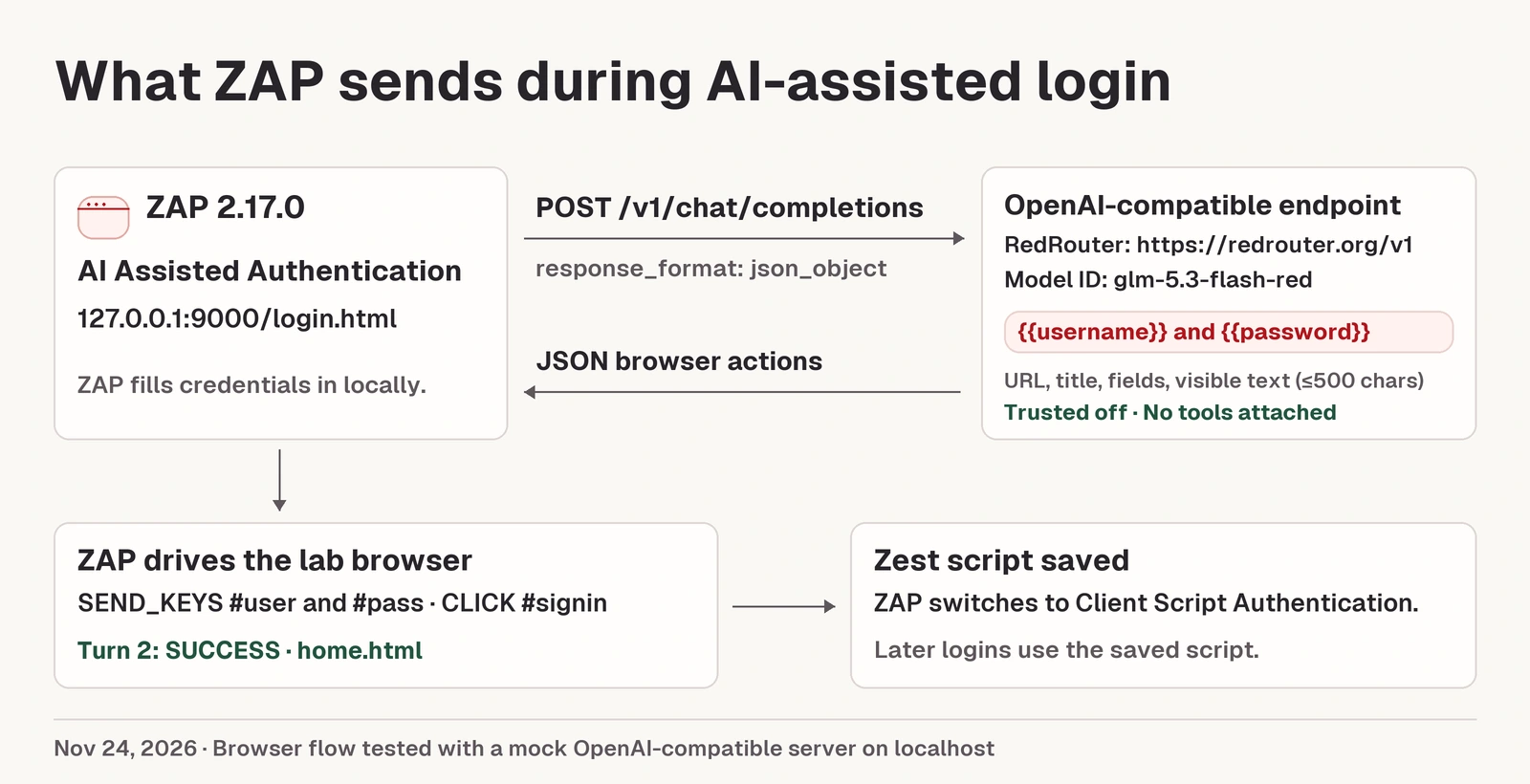
ZAP made two requests, one per turn of the login loop. The log:
AiAuthScriptGenerator - Starting AI auth loop for URL: http://127.0.0.1:9000/login.html
AiAuthScriptGenerator - Turn 1: state=IN_PROGRESS, reasoning=Login form with email and password fields.
AiAuthScriptGenerator - Turn 2: state=SUCCESS, reasoning=URL is home.html and a greeting is visible.
AiAuthScriptGenerator - AI auth loop finished: success=true
AiAssistedAuthenticationMethodType - Registered Zest authentication script: AI Auth - 127.0.0.1:9000
AiAssistedAuthenticationMethodType - Switched context to Client Script Authentication using script: AI Auth - 127.0.0.1:9000
Both requests went to POST /v1/chat/completions with a Bearer key and User-Agent: langchain4j-openai. ZAP's OpenAI Compatible provider is built on the LangChain4j OpenAI client. Here is the first request body with the long system prompt cut short. In this JSON excerpt, \u007b encodes an opening brace.
{
  "model": "glm-5.3-flash-red",
  "temperature": 0.3,
  "stream": false,
  "response_format": {"type": "json_object"},
  "messages": [
    {"role": "system", "content": "You are a browser automation agent whose sole job is to complete a web authentication flow. ..."},
    {"role": "user", "content": "{\"step\":1,\"url\":\"http://127.0.0.1:9000/login.html\",\"pageTitle\":\"Lab Portal Sign In\",\"inputElements\":[{\"tag\":\"input\",\"type\":\"email\",\"id\":\"user\",\"name\":\"user\",\"label\":\"Email\",...},{\"tag\":\"input\",\"type\":\"password\",\"id\":\"pass\",\"name\":\"pass\",\"label\":\"Password\",...},{\"tag\":\"button\",\"type\":\"submit\",\"id\":\"signin\",...}],\"previousActions\":[],\"credentials\":{\"password\":\"\u007b{password}}\",\"username\":\"\u007b{username}}\"},\"userHint\":\"\",\"visibleText\":\"Lab Portal | Sign in to continue. | Email | Password\"}"}
  ]
}
What the capture shows:
- Credentials stayed in ZAP. The model sees only the
usernameandpasswordplaceholders. ZAP fills in the real values in the browser. We searched both logged requests for the lab email and password, and neither appeared. This matches the AI Assisted Authentication announcement. - Page text goes out regardless of Trusted. The URL, title, form fields and up to 500 characters of visible text are sent on every turn. ZAP's announcement says this happens whatever the provider's Trusted setting is. On a real app that text can include names, account numbers or internal hostnames.
- JSON mode is required. Every request asks for
response_format: {"type": "json_object"}. The endpoint and model have to accept it. RedRouter's models page lists response-format support for bothglm-5.3-flash-redandred-cyber-1. Alert review asks for a JSON schema (AlertFeedback) in the source, so the same requirement applies there. - No tools and no
max_tokens. The provider was untrusted, so no tools were attached. With no output limit in the request, the endpoint's default output limit applies. - It's small. About 5 KB on the first turn and 6 KB on the second, because the loop re-sends the history each turn.
After the loop, ZAP did what the docs describe. It saved a Zest script and switched the context to Client Script Authentication, so later logins don't use the LLM. One caveat from our lab: the follow-up requestor call in the same plan still got a 302 back from our toy app. The login loop worked, but test session handling and verification for your own app before you rely on it in CI.
Pointing the same plan at RedRouter
Next we switched defaultProvider to redrouter and ran the plan with a deliberately invalid key. That checks the URL wiring without spending anything:
AiAuthScriptGenerator - Starting AI auth loop for URL: http://127.0.0.1:9000/login.html
LlmLogResponseHandler - [authhelper-ai-auth] LLM Error : {"error":{"code":"invalid_api_key","message":"Missing, invalid, or revoked API key.","param":null,"type":"authentication_error"}}
AiAssistedAuthenticationMethodType - AI authentication did not succeed: state=FAILURE, reason=LLM returned no parseable response at step 1
An authentication error, not a 404, means ZAP reached https://redrouter.org/v1/chat/completions. With a real key in REDROUTER_API_KEY, the plan is unchanged. We didn't have a key on the lab box, so we haven't shown a model's answers here. Note how ZAP reports a failed call: one line about an unparseable response, and the loop stops at step 1. Check zap.log for the real error.
Trusted vs untrusted: what leaves ZAP
The Options docs define Trusted as permission to send richer context and to attach tools. Remote providers start untrusted. We left RedRouter that way, and it's the setting we recommend for any remote endpoint. Here is what stays off:
- Alert review sends the alert title, description, evidence and other info. Only a trusted provider also gets the full HTTP request, the response headers and the text around the evidence.
- Chat tools (ZAP's MCP tools: spider, active scan, reports) are never attached for an untrusted provider, and the tools toggle stays disabled.
Untrusted still sends some data. Anything you append to a chat goes out. AI Assisted Authentication sends page text, as shown above. ZAP wraps appended HTTP data in BEGIN/END markers and a system instruction to treat it as data, and its own docs say that reduces prompt-injection risk without removing it.
Common mistakes with the ZAP LLM support add-on
- The full path in Endpoint Base URL. Enter
https://redrouter.org/v1. ZAP adds/chat/completions. - A model that isn't in the list. The
defaultModelmust be one of the default provider'smodels. If the result isn't valid, the job changes nothing. - A model without JSON mode. AI Assisted Authentication and alert review both request structured output. Check the model's response-format support before blaming ZAP.
- The key in the plan file. Use
${REDROUTER_API_KEY}. Plans end up in repos and CI logs. - Short timeouts. The default is 60 seconds. The lab plan used 120 for the remote provider.
- Treating "alpha" as stable. LLM Support is an alpha add-on and changes often (0.0.1 in August, 0.3.0 on November 13). Re-check field names after updates.
- Assuming Ollama behaves like a remote provider.
OLLAMAdefaults to trusted. If you mix local and remote providers, check the Trusted column for each.
Choosing a model for the ZAP LLM add-on
Use a model that returns valid JSON when asked and follows a fixed schema. On RedRouter, GLM 5.3 Flash Red (glm-5.3-flash-red) costs $0.25 per 1M input tokens, $0.13 per 1M cached input tokens and $1.00 per 1M output tokens. red-cyber-1 (Beta), the featured model for authorized penetration testing and red-team work, is $0.28 / $0.13 / $1.10 per 1M tokens. The models docs list current rates and limits for every model. Plans are on /pricing.
Login pages and scanner alerts are full of security terms. RedRouter is built for that kind of authorized security work. On retention: zero data retention is an opt-in setting, off by default. The data handling docs explain what is stored and how to turn it on. What RedRouter keeps covers the same in plain terms.
FAQ
Does OWASP ZAP support a custom LLM API?
Yes. The LLM Support add-on has an OpenAI Compatible provider for any server that exposes the Chat Completions API. Put the base URL in Endpoint Base URL and list your model IDs. Azure OpenAI, Claude, Gemini and Ollama have their own provider types.
What is the ZAP LLM OpenAI-compatible base URL for RedRouter?
https://redrouter.org/v1. ZAP adds /chat/completions. In our lab the requests went to /v1/chat/completions.
Can I configure the ZAP LLM support add-on without the GUI?
Yes, with the Automation Framework llm-config job (LLM Support 0.1.0 and later). Use type: OPENAI_COMPATIBLE, an endpoint, a models list and apiKey: ${ENV_VAR}. Of the current LLM features, AI Assisted Authentication is the one that runs headless; chat, alert review and the OpenAPI importer are desktop menus.
Does ZAP send my login credentials to the LLM?
Not in our test. ZAP sent username and password placeholders and filled the real values in locally. It does send the page URL, title, form fields and visible text on every turn, whether or not the provider is trusted.
Should I mark a remote provider as Trusted in ZAP?
We kept RedRouter untrusted, which is ZAP's default for remote providers. Untrusted providers get the minimum data for each feature and never get tools. Read the Options docs before changing it, and keep client data out unless your engagement terms allow it.
Which ZAP features use the LLM add-on?
LLM Chat (with MCP tools for trusted providers), alert review in Alert Filters, the LLM/AI OpenAPI Importer, and AI Assisted Authentication in Authentication Helper.
Sources
- ZAP documentation, checked November 24, 2026: LLM Support, LLM Options, LLM Automation Framework Support, LLM Chat, LLM MCP Support, Alert Filter LLM Support, OpenAPI LLM Support, AI Assisted Authentication, Automation Framework.
- ZAP blog: Introducing LLM Support (August 7, 2026), AI Assisted Authentication (November 3, 2026).
- Source and releases: zap-extensions LLM add-on, LLM add-on changelog, llm-v0.3.0 release, ZAP 2.17.0 release.
- Lab outputs: ZAP 2.17.0, LLM Support 0.3.0, Authentication Helper 0.44.0, Automation 0.62.0, headless Chrome 156; local mock OpenAI-compatible server and a synthetic login app; RedRouter wiring check with an invalid key. November 24, 2026.
- RedRouter Docs: Quickstart, Models and pricing, Data handling. Checked November 24, 2026.