 redrouter


You can generate CodeQL queries with an LLM, and the first draft will usually look like real QL. It will also often be written against a data flow API that no longer exists, or it will flag code your team already made safe. Using an LLM for CodeQL query writing works when the model drafts and CodeQL decides: codeql query compile for whether the query is valid QL against today's libraries, codeql test run for whether it finds exactly the results you expect, and codeql database analyze before anything reaches code scanning.
This guide walks through that loop on one small, checkable example: a custom Python query for user input that reaches an in-house shell wrapper. Every tool output quoted below comes from running CodeQL CLI 2.27.4 on the queries and test files shown. The query drafts were written for this guide to show mistakes models commonly make; they are not a captured model transcript. Model output is never the evidence. CodeQL's output is.
It's the QL sibling of our guides to generating Semgrep rules with an LLM and generating Sigma and YARA rules with an LLM. Same idea, different validator.
Defensive and authorized work only. Write queries for your own code or for a client who hired you. Don't paste proprietary source, secrets or customer data into any prompt you aren't cleared to share. See what to send the model below.
Why write custom CodeQL queries with an LLM
The standard CodeQL query suites already cover common bugs like command injection and SQL injection. Custom queries earn their keep on the code only your team knows about: internal wrappers, house frameworks and helper libraries that the standard models have never seen.
QL is a hard language to write from memory. A data flow query needs the right imports, a configuration module, a flow module, a path graph and query metadata, and the library APIs change over time. In 2023 GitHub introduced a new data flow API that replaced the class-based TaintTracking::Configuration with modules that implement DataFlow::ConfigSig. The changelog said the old API would keep working until December 2024. A lot of public QL, and so a lot of model training data, still uses the old style.
That makes CodeQL a good fit for the draft-then-verify loop. The model saves you the boilerplate and the docs lookups. The compiler and the test runner catch what it gets wrong. (If you want a model to review your code directly instead of writing queries, see LLM secure code review without refusals.)
License note. The CodeQL CLI is not open source. Its terms allow academic research, demos and analysis of open source codebases. For private code, GitHub's CLI docs list it as available on organization-owned repositories with GitHub Code Security enabled. Check which applies before you run it on private code.
The workflow
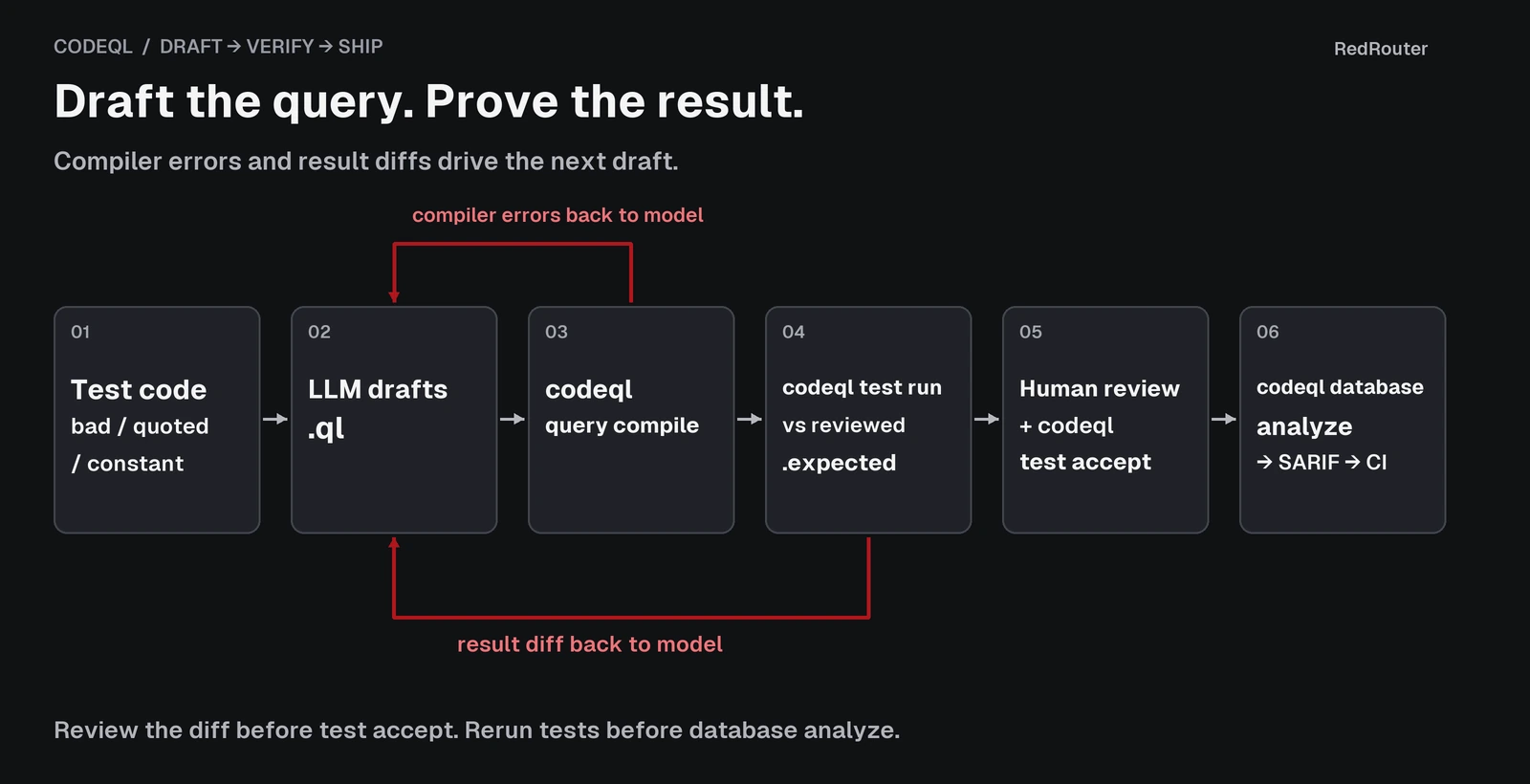
- Write the test code first. Put a vulnerable case, a safe case and a constant case in a CodeQL test directory. This is your spec.
- Ask for a draft. Give the model the sink, the source, the sanitizer and the current API style, and ask for the
.qlfile only. - Compile it.
codeql query compilecatches unresolved modules, old APIs and type errors. - Test it.
codeql test runcompares the query's results with a.expectedfile you have reviewed by hand. - Feed back exact errors. Paste the compiler errors or the result diff back to the model and ask for a corrected query.
- Analyze a real database, then review. Run the passing query with
codeql database analyzeon your own repo and read every result before it goes into CI.
Step 1: Set up a query pack and a test pack
The CodeQL docs on testing custom queries describe the layout: a query pack, a test pack that depends on it, and one test directory per query holding a .qlref file that points at the query. Here is the lab layout:
lab/
  codeql-workspace.yml          # provide: ["*/qlpack.yml"]
  queries/
    qlpack.yml                  # name: lab/shell-wrapper-queries, depends on codeql/python-all
    ShellWrapperInjection.ql
  tests/
    qlpack.yml                  # depends on lab/shell-wrapper-queries, extractor: python
    ShellWrapperInjection/
      ShellWrapperInjection.qlref   # contains: ShellWrapperInjection.ql
      ShellWrapperInjection.expected
      opsutil.py
      test.py
The workspace file lets the test pack resolve the local query pack without publishing it. Without it, codeql pack install in the test pack tried to download lab/shell-wrapper-queries from the public registry and failed with an HTTP 403.
The code under test is a small internal helper that runs a command string with shell=True:
# opsutil.py
import subprocess


def run_shell(cmd):
    return subprocess.run(cmd, shell=True, capture_output=True, text=True).stdout
And the test cases:
# test.py
import shlex
from flask import Flask, request

from opsutil import run_shell

app = Flask(__name__)


@app.route("/ping")
def ping():
    host = request.args.get("host")
    return run_shell("ping -c 1 " + host)  # BAD: user input reaches the shell wrapper


@app.route("/ping-safe")
def ping_safe():
    host = request.args.get("host")
    return run_shell("ping -c 1 " + shlex.quote(host))  # OK: quoted


@app.route("/uptime")
def uptime():
    return run_shell("uptime")  # OK: constant command
One bad call, one quoted call and one constant call. This maps to CWE-78, OS command injection. The query should report line 12 and nothing else.
Step 2: Compile the first LLM draft
A typical first draft looks plausible. It has metadata, imports and a taint tracking configuration:
/**
 * @name Remote input reaches run_shell
 * @description User-controlled data flows into the opsutil.run_shell wrapper, which runs it with shell=True.
 * @kind path-problem
 * @problem.severity error
 * @id lab/python/shell-wrapper-injection
 * @tags security external/cwe/cwe-078
 */

import python
import semmle.python.dataflow.new.DataFlow
import semmle.python.dataflow.new.TaintTracking
import semmle.python.dataflow.new.RemoteFlowSources
import DataFlow::PathGraph

class ShellWrapperConfig extends TaintTracking::Configuration {
  ShellWrapperConfig() { this = "ShellWrapperConfig" }

  override predicate isSource(DataFlow::Node source) { source instanceof RemoteFlowSource }

  override predicate isSink(DataFlow::Node sink) {
    exists(DataFlow::CallCfgNode call |
      call.getFunction().asCfgNode().(NameNode).getId() = "run_shell" and
      sink = call.getArg(0)
    )
  }
}

from ShellWrapperConfig cfg, DataFlow::PathNode source, DataFlow::PathNode sink
where cfg.hasFlowPath(source, sink)
select sink.getNode(), source, sink, "Remote input reaches $@.", source.getNode(), "run_shell"
This is the old class-based API. CodeQL 2.27.4 rejects it:
$ codeql query compile queries/ShellWrapperInjection.ql
Compiling query plan for /workspace/codeql-post/lab/queries/ShellWrapperInjection.ql.
ERROR: could not resolve module DataFlow::PathGraph (.../ShellWrapperInjection.ql:14,8-27)
ERROR: could not resolve type TaintTracking::Configuration (.../ShellWrapperInjection.ql:16,34-62)
ERROR: could not resolve type DataFlow::PathNode (.../ShellWrapperInjection.ql:29,30-48)
ERROR: could not resolve type DataFlow::PathNode (.../ShellWrapperInjection.ql:29,57-75)
WARNING: unused method 'isSource' (.../ShellWrapperInjection.ql:19,22-30)
WARNING: unused method 'isSink' (.../ShellWrapperInjection.ql:21,22-28)
Failed [1/1] /workspace/codeql-post/lab/queries/ShellWrapperInjection.ql.
The exit code was 2. Paste the errors back with one line of guidance: "Rewrite this with the current module-based data flow API (DataFlow::ConfigSig and TaintTracking::Global)." Better still, say that in the first prompt and save a round trip.
Step 3: A query that compiles can still be wrong
The second draft uses the current API. It also swaps the name-matching sink for API graphs, which match run_shell only when it is imported from opsutil:
import python
import semmle.python.dataflow.new.DataFlow
import semmle.python.dataflow.new.TaintTracking
import semmle.python.dataflow.new.RemoteFlowSources
import semmle.python.ApiGraphs

module ShellWrapperConfig implements DataFlow::ConfigSig {
  predicate isSource(DataFlow::Node source) { source instanceof RemoteFlowSource }

  predicate isSink(DataFlow::Node sink) {
    sink = API::moduleImport("opsutil").getMember("run_shell").getACall().getArg(0)
  }
}

module ShellWrapperFlow = TaintTracking::Global<ShellWrapperConfig>;

import ShellWrapperFlow::PathGraph

from ShellWrapperFlow::PathNode source, ShellWrapperFlow::PathNode sink
where ShellWrapperFlow::flowPath(source, sink)
select sink.getNode(), source, sink, "This command depends on a $@.", source.getNode(),
  "user-provided value"
The metadata block is the same as before, plus @security-severity and @precision. It compiles cleanly (Done [1/1 comp 33.6s], exit code 0). That only proves it's valid QL. The test run, with an empty .expected file, shows what it actually reports. Here are the #select rows from the diff, trimmed:
$ codeql test run tests/ShellWrapperInjection
...
+#select
+| test.py:12:22:12:40 | ControlFlowNode for BinaryExpr | ... | This command depends on a $@. | ...
+| test.py:18:22:18:53 | ControlFlowNode for BinaryExpr | ... | This command depends on a $@. | ...
...
0 tests passed; 1 tests failed:
  FAILED: /workspace/codeql-post/lab/tests/ShellWrapperInjection/ShellWrapperInjection.qlref
Line 12 is the real bug. Line 18 is the shlex.quote call, which your team treats as safe. The path output shows why: taint flows through shlex.quote by a library summary (provenance | MaD:104), and nothing in this configuration says quoting stops it. A model reading its own query would not spot that. The test did.
Step 4: Add the barrier, review, accept
The fix is a barrier predicate in the configuration, as covered in the Python data flow guide:
  predicate isBarrier(DataFlow::Node node) {
    node = API::moduleImport("shlex").getMember("quote").getACall()
  }
Now the test diff has a single #select row, for test.py:12. Read the full diff, edges and nodes included, and confirm it matches your intent. Only then write it as the expected output:
$ codeql test accept tests/ShellWrapperInjection
Accepted /workspace/codeql-post/lab/tests/ShellWrapperInjection/ShellWrapperInjection.qlref.

$ codeql test run tests/ShellWrapperInjection
...
[1/1 comp 660ms eval 1.2s] PASSED /workspace/codeql-post/lab/tests/ShellWrapperInjection/ShellWrapperInjection.qlref
Completed in 4s (extract 988ms comp 660ms eval 1.5s).
All 1 tests passed.
Don't run codeql test accept on a model's output without reading it. Doing that turns whatever the query found into the spec, including its false positives. The .expected file is only as good as your review of it.
Commit the test directory with the query. From then on, any edit to the query, or a CodeQL library upgrade that changes its results, fails codeql test run until someone looks.
Step 5: Run it on a real database
Tests prove the query matches the test code. Next, run it on a database built from your code. For this lab, the app and opsutil.py were copied into one source root, and the custom query ran next to the standard py/command-line-injection query:
$ codeql database create db --language=python --source-root=app
...
Successfully created database at /workspace/codeql-post/db.

$ codeql database analyze db lab/queries/ShellWrapperInjection.ql \
    codeql/python-queries:Security/CWE-078/CommandInjection.ql \
    --format=sarif-latest --output=results.sarif
The SARIF results, summarized:
lab/python/shell-wrapper-injection   app.py      line 12   This command depends on a [user-provided value](1).
py/command-line-injection            opsutil.py  line 5    This command line depends on a [user-provided value](1).
The standard query found the problem too, but it reported it inside the wrapper, at the subprocess.run line. The custom query points at the call site, the line a developer has to fix.
Then the lab was rerun with opsutil.py left out of the source root, as if the wrapper came from an internal package installed from elsewhere:
lab/python/shell-wrapper-injection app.py line 12 This command depends on a [user-provided value](1).
The standard query reported nothing, because the database no longer contains the subprocess call. The custom query still flagged line 12. That gap, sinks that live outside the analyzed code, is the main reason to write custom CodeQL queries at all.
Once the query passes tests and you've reviewed its real results, add the pack to your code scanning setup. See the database analyze reference for output formats and pack syntax.
A prompt that gets better first drafts
Most of the failed rounds above can be avoided in the prompt. This one asks for the current API, names the sink and the barrier, and asks for the file only. It uses the OpenAI Python SDK against RedRouter's OpenAI-compatible API:
import os
from openai import OpenAI

client = OpenAI(base_url="https://redrouter.org/v1", api_key=os.environ["REDROUTER_API_KEY"])

prompt = """Write a CodeQL query for Python. Return only the .ql file.
Use the current module-based data flow API: a module implementing
DataFlow::ConfigSig and TaintTracking::Global<...>, with the module's PathGraph.
Do not use TaintTracking::Configuration.
Source: RemoteFlowSource.
Sink: the first argument of opsutil.run_shell (use API graphs).
Barrier: calls to shlex.quote.
Metadata: @kind path-problem, @id lab/python/shell-wrapper-injection, CWE-078 tag.
Test code (only line 12 should be reported):
<paste test.py here>"""

resp = client.chat.completions.create(
    model="glm-5.3-flash-red",
    messages=[{"role": "user", "content": prompt}],
    max_tokens=4096,
)
print(resp.choices[0].message.content)
Save the reply as the .ql file and go straight to codeql query compile. When it fails, send back the exact compiler errors or test diff, not a summary. The RedRouter quickstart covers keys and the base URL.
What to send the model
A CodeQL prompt needs the shape of the code, not the code itself:
- Send: the sink's name and module, the source type, sanitizer functions, a small test file you wrote, and compiler errors or test diffs.
- Don't send: proprietary source files, secrets, tokens, customer data, or real hostnames from a client engagement unless your agreement allows it.
- Check retention first. On RedRouter, Zero Data Retention is an opt-in setting and off by default. The data handling docs explain what is stored and how to turn it on. Our post on what RedRouter keeps covers the same ground in plain terms.
Choosing a model
Use any model that follows a "QL file only" instruction and handles a few hundred lines of context. On RedRouter, GLM 5.3 Flash Red (glm-5.3-flash-red) costs $0.25 per 1M input tokens, $0.10 per 1M cached input tokens and $1.00 per 1M output tokens, with a 1,048,576-token context window. red-cyber-1 (Beta), the featured model for authorized security work, is $0.28 / $0.10 / $1.10 per 1M tokens. See pricing and the models page for current rates.
Security tooling prompts sometimes trip refusals on mainstream assistants, even when the code is your own. We documented one case in Claude Code refusals on defensive review of your own code. Whatever model you use, judge it by one thing: whether its queries pass codeql test run on your test code.
Common CodeQL mistakes in LLM drafts
| Mistake | How CodeQL shows it | What to tell the model |
|---|---|---|
Old TaintTracking::Configuration class API | could not resolve type TaintTracking::Configuration at compile | Use DataFlow::ConfigSig and TaintTracking::Global |
import DataFlow::PathGraph | could not resolve module DataFlow::PathGraph | Import the flow module's PathGraph |
| Sink matched by bare function name | Extra rows in the test diff for unrelated functions with the same name | Match through API graphs from the import |
| No barrier for your sanitizer | False positive on the safe line in #select | Add isBarrier for the named sanitizer |
| Accepting the first test output | A false positive becomes the expected result | Review the diff before codeql test accept |
FAQ
Can an LLM write CodeQL queries?
Yes, as a first draft. Expect old API usage and missing barriers. Treat the draft as untrusted until codeql query compile passes and codeql test run matches a .expected file you've reviewed.
What's the difference between codeql query compile and codeql test run?
query compile checks that the query is valid QL against the libraries it imports. test run builds a small database from your test code, runs the query and diffs the results against the .expected file. A query can compile and still report the wrong lines.
Why did my LLM-generated CodeQL query fail to compile?
The most common cause is the old class-based data flow API. Ask for DataFlow::ConfigSig and TaintTracking::Global explicitly, and paste the exact compiler errors back.
Should I use Semgrep or CodeQL for custom rules?
Semgrep rules are pattern-first YAML and quick to write; see generating Semgrep rules with an LLM. CodeQL builds a database and does interprocedural data flow, which suits source-to-sink questions like this one. Many teams use both.
Is it safe to paste my code into an LLM?
Only code you're cleared to share, with secrets removed. A small test file that reproduces the pattern is usually enough. On RedRouter, Zero Data Retention is opt-in and off by default; the data handling docs explain what's stored.
Can I use CodeQL on private code for free?
Check the CodeQL terms. They allow academic research, demos and analysis of open source codebases. For private repositories, GitHub's CLI reference lists the CLI as available to organization-owned repositories with GitHub Code Security enabled.
Sources
- CodeQL: CLI 2.27.4 release, CLI terms, scanning from the command line, testing custom queries, query compile, test run, test accept, database analyze. Checked November 16, 2026.
- CodeQL language docs: data flow in Python, API graphs in Python, path queries, query metadata. Checked November 16, 2026.
- GitHub Changelog: New dataflow API for writing custom CodeQL queries (August 14, 2023). Checked November 16, 2026.
- MITRE: CWE-78. Checked November 16, 2026.
- RedRouter Docs: Quickstart, Models and pricing, Data handling. Checked November 16, 2026.
- Tool outputs: CodeQL CLI 2.27.4 (codeql-bundle-v2.27.4, Python bundle), run November 16, 2026 on the queries and test files shown.