 redrouter

You can generate KQL hunting queries with an LLM in seconds, and most drafts will look right. Some will reference a column that summarize never created. Others will parse fine and still flag every "Keep me signed in" prompt in your tenant as an attack. Using an LLM for KQL works when the model drafts and something else decides: a parser that knows your table schema, and a small fixture of lab rows where you already know the right answer.
This guide walks through that loop on one hunt: password spraying against Microsoft Entra ID, written in Kusto Query Language (KQL) for Microsoft Sentinel or a Log Analytics workspace. Every diagnostic quoted below comes from running Microsoft's open-source Kusto.Language parser (version 12.4.1) on the queries shown, against the documented SigninLogs schema. The drafts were written for this guide to show mistakes models commonly make; they are not a captured model transcript. Model output is never the evidence.
It's the KQL sibling of our guides to generating Sigma and YARA rules with an LLM, Falco rules and CodeQL queries. Same idea, different validator.
Defensive and authorized work only. Hunt in tenants you own or were hired to protect. Don't paste real user names, IP addresses or tenant IDs into a prompt you aren't cleared to share. See what to send the model below.
Why use an LLM for KQL hunting queries
KQL is its own language. A hunt is a pipeline of tabular operators (where, summarize, join, extend, project) with let statements for parameters, and each table has its own column names and types. Sigma modifiers and SPL habits don't carry over, and a model trained on a mix of all three will blend them.
The Microsoft Sentinel hunting docs describe hunting queries as a way to look for threats your scheduled analytics rules don't catch, and show how to turn a query's results into a new analytics rule. That's where model help pays off: the boilerplate, the time binning, the joins and the parameter blocks. It's also where a wrong query costs you, because a hunt that silently returns nothing looks the same as a clean tenant.
How to check an LLM-generated KQL query
There are two separate questions:
- Is it valid KQL against this schema? Do the tables, columns, functions and types resolve? Microsoft publishes a C# parser and semantic analyzer for KQL as the open-source Kusto.Language library (NuGet). The Microsoft Sentinel content repo uses the same library to check the syntax of community detection queries in CI. You can run it offline with no workspace and no credentials.
- Does it find what you meant, and only that? A parser can't answer this. You need rows where you know the right answer. In KQL you can build them inline with
rangeordatatableand aletstatement that shadows the real table name, then run the hunt in your lab workspace's Logs page.
If you'd rather run the query engine locally too, Microsoft offers a Kusto emulator as a Docker image. It's the Azure Data Explorer engine, not Sentinel, so it won't have your workspace tables or Sentinel-specific functions.
The workflow
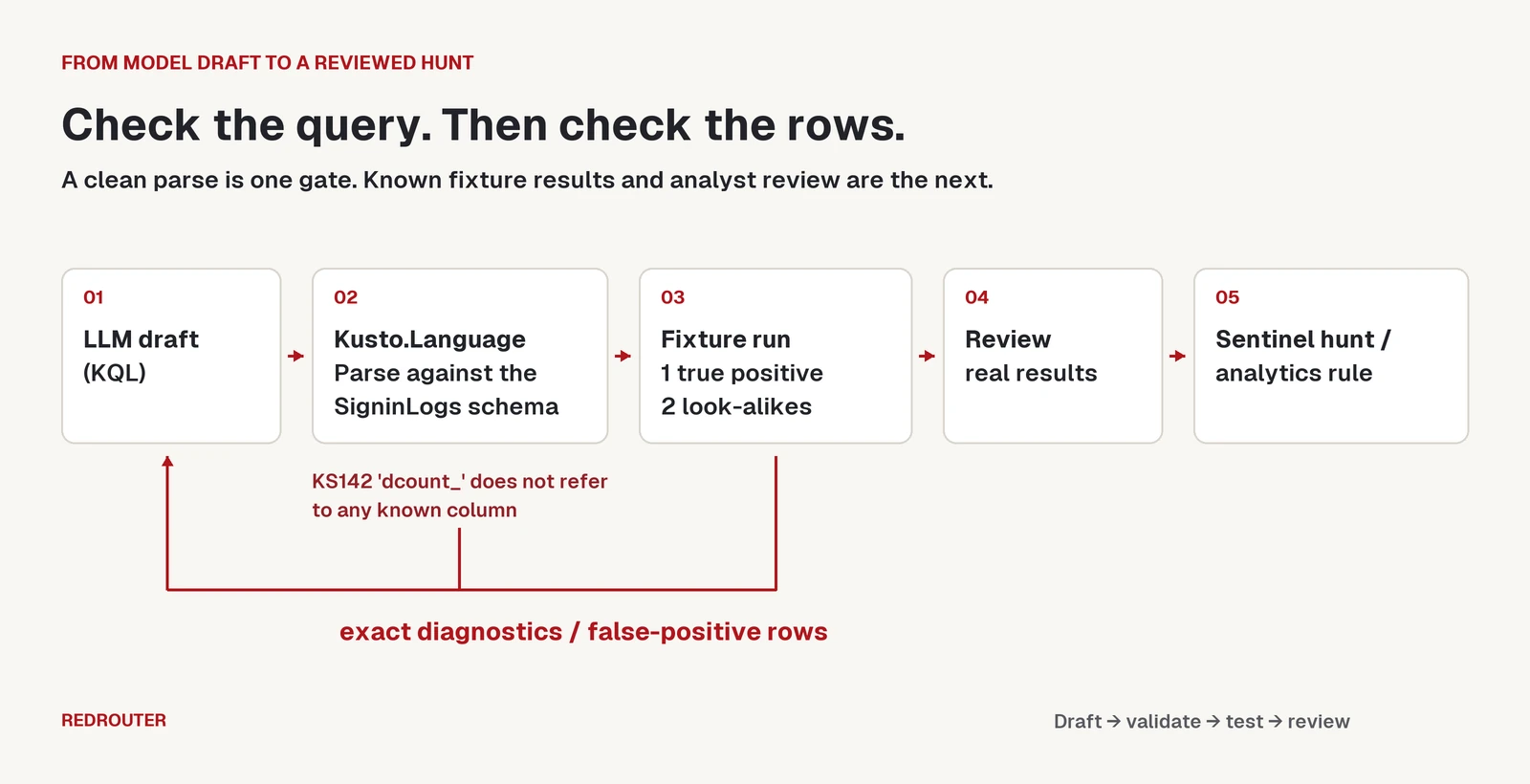
- Pick one behavior. Here: one IP address failing sign-ins for many different accounts in a short window (MITRE ATT&CK T1110.003, Password Spraying).
- Give the model the schema. Paste the relevant columns and types from the SigninLogs table reference, not just the table name.
- Ask for a draft. KQL only, with thresholds in
letstatements. - Parse it against the schema. Feed every diagnostic back to the model word for word.
- Run it on a fixture. Lab rows with a known true positive and known false positives.
- Run it on real data, then review. Read the results by hand before it becomes a saved hunt or an analytics rule.
Step 1: Give the model the right columns
The first thing a model gets wrong in KQL is the schema. For this hunt the columns that matter in SigninLogs, per Microsoft's table reference, are:
| Column | Type | Note |
|---|---|---|
TimeGenerated | datetime | Event time |
UserPrincipalName | string | The account that tried to sign in |
IPAddress | string | Client IP |
ResultType | string | Error code; 0 means success |
AppDisplayName | string | Target application |
ResultType is a string, even though it holds numbers. Say so in the prompt.
The error codes come from the Microsoft Entra authentication error codes page. For a spray hunt, the useful ones are 50126 (invalid username or password) and 50053 (account locked after too many attempts, or sign-in blocked from an IP with malicious activity). Not every non-zero code is a failure in the attack sense. 50140 is the "Keep me signed in" interrupt, which the same page calls an expected part of the sign-in flow.
Step 2: The first draft and the parser
A typical first draft:
SigninLogs
| where TimeGenerated > ago(1d)
| where ResultType == 50126
| summarize dcount(UserPrincipalName) by IPAddress, bin(TimeGenerated, 1h)
| where dcount_ > 10
We checked it with a small .NET console tool that loads the documented SigninLogs columns into a Kusto.Language GlobalState and calls KustoCode.ParseAndAnalyze:
kqlcheck (Kusto.Language 12.4.1.0) draft1.kql
Error KS142 at 5:9 'dcount_': The name 'dcount_' does not refer to any known column, table, variable or function.
The model guessed the name of the auto-generated column. The summarize docs say an unnamed aggregate gets "a name derived from the expression," and guessing that name is a habit worth breaking. Tell the model to name every aggregate (FailedUsers = dcount(UserPrincipalName)).
Note what the parser did not flag: ResultType == 50126 compares a string column with a number. Kusto.Language reported no diagnostic for it. A clean parse is not proof that a query is right. Ask for "50126" as a string literal, since that's the documented column type.
Step 3: A draft that parses but is wrong
The second draft names its aggregates and parses with zero diagnostics:
SigninLogs
| where TimeGenerated > ago(1d)
| where ResultType != "0"
| summarize FailedUsers = dcount(UserPrincipalName), Attempts = count() by IPAddress, bin(TimeGenerated, 1h)
| where FailedUsers > 10
| sort by FailedUsers desc
kqlcheck (Kusto.Language 12.4.1.0) draft2.kql
OK: 0 diagnostics
The logic is the problem. ResultType != "0" counts every interrupt and policy prompt as a failure, and nothing excludes your own office egress or VPN. To see that, you need data where you know the answer.
Step 4: Build a fixture with known answers
This block goes at the top of the query. It defines a lab SigninLogs that shadows the real table for this query only:
// Lab fixture: shadows the real SigninLogs table for this query only.
let t0 = bin(now() - 1h, 1h) + 10m;
let rows = (ip:string, code:string, n:long) {
    range i from 1 to n step 1
    | project TimeGenerated = t0 + i * 1s, IPAddress = ip,
        UserPrincipalName = strcat("user", i, "@lab.example"),
        ResultType = code, AppDisplayName = "Office 365 Exchange Online"
};
let SigninLogs = union
    rows("198.51.100.7", "50126", 12),  // true positive: spray from one IP
    rows("198.51.100.7", "0", 1),       // ...and one account that then signs in
    rows("203.0.113.10", "50126", 15),  // your own egress after a password change
    rows("192.0.2.50", "50140", 14);    // "Keep me signed in" interrupts, not failures
The addresses are from the documentation ranges, and the users are fake. The fixture holds one real spray and two look-alikes. A correct hunt returns exactly one row, for 198.51.100.7, and shows that one account signed in from that address.
Work draft 2 through the fixture by hand and it returns three rows: the spray, your own egress (15 users) and the interrupts (14 users). Two of the three are false positives. With fixture plus draft 2 pasted into one query, Kusto.Language again reports 0 diagnostics, so the parser can't catch this. The fixture can.
We checked these queries with Kusto.Language only; we didn't run them against a live workspace for this guide. Run the fixture in your own lab workspace and compare what you get with the expected rows above before trusting any version.
Step 5: The corrected hunt
Paste the fixture results back to the model ("rows for 203.0.113.10 and 192.0.2.50 are false positives; here's why") and ask it to fix the logic. The version we kept:
let lookback = 1d;
let window = 1h;
let minUsers = 10;
// 50126: invalid username or password. 50053: account locked or sign-in blocked.
let sprayCodes = dynamic(["50126", "50053"]);
// Your own egress and VPN ranges, kept in a watchlist or a let-statement.
let trustedRanges = dynamic(["203.0.113.0/24"]);
let failures = SigninLogs
    | where TimeGenerated > ago(lookback)
    | where ResultType in (sprayCodes)
    | where not(ipv4_is_in_any_range(IPAddress, trustedRanges))
    | summarize FailedUsers = dcount(UserPrincipalName), Attempts = count(),
        Users = make_set(UserPrincipalName, 25), Apps = make_set(AppDisplayName, 10),
        FirstSeen = min(TimeGenerated), LastSeen = max(TimeGenerated)
        by IPAddress, Window = bin(TimeGenerated, window)
    | where FailedUsers >= minUsers;
let successes = SigninLogs
    | where TimeGenerated > ago(lookback)
    | where ResultType == "0"
    | summarize SuccessUsers = make_set(UserPrincipalName, 25) by IPAddress, Window = bin(TimeGenerated, window);
failures
| join kind=leftouter successes on IPAddress, Window
| project-away IPAddress1, Window1
| extend SuccessAfterSpray = coalesce(array_length(SuccessUsers), 0) > 0
| order by SuccessAfterSpray desc, FailedUsers desc
kqlcheck (Kusto.Language 12.4.1.0) final.kql
OK: 0 diagnostics
kqlcheck (Kusto.Language 12.4.1.0) test-final.kql
OK: 0 diagnostics
What changed, and why:
- Spray-specific codes only.
in (sprayCodes)replaces!= "0", so interrupts like50140drop out. - Real CIDR matching.
ipv4_is_in_any_rangeaccepts a dynamic array of ranges. Models often writeIPAddress !in ("203.0.113.0/24")instead, which parses but compares the IP with the literal string"203.0.113.0/24"and excludes nothing. In production, keep the ranges in a Sentinel watchlist instead of hardcoding them. - Success after spray. A left outer join on IP and time window pulls in any account that signed in from the same address in the same hour, which is the row an analyst should open first.
coalescehandles windows with no success, where the join leavesSuccessUsersnull. - Context for triage.
make_setwith a cap keeps sample users and apps on each row without blowing up the result. dcountis an estimate. It's fine for a threshold of 10 accounts, but don't quote its output as an exact count in a report.
One known gap: a success in the hour after the spray window won't join. If that matters for your tenant, widen the success side or join on IP alone and compare times.
What to send the model
A KQL prompt needs the shape of your data, not the data:
- Send: table and column names with types, the error codes you care about, your thresholds, fake fixture rows, and parser diagnostics.
- Don't send: real UPNs, IP addresses, tenant IDs, device names or rows exported from a client's workspace unless your agreement allows it. Swap them for
@lab.exampleusers and documentation IP ranges like the fixture above. - Check retention first. On RedRouter, Zero Data Retention is an opt-in setting and off by default. The data handling docs explain what is stored and how to turn it on. Our post on what RedRouter keeps covers the same ground in plain terms.
Automating the loop
The loop scripts easily. This sketch asks a model for a query, runs the parser, and sends any diagnostics back until the query parses. It uses the OpenAI Python SDK with RedRouter's https://redrouter.org/v1 base URL, as covered in our OpenAI-compatible API guide and the RedRouter quickstart. kqlcheck is the small Kusto.Language wrapper described in Step 2; build your own from the library's README.
import os, subprocess, pathlib
from openai import OpenAI

client = OpenAI(base_url="https://redrouter.org/v1", api_key=os.environ["REDROUTER_API_KEY"])
schema = pathlib.Path("signinlogs-columns.md").read_text()  # columns and types, no real data
task = ("Write a KQL hunting query for Microsoft Sentinel that finds password spraying "
        "in SigninLogs. ResultType is a string. Name every aggregate. Put thresholds in "
        "let statements. Return KQL only.\n\nSchema:\n" + schema)
messages = [{"role": "user", "content": task}]

for attempt in range(4):
    reply = client.chat.completions.create(model="glm-5.3-flash-red", messages=messages)
    query = reply.choices[0].message.content.strip().removeprefix("```kusto").removesuffix("```")
    pathlib.Path("draft.kql").write_text(query)
    check = subprocess.run(["kqlcheck", "draft.kql"], capture_output=True, text=True)
    print(check.stdout)
    if check.returncode == 0:
        break
    messages += [{"role": "assistant", "content": query},
                 {"role": "user", "content": "Kusto.Language reported:\n" + check.stdout + "\nFix the query. KQL only."}]
A clean parse ends the automated part. The fixture run and the review of real results stay with a person.
Choosing a model
Use any model that follows a "KQL only" instruction and can hold a schema plus a few rounds of diagnostics. On RedRouter, GLM 5.3 Flash Red (glm-5.3-flash-red) costs $0.25 per 1M input tokens, $0.10 per 1M cached input tokens and $1.00 per 1M output tokens, with a 1,048,576-token context window. red-cyber-1 (Beta), the featured model for authorized security work, is $0.28 / $0.10 / $1.10 per 1M tokens. See pricing and the models page for current rates.
Hunting prompts that mention attacker techniques sometimes trip refusals on mainstream assistants, even when the tenant is your own. The RedRouter security page explains how the service is meant for authorized work. Whatever model you use, judge it by one thing: whether its queries return the right rows on your fixture.
Common KQL mistakes in LLM drafts
| Mistake | How it shows up | What to tell the model |
|---|---|---|
Guessing auto-generated column names (dcount_) | KS142 ... does not refer to any known column | Name every aggregate |
Comparing ResultType with a number | No parser diagnostic; check the schema | ResultType is a string; quote the codes |
ResultType != "0" as "failed" | Fixture shows interrupt rows (50140) as hits | Use the specific failure codes |
!in ("10.0.0.0/8") for CIDR exclusion | Parses; fixture shows trusted IPs still flagged | Use ipv4_is_in_any_range |
| Columns from another table or Sigma field names | KS142 on the column | Paste the table's real column list |
| Hardcoded thresholds and lookbacks | Hard to tune in Sentinel | Put them in let statements |
The KQL best practices page is worth pasting into a prompt too, mainly the advice to apply filters on datetime table columns first and to filter on table columns rather than calculated ones.
FAQ
Can an LLM write KQL hunting queries?
Yes, as a first draft. Expect guessed column names, loose filters and missing exclusions. Treat the draft as untrusted until it parses against your schema and returns the right rows on a fixture you built.
How do I validate KQL without a Sentinel workspace?
Use Microsoft's open-source Kusto.Language library with your table schemas loaded. It reports syntax and semantic errors offline. It doesn't run the query, so you still need a lab workspace, or the Kusto emulator for engine-only tests, to see results.
How do I test a KQL query for false positives?
Shadow the table with a let statement and inline rows from range or datatable, including look-alike rows that should not match. Run the hunt on that fixture and check you get only the rows you expect.
What's the difference between this and a Sigma rule?
Sigma is a vendor-neutral rule format that you convert into a backend query language. KQL is the query language Sentinel actually runs. If you write portable detections, see generating Sigma and YARA rules with an LLM. If you hunt in Sentinel, writing and testing KQL directly is shorter.
Is it safe to paste sign-in logs into an LLM?
Not real ones, unless you're cleared to. Send the schema and fake fixture rows instead. On RedRouter, Zero Data Retention is opt-in and off by default; the data handling docs explain what's stored.
Can I turn a hunting query into a Sentinel analytics rule?
Yes, once it's stable. The Sentinel hunting docs describe creating an analytics rule from a query's results with the analytics rule wizard. Re-run the fixture after every change.
Sources
- Microsoft Learn: Kusto Query Language overview, summarize, dcount, make_set, ipv4_is_in_any_range, left outer join, let statement, range, datatable, best practices. Checked November 16, 2026.
- Microsoft Learn: SigninLogs table reference, Microsoft Entra authentication error codes, Microsoft Sentinel hunting, Sentinel watchlists, Kusto emulator, password spray investigation playbook. Checked November 16, 2026.
- GitHub: microsoft/Kusto-Query-Language, Azure-Sentinel KQL validation tests. NuGet: Microsoft.Azure.Kusto.Language 12.4.1. Checked November 16, 2026.
- MITRE ATT&CK: T1110.003 Password Spraying. Checked November 16, 2026.
- RedRouter Docs: Quickstart, Models and pricing, Data handling. Checked November 16, 2026.
- Tool outputs: Kusto.Language 12.4.1 (.NET 8), run November 16, 2026 on the queries and fixture shown, against the documented SigninLogs columns.