 redrouter

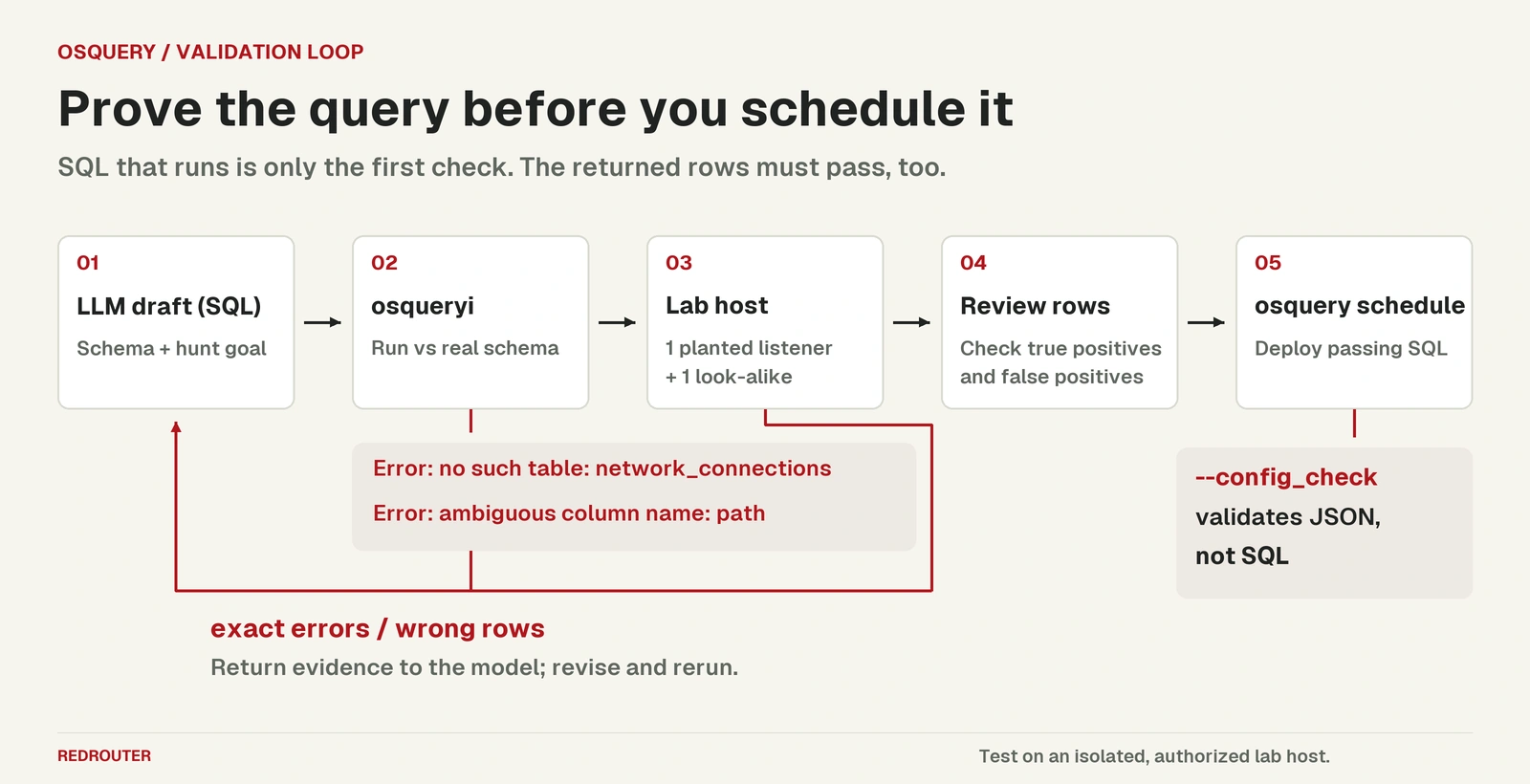
You can generate osquery queries with an LLM in seconds, and the SQL will usually look plausible. Some drafts will query a table that doesn't exist. Others will run cleanly and bury the one process you care about under a page of your own monitoring agents. Using an LLM for osquery works when the model drafts and something else decides: osqueryi running the query against the real schema, and a lab host where you already know which rows should come back.
This guide walks through that loop on one host hunt: processes listening on a network port whose binary lives outside package-managed paths, or has been deleted from disk. Every error message and result table below comes from running osquery 5.24.1 (osqueryd -S, which behaves as osqueryi) on the queries shown, on a Linux lab box. The drafts were written for this guide to show mistakes models commonly make; they are not a captured model transcript. Model output is never the evidence.
It's the endpoint sibling of our guides to generating Sigma and YARA rules with an LLM, KQL hunting queries and Falco rules. Same idea, different validator.
Defensive and authorized work only. Query hosts you own or were hired to protect. Strip hostnames, usernames and other identifiers from any sample rows you send to a model. See what to send the model below.
Why use an LLM for osquery queries
osquery exposes the operating system as SQL tables. The osqueryi docs describe it as a standalone interactive shell that "does not communicate with a daemon", and point to SQLite for SQL syntax. Tables such as processes and listening_ports have their own columns and types, defined in the project's table specs.
That makes osquery a good fit for model help and a bad fit for trusting it. A model knows SQL well. It knows osquery's schema less well, and it blends in column names from Sysmon, netstat, EDR consoles and other SQL dialects. The joins, DISTINCT, path filters and allowlists are where a model saves time. Table and column names are where it guesses.
How to check an LLM-generated osquery query
There are two separate questions:
- Does it run? Paste it into
osqueryi. The shell knows every table compiled into your build and reports the SQLite error if a table or column is wrong..schema <table>prints the exact columns. - Does it return the right rows? Running cleanly says nothing about this. You need a host where you planted one row that should match and one look-alike that shouldn't.
A third trap sits in deployment. osquery's --config_check flag checks "the format of an osquery config". In our lab it rejected a config with a trailing comma, but it accepted a scheduled query that names a table that doesn't exist. Run every scheduled query in osqueryi before it goes into a config.
Step 1: Give the model the schema, not just the goal
Ask for one hunt, and paste the columns of every table it may use. Get them from your own build:
osquery> .schema listening_ports
CREATE TABLE listening_ports(`pid` INTEGER, `port` INTEGER, `protocol` INTEGER, `family` INTEGER, `address` TEXT, `fd` BIGINT, `socket` BIGINT, `path` TEXT, `net_namespace` TEXT);
A prompt that works well:
Write one osquery SQL query for Linux. Find processes that hold a listening TCP or UDP port where the process binary is outside /usr and /opt, or no longer exists on disk. Use only the tables and columns below. Qualify every column with a table alias. Return SQL only. [paste
.schema processesand.schema listening_ports]
Tell it about any column that doesn't mean what its name suggests. Two matter here, both from the 5.24.1 specs: listening_ports.path is the "Path for UNIX domain sockets", not the program path, and processes.on_disk means "The process path exists yes=1, no=0, unknown=-1".
Step 2: Run the draft in osqueryi
A first draft without the schema in the prompt often looks like this:
SELECT pid, process_name, local_port, remote_address
FROM network_connections
WHERE state = 'LISTEN';
osquery 5.24.1 rejects it immediately:
Error: no such table: network_connections
There is no network_connections table. The columns are invented too. Send the exact error back with the schema, and the next draft might use the right tables:
SELECT pid, name, path, port, address
FROM processes
JOIN listening_ports USING (pid)
WHERE path NOT LIKE '/usr/%' AND path NOT LIKE '/opt/%';
Error: ambiguous column name: path
Both tables have a path column. Unqualified, the query can't run, and if a model "fixes" it by picking the wrong table, it filters on socket paths instead of binaries. This is why the prompt asks for table aliases on every column.
Step 3: Test it on a lab host
The third draft runs:
SELECT p.pid, p.name, p.path, p.on_disk, l.port, l.family, l.path AS socket_path
FROM processes p
JOIN listening_ports l USING (pid)
WHERE p.on_disk != 1
   OR p.path NOT LIKE '/usr/%' AND p.path NOT LIKE '/opt/%';
To see whether it's right, we set up two short-lived listeners on the lab box, both bound to 127.0.0.1:
- True positive: a copy of the Python interpreter at
/workspace/seo/osquery-lab/labbin/lab-listener, serving on port 48081. A binary outside package paths with an open port is the thing the hunt should catch. - Look-alike: the normal
/usr/bin/python3.13serving on port 48082. Same program, same kind of socket, package path. It should not match.
The query returned 20 rows. The planted listener was there, twice. The /usr/bin/python3.13 look-alike was correctly excluded. The other 18 rows were the lab box's own agent, /exec-daemon/node, on 9 distinct ports, each listed twice.
Three problems show up only on real data:
- Duplicates.
listening_portsreturned 54 rows for 27 distinct pid, port and family combinations on this box. WithoutDISTINCT, every hit appears more than once. - Known software outside /usr. Agents, containers and vendor tools often live elsewhere. They need an explicit allowlist, kept short and reviewed, or the hunt drowns.
on_disk != 1matches unknown. As an unprivileged user, osquery reportedon_disk = -1for 30 of 207 processes on the lab box.!= 1treats "unknown" as "deleted". Usep.on_disk = 0for deleted binaries, and run the scheduled query fromosquerydwith the privileges it needs to see every process.
The raw join also listed UNIX domain sockets with port = 0, family = 1 and a socket path such as /tmp/.X11-unix/X1. None slipped through here because their owners lived in /usr/bin, but a vendor tool outside /usr with only a UNIX socket would. Filter on l.port > 0 and l.family IN (2, 10) (IPv4 and IPv6).
Step 4: The final query
SELECT DISTINCT p.pid, p.name, p.path, p.on_disk, l.address, l.port, l.protocol
FROM listening_ports l
JOIN processes p USING (pid)
WHERE l.port > 0
  AND l.family IN (2, 10)
  AND (
    p.on_disk = 0
    OR (p.path NOT LIKE '/usr/%'
        AND p.path NOT LIKE '/opt/%'
        AND p.path NOT IN ('/exec-daemon/node'))
  );
On the same lab box it returned exactly one row:
+-------+--------------+------------------------------------------------+---------+-----------+-------+----------+
| pid   | name         | path                                           | on_disk | address   | port  | protocol |
+-------+--------------+------------------------------------------------+---------+-----------+-------+----------+
| 42580 | lab-listener | /workspace/seo/osquery-lab/labbin/lab-listener | 1       | 127.0.0.1 | 48081 | 6        |
+-------+--------------+------------------------------------------------+---------+-----------+-------+----------+
The planted listener matched, the look-alike didn't, and the box's agent was allowlisted by its exact path. The parentheses around the OR are deliberate. SQLite gives AND higher precedence than OR, so leaving them out changes which rows the port filters apply to.
We didn't exercise the on_disk = 0 branch in this lab. Test it the same way on your own isolated host before relying on it. Adapt the allowlist to your fleet: /exec-daemon/node belongs to our lab box, not to yours.
Step 5: Schedule it, then run it again
Once it's stable, add it to the osquery configuration schedule, where each query has a name, the SQL and an interval in seconds:
{
  "schedule": {
    "unpackaged_listeners": {
      "query": "SELECT DISTINCT p.pid, p.name, p.path, p.on_disk, l.address, l.port, l.protocol FROM listening_ports l JOIN processes p USING (pid) WHERE l.port > 0 AND l.family IN (2, 10) AND (p.on_disk = 0 OR (p.path NOT LIKE '/usr/%' AND p.path NOT LIKE '/opt/%' AND p.path NOT IN ('/exec-daemon/node')));",
      "interval": 3600,
      "description": "Listening processes whose binary is outside package paths or deleted from disk"
    }
  }
}
osqueryd --config_check --config_path=osquery.conf exited 0 on this file. With one trailing comma added it exited 1 with Error parsing the config JSON. With listening_ports swapped for the non-existent network_connections, it still exited 0. The config check validates the config, not the SQL inside it. Copy the query string back into osqueryi after every edit.
The configuration docs explain that after the first run only result-set differences are logged, emitted with "action": "added" or "action": "removed", so a new listener shows up as an added row.
What to send the model
- Schema, yes.
.schemaoutput is public information about osquery, not about you. - Sample rows, only scrubbed. Replace hostnames, usernames, internal IPs and home-directory paths before pasting results. Fake rows that keep the shape work just as well for debugging.
- Your allowlist, carefully. A list of the agents and vendor tools you run is reconnaissance data. Describe the pattern ("our EDR agent lives in /opt/vendor") rather than pasting the inventory.
- Check retention first. On RedRouter, Zero Data Retention is an opt-in setting and off by default. The data handling docs explain what is stored and how to turn it on. Our post on what RedRouter keeps covers the same ground in plain terms.
Automating the loop
The run-and-retry part scripts easily, because osqueryi exits non-zero on a SQL error (exit 1 for both failed drafts above). This sketch asks a model for a query, runs it, and sends any error back until it runs. It uses the OpenAI Python SDK with RedRouter's https://redrouter.org/v1 base URL, as covered in our OpenAI-compatible API guide and the RedRouter quickstart.
import os, subprocess, pathlib
from openai import OpenAI

client = OpenAI(base_url="https://redrouter.org/v1", api_key=os.environ["REDROUTER_API_KEY"])
schema = pathlib.Path("schema.sql").read_text()  # output of .schema processes / listening_ports
task = ("Write one osquery SQL query for Linux that finds processes holding a listening "
        "TCP or UDP port whose binary is outside /usr and /opt or is deleted from disk. "
        "Use only these tables and columns. Qualify every column. Return SQL only.\n\n" + schema)
messages = [{"role": "user", "content": task}]

for attempt in range(4):
    reply = client.chat.completions.create(model="glm-5.3-flash-red", messages=messages)
    sql = reply.choices[0].message.content.strip().removeprefix("```sql").removesuffix("```").strip()
    run = subprocess.run(["osqueryi", "--json", sql], capture_output=True, text=True)
    print(run.stdout or run.stderr)
    if run.returncode == 0:
        break
    messages += [{"role": "assistant", "content": sql},
                 {"role": "user", "content": "osqueryi reported:\n" + run.stderr + "\nFix the query. SQL only."}]
Run it on a lab host, not production. A query that runs ends the automated part. Checking the rows against your planted true positive and look-alike stays with a person.
Choosing a model
Use any model that follows a "SQL only" instruction and can hold two table schemas plus a few rounds of errors. On RedRouter, GLM 5.3 Flash Red (glm-5.3-flash-red) costs $0.25 per 1M input tokens, $0.10 per 1M cached input tokens and $1.00 per 1M output tokens, with a 1,048,576-token context window. red-cyber-1 (Beta), the featured model for authorized penetration testing and red-team work, is $0.28 / $0.10 / $1.10 per 1M tokens. See pricing and the models page for current rates.
Host-hunting prompts that mention persistence, deleted binaries or attacker tradecraft sometimes trip refusals on mainstream assistants, even on your own fleet. The RedRouter security page explains how the service is meant for authorized work. Whatever model you use, judge it by one thing: whether its query returns the right rows on your lab host.
Common osquery mistakes in LLM drafts
| Mistake | How it shows up | What to tell the model |
|---|---|---|
Invented tables (network_connections) | Error: no such table | Paste .schema for the allowed tables |
| Unqualified columns after a join | Error: ambiguous column name: path | Qualify every column with an alias |
Treating listening_ports.path as the binary | Runs; filters on socket paths | It's the UNIX socket path; use processes.path |
No DISTINCT | Every hit listed twice on our lab box | Use SELECT DISTINCT |
on_disk != 1 for "deleted" | Matches -1 (unknown) processes | Use on_disk = 0 |
| UNIX sockets counted as listeners | Rows with port = 0, family = 1 | Filter port > 0 and family IN (2, 10) |
OR without parentheses | Runs; port filters skip one branch | Parenthesize every OR group |
FAQ
Can an LLM write osquery queries?
Yes, as a first draft. Expect invented tables and columns, missing DISTINCT and filters that run but match the wrong rows. Treat the draft as untrusted until it runs in osqueryi and returns the right rows on a lab host.
How do I validate an osquery query?
Run it in osqueryi on a build that matches your fleet. A wrong table or column fails with a SQLite error, and .schema <table> shows the real columns. Then plant one row that should match and one that shouldn't, and check the output.
Does osqueryd --config_check validate my SQL?
Not in our test. On osquery 5.24.1 it rejected malformed JSON, but accepted a scheduled query that referenced a non-existent table. Run each scheduled query in osqueryi separately.
Does osquery need root to see every process?
It needs enough privilege to read every process's details. As an unprivileged user on our lab box, 30 of 207 processes reported on_disk = -1. Unprivileged osqueryi is fine for drafting and testing a query, not for trusting an empty result from a host.
How is this different from a Sigma or KQL rule?
osquery asks a host about its current state with SQL. Sigma is a vendor-neutral log detection format, and KQL queries logs already shipped to Microsoft Sentinel or Log Analytics. See Sigma and YARA rules with an LLM and KQL hunting queries with an LLM for those.
Is it safe to paste osquery results into an LLM?
Not raw ones, unless you're cleared to. Send the schema and scrubbed or fake rows instead. On RedRouter, Zero Data Retention is opt-in and off by default; the data handling docs explain what's stored.
Sources
- osquery docs: osqueryi (shell), Configuration, Command line flags. Checked November 17, 2026.
- GitHub: osquery 5.24.1 release, table specs for processes and listening_ports. Checked November 17, 2026.
- SQLite: SQL language expressions (operator precedence). Checked November 17, 2026.
- RedRouter Docs: Quickstart, Models and pricing, Data handling. Checked November 17, 2026.
- Tool outputs: osquery 5.24.1 (
osqueryd -Sand--config_check), run November 17, 2026 as an unprivileged user on a Linux lab box, on the queries and config shown.