 redrouter

Pentest Harness is a self-hosted AI agent workspace for authorized pentests, bug bounty research, labs and CTFs. Its README promises that it works with "any OpenAI-compatible gateway" and auto-discovers your models in one click. That is mostly true. This post shows how to connect Pentest Harness to an OpenAI-compatible API such as RedRouter, which settings the custom provider form does not expose, and the one compat switch that decides whether your first request works or returns a 400.
What we checked, on November 19, 2026: the repository at commit 4638f38 (September 11, 2026, MIT license, 475 stars that day), its provider guide and generated config reference, and the @earendil-works/pi-ai 0.82.1 adapter the lockfile pins. Pentest Harness hands every model request to that adapter. We sent requests through it to a local mock server that enforces RedRouter's documented request contract, and we called RedRouter's live GET /v1/models. pnpm install and pnpm build succeeded on our box, but the web profile failed to boot with ERR_MODULE_NOT_FOUND for @pentest-harness/dsh-client-ui-workflow, so we did not drive the UI or run an engagement. Treat the run steps as a recipe, not a reported result.
Use Pentest Harness only against systems you own, an isolated lab, or targets you have written permission to test.
What Pentest Harness is
Pentest Harness (the CLI is dsh) is a local web app built on the Cordis plugin framework. The README lists a full agent toolset: shell, filesystem, web research, skills, subagents, background jobs and workflow control, plus a "Pentest Mode" operating standard for engagements. Sessions persist as JSONL or SQLite on your machine.
The parts that matter for a custom LLM API:
| Setting | Default |
|---|---|
| Web UI | http://127.0.0.1:2323 |
| Settings file | $DSH_HOME/settings.yaml (default ~/.dsh/settings.yaml) |
| Credentials | $DSH_HOME/.credentials.yaml, owner-only permissions |
| Provider protocols | OpenAI Chat Completions, OpenAI Responses, Anthropic Messages, and others through pi-ai |
A tool that can run shell commands and background jobs on its own belongs in a disposable VM or container, not on the laptop that holds your client data.
Step 1: Install and start Pentest Harness
The README's quick start needs Node.js and pnpm. The repo's package.json asks for Node ^22.19.0 or >=24.0.0 and pins pnpm 11.7.0:
git clone https://github.com/S1N6H/pentest-harness.git
cd pentest-harness
pnpm install
pnpm build
pnpm dsh web
The UI opens on 127.0.0.1:2323. Use pnpm dsh web --port 3000 for another port. Keep it bound to localhost. If you need it from another machine, reach it through an SSH tunnel instead of exposing the port.
Step 2: Add a custom OpenAI-compatible provider
Open Settings → Models and choose Add a custom provider. The form asks for a Provider ID, display name, base URL, API protocol, API key and at least one model. For RedRouter:
- Provider ID:
redrouter(permanent: sessions and credential references use it) - Base URL:
https://redrouter.org/v1 - API protocol: OpenAI Chat Completions (
openai-completions) - API key: your RedRouter key, which the harness stores in its credential file rather than in settings
Then choose Fetch available models. Pentest Harness calls the OpenAI-compatible GET /models endpoint for any route its built-in catalog does not know. RedRouter's GET /v1/models returned 200 on November 19 and lists glm-5.3-flash-red and red-cyber-1, each with capability flags for tool calling and response format.
The listing does not include context window or output limits. Pentest Harness's discovery code reads those only if a gateway adds fields such as context_window or max_tokens. Set them by hand in Step 4, so the harness's compaction and output cap match the model.
Step 3: Set the one compat switch that matters
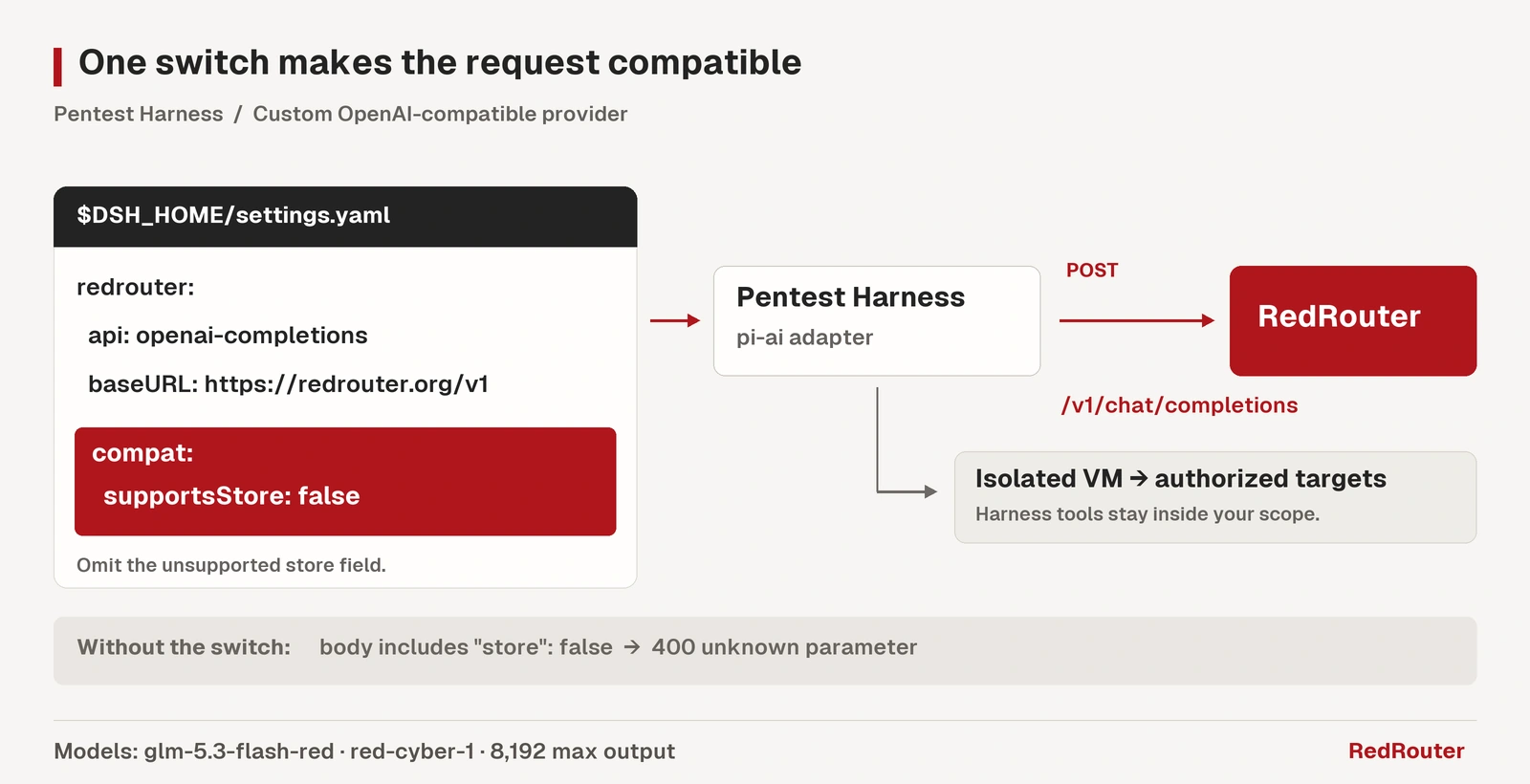
Here is the part the README skips. Pentest Harness decides the shape of each request through pi-ai, and pi-ai guesses from the base URL. An address it does not recognize is treated "as though it were OpenAI itself," as the provider guide puts it. For OpenAI, pi-ai adds "store": false to every Chat Completions request.
RedRouter's Chat Completions docs list the accepted top-level fields, and store is not one of them. Unknown top-level fields return 400. So a provider added only through the form sends store on every turn.
We reproduced the request shape with pi-ai 0.82.1 against a local mock that accepts exactly the field list RedRouter documents. The mock's error text is our own wording, not RedRouter's:
## run 1: no compat (pi-ai auto-detect for an unknown host)
sent keys: max_completion_tokens, messages, model, store, stream, stream_options
error 400: {"code":"unknown_parameter","param":"store","message":"Unknown parameter: store"}

## run 2: compat supportsStore=false
sent keys: max_completion_tokens, messages, model, stream, stream_options
done: stop [{"type":"text","text":"ok"}]
The fix is compat.supportsStore: false on the route. The form has no field for compat switches, so add it in settings.yaml. The config reference describes it as "Whether the endpoint accepts store," valid on the openai-completions protocol.
The provider guide suggests two other switches when a gateway refuses every request: supportsDeveloperRole: false and maxTokensField: max_tokens. RedRouter does not need either. Its docs say system and developer both become system instructions, and it accepts max_completion_tokens or max_tokens (one, never both). stream_options with include_usage is accepted on streaming requests, and reasoning_effort is accepted and ignored on current models.
Step 4: The full settings.yaml route
Model changes take effect on the next request without a restart. If you created the provider in the form, add the compat block and the model limits under the route it wrote. If you prefer to configure it by hand, this route follows the provider guide and the dsh-llm-pi-ai README:
llm-pi-ai:
  providers:
    redrouter:
      displayName: RedRouter
      apiKeyEnv: REDROUTER_API_KEY
      api: openai-completions
      baseURL: https://redrouter.org/v1
      compat:
        supportsStore: false
      models:
        - id: glm-5.3-flash-red
          name: GLM 5.3 Flash Red
          contextWindow: 1048576
          maxTokens: 8192
        - id: red-cyber-1
          name: red-cyber-1
          contextWindow: 1048576
          maxTokens: 8192
apiKeyEnv is a reference resolved per request, so the secret never lands in the file. Start the harness with REDROUTER_API_KEY exported, or store the key through the Models page. Because our build would not boot the web profile, we could not load this exact file through the harness's validator. Every key comes from the guide and the generated config reference.
Leave out input: [text, image]. Both models are text-only, and the harness treats hand-entered models as text-only by default, which refuses an image before it is sent.
Which model to pick
Prices are from docs.redrouter.org/models and the public catalog on November 19, 2026:
- GLM 5.3 Flash Red (
glm-5.3-flash-red): $0.25 input, $0.10 cached input, $1.00 output per 1M tokens. A sensible default for an agent loop that makes many short tool-calling turns. - red-cyber-1 (
red-cyber-1, Beta): $0.28 input, $0.10 cached input, $1.10 output per 1M tokens. The model RedRouter features for authorized penetration testing and red-team work.
Both list a 1,048,576-token context window, an 8,192-token maximum output, tool calling and structured output. Plans are on /pricing. If you want to see how red-cyber-1 fits a full engagement, Authorized Pentest Workflows With red-cyber-1 walks through it.
Keep it inside your scope
Pentest Mode is an operating standard in the prompt, not a permission system. The harness will run whatever its shell tool is allowed to run, so put the limits outside the model:
- Run it in a VM or container that can reach only the lab network or the in-scope hosts.
- Write the scope and rules of engagement into the first message of each session, and keep a copy with the engagement record. The scope tool helps you write one.
- Keep the UI on localhost and keep
$DSH_HOMEon an encrypted disk. Session logs hold everything the agent saw. - Review background jobs before you leave a session running.
For the broader pattern of giving an agent a model without giving it your whole network, see OpenAI-compatible APIs for security agents. If you are comparing harnesses, the same base-URL questions come up in 0 and PentAGI.
Troubleshooting Pentest Harness with a custom provider
| Symptom | Likely cause | Fix |
|---|---|---|
| Every request returns 400, key and URL are right | pi-ai sends store to an unknown host | Add compat.supportsStore: false on the route |
| 400 mentioning both token fields | Both max_tokens and max_completion_tokens sent | Remove any custom request params that add a second cap |
| Models fetch fine, but chat requests return 401 | Wrong key. RedRouter's model list is public, so a successful fetch does not prove the key works | Re-enter the key on the Models page |
MISSING_CREDENTIAL | apiKeyEnv points at an unset variable | Export REDROUTER_API_KEY or store the key on the Models page |
UNKNOWN_MODEL | Model id not on the route | Add glm-5.3-flash-red or red-cyber-1 to models |
| Image refused before sending | Model is text-only | Expected; describe the screenshot in text instead |
| Compat switch "refused as having no value" | A key with nothing after the colon | Write supportsStore: false, not supportsStore: |
Where the data goes
Pentest Harness keeps sessions, tool output and settings in $DSH_HOME on your machine. On RedRouter's side, zero data retention is an opt-in setting, off by default. Details are in the data handling docs, and What RedRouter keeps explains the defaults. Whatever you choose, only send client data that your engagement terms allow.
FAQ
Does Pentest Harness work with any OpenAI-compatible API?
It can talk to any endpoint that speaks Chat Completions or Responses, but "compatible" varies. Pentest Harness's adapter assumes an unknown host behaves like OpenAI. Expect to set at least one compat switch in settings.yaml.
What base URL do I use for RedRouter in Pentest Harness?
https://redrouter.org/v1 with the OpenAI Chat Completions protocol. Model discovery reads https://redrouter.org/v1/models.
Why does Pentest Harness return 400 with a working key?
The most common reason is a field the gateway does not accept. With RedRouter it is store, which pi-ai adds for hosts it assumes are OpenAI. Set compat.supportsStore: false.
Can I use the Anthropic Messages protocol instead?
Pentest Harness supports anthropic-messages routes, and RedRouter serves POST /v1/messages with https://redrouter.org as the SDK base URL. We only tested the Chat Completions route for this post.
Which model should I start with? GLM 5.3 Flash Red for cost per turn, red-cyber-1 if you want RedRouter's featured pentest model. Both support tool calling.
Is it safe to run Pentest Harness on my main machine? Not for real targets. It runs shell commands and background jobs. Use an isolated VM and authorized targets only.
Sources
- Pentest Harness repository and README: https://github.com/S1N6H/pentest-harness
- Pentest Harness, Configure models (provider guide): https://github.com/S1N6H/pentest-harness/blob/main/docs/user/guide/providers.md
- Pentest Harness, plugin configuration catalog: https://github.com/S1N6H/pentest-harness/blob/main/docs/config-catalog.md
- Pentest Harness,
dsh-llm-pi-aiREADME: https://github.com/S1N6H/pentest-harness/blob/main/packages/llm/llm-pi-ai/README.md - RedRouter docs, Chat Completions: https://docs.redrouter.org/chat-completions
- RedRouter docs, OpenAI and Anthropic API compatibility: https://docs.redrouter.org/compatibility
- RedRouter docs, Models and pricing: https://docs.redrouter.org/models
- RedRouter docs, Data handling: https://docs.redrouter.org/data-handling
- RedRouter model list: https://redrouter.org/v1/models
- RedRouter public catalog: https://redrouter.org/api/catalog