 redrouter

red-cyber-1 is the model RedRouter now features for authorized penetration testing and red-team work. The model page covers what it is. This post covers how to use it: an authorized pentest workflow with red-cyber-1 that starts from written scope, runs through a client you already use, and keeps a person on every decision that touches a target or a report.
Everything here was checked against the live red-cyber-1 model page, the Models & pricing docs and the public catalog at https://redrouter.org/api/catalog on November 17, 2026. The model is in Beta. The client recipes below are configuration recipes from RedRouter's docs, not results of a test run for this post.
What the catalog says about red-cyber-1
Short version, so you can decide if it fits your pentest workflow:
- Model ID
red-cyber-1, marked Featured and Beta, with reduced refusals. - 1,048,576-token context, 8,192-token maximum output (also its default when the client sends no limit).
- Tool calling and structured JSON output. No image input.
- Served on OpenAI Chat Completions, the OpenAI Responses API and Anthropic Messages.
- The underlying model and hosting details are not disclosed.
The docs put it this way: "red-cyber-1 (Beta) is the featured model for authorized penetration testing and red-team work." Reduced refusals is not zero refusals, and it isn't a quality guarantee. The security page is blunt about that: models can still decline, hallucinate or give unsafe advice.
Step 1: Write the scope before the agent runs
A red-cyber-1 pentest workflow starts the same way any authorized test does: with written permission and a scope. NIST SP 800-115 splits a test into planning, discovery, attack and reporting, and planning is where the rules get written down. For a bug-bounty or VDP target, the program's published scope is that document. For a client engagement, it's the signed rules of engagement.
Put the scope where the model can read it and where you can diff it:
- In-scope hosts, repositories or apps, and explicit exclusions.
- Prohibited techniques (denial of service, data alteration, social engineering, pivoting) unless the client allowed them in writing.
- Rate limits, test accounts and the testing window.
- Who signs off on anything that leaves the lab.
RedRouter's scope builder generates a scope.yaml and a printable rules-of-engagement sheet in the browser, with red-cyber-1 first in its model list. Its own note matters: scope is sent to the agent as instructions, so keep secrets out of it. A scope file tells the model what you're allowed to do. It doesn't grant permission, and it doesn't stop a client from running a command you approve.
Step 2: Point an existing client at red-cyber-1
You don't need a new tool. RedRouter speaks the OpenAI and Anthropic wire formats, so the usual pentest client just needs a base URL, a key and the model ID.
Claude Code. RedRouter's Claude Code guide uses red-cyber-1 as its example model. The core settings, with Manual mode for this workflow:
export ANTHROPIC_BASE_URL="https://redrouter.org"
export ANTHROPIC_AUTH_TOKEN="$REDROUTER_API_KEY"
export ANTHROPIC_API_KEY=""
export ANTHROPIC_MODEL="red-cyber-1"
claude --model red-cyber-1 --permission-mode default
The base URL has no /v1, because Claude Code appends /v1/messages. The guide also maps the Sonnet, Opus, Haiku and subagent model variables to red-cyber-1 so no alias falls back to another model; copy the full block from the docs, and see our Claude Code, OpenCode and Cline setup post for the walkthrough.
Pick the permission mode on purpose. Claude Code's permission modes include Manual mode, whose configuration value is default, and plan mode, which analyzes before it edits. Plan mode can still use a classifier to approve commands when auto mode is available, so it doesn't guarantee a human reviews every command. RedRouter doesn't provide server-side safety classification: its docs say a 400 naming safeguards means the client requested it. Use Manual mode for this workflow, review existing allow rules, approve commands yourself, and add deny rules for anything out of scope. Claude Code's docs say deny rules apply in every mode.
Codex CLI. The Codex CLI guide adds a redrouter profile with model = "red-cyber-1", base_url = "https://redrouter.org/v1" and wire_api = "responses". Codex needs the Responses API; a Chat Completions base alone won't work. The guide also turns off shell snapshots and image viewing and runs exec --sandbox read-only for the first pass.
OpenAI-compatible agents. Anything that takes an OpenAI base URL uses https://redrouter.org/v1 and the model ID red-cyber-1. The OpenAI-compatible API guide for security agents covers the generic clients. For specific frameworks, use the dedicated posts instead of guessing env vars:
- ARTEX with RedRouter
- PentAGI with an OpenAI-compatible API
- HexStrike AI MCP with a custom LLM endpoint
- Cairn with Claude Code or Codex
- Strix with an OpenAI-compatible API
- 0 with a custom OpenAI-compatible API
Before a long run, check the key for free. GET https://redrouter.org/v1/key returns the key's restrictions and store_content setting without generating tokens.
Step 3: Use red-cyber-1 where it helps, and keep people where they matter
Here's how the phases of an authorized engagement split between the model and the tester.
| Phase | Good work for red-cyber-1 | What stays with a person |
|---|---|---|
| Planning | Turn the scope and RoE into a test plan and a checklist | Confirming authorization, scope and the testing window |
| Discovery | Summarize scanner, crawler and service output; group hosts and endpoints | Approving every command that sends traffic |
| Analysis | Read source, configs and HTTP exchanges; rank candidate issues with reasons | Deciding which candidates are worth testing |
| Attack (in scope) | Draft test cases and payload ideas for approved targets or a lab copy | Running or approving each step, and stopping at the RoE limits |
| Reporting | Draft finding write-ups, reproduction steps and remediation text | Verifying every claim against evidence before it ships |
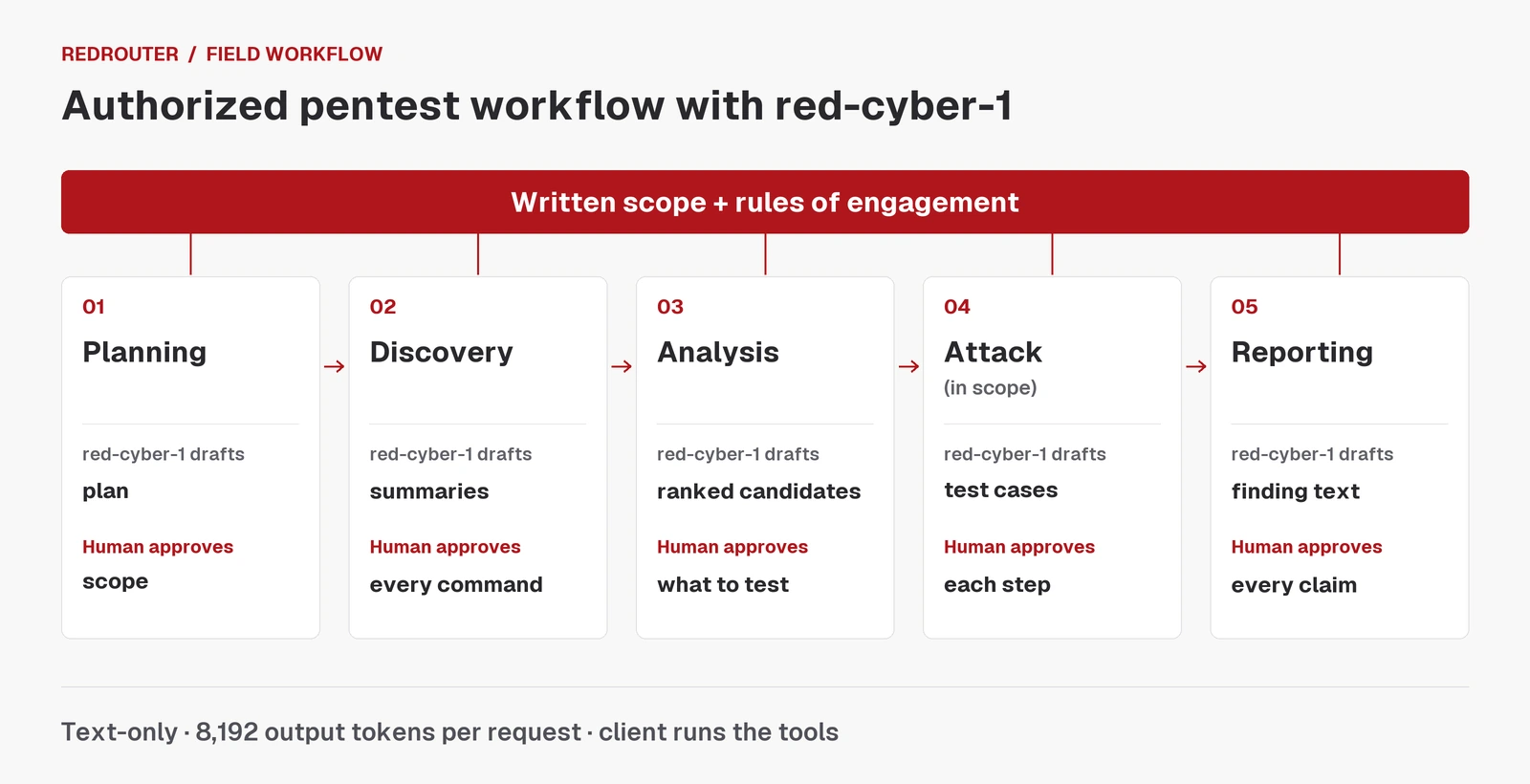
The point of a low-refusal model in this table is boring and useful: it should do the analysis and writing you're authorized to do without stalling on a word like "exploit". It doesn't move the approvals. RedRouter executes nothing on your behalf. The Claude Code guide says so directly: your local client runs any permitted tools, and RedRouter doesn't execute terminal commands, fetch web pages or run hosted Anthropic tools.
Treat target data as untrusted input. HTTP responses, page text, banners and source comments can carry instructions aimed at the model. Read the model's proposed tool calls before you approve them, especially after it has just read something from the target.
Step 4: Plan around the limits
A few catalog facts shape a red-cyber-1 workflow more than any prompt does.
8,192 output tokens per request. The 1M context lets you send a lot. It doesn't let the model write more than 8,192 tokens back, and that budget includes tool-call arguments. The model selection docs recommend setting an explicit output limit and splitting long answers into sections. In practice: ask for one finding write-up per request, not the whole report.
Text only. red-cyber-1 can't read screenshots. Paste the HTTP request and response, the DOM text or the tool output instead. In Codex, keep features.view_image=false; in tools like Strix, turn off image context.
Agents resend history. Every turn sends the conversation and tool output again, so a long agent loop costs more than its final answer suggests. Trim noisy scanner output before the model sees it.
Tool budget. Through the Messages adapter, the active tool set has to fit within 128 tools and 256 KiB. Large MCP setups may need fewer enabled tools.
No silent fallback. RedRouter doesn't switch to a different model if the one you picked is unavailable; the request fails, and your client decides what happens next. If you script a fallback, log which model produced each result.
It's Beta. Pin the model ID in your config, save your client version, and rerun a small check when either changes.
What it costs
GLM 5.3 Flash Red (glm-5.3-flash-red), an agent-work option in the same catalog, is $0.25 per 1M input tokens, $0.10 cached input and $1.00 output, with a 1,048,576-token context. red-cyber-1 is $0.28 input, $0.10 cached input and $1.10 output per 1M tokens, also with a 1,048,576-token context. Those are the live catalog rates on November 17, 2026; check the model pages before you budget, since rates can change. Pricing covers plans and credit; per-model token rates are on the model pages.
Which one to run is a question for your workload, not a spec sheet. RedRouter's docs suggest a small evaluation set from your real tasks: keep the prompts and checks fixed, change only the model, and compare accepted results, retries and total cost.
Keep engagement data under control
Client data is the part of a pentest you can't take back. A few settings to check before the first request:
- New RedRouter API keys default to content storage off. Older keys may still have it on, so check with
GET /v1/key. - Account-wide Zero Data Retention is a separate setting. It's opt-in and off by default; turn it on in Settings before you send anything if your engagement requires it. The data handling docs cover eligibility and what each setting does, and what RedRouter keeps explains it in plain terms.
- RedRouter's settings don't touch your local copies. Claude Code transcripts, Codex logs, proxy exports and saved tool results stay on your machine until you delete them.
- Strip credentials, session cookies and unneeded customer data before they reach the prompt. If the client agreement doesn't allow external processing, don't send it.
A short checklist for each run
- Written authorization and scope are in the working directory.
- The client points at RedRouter with the model ID
red-cyber-1, and every model alias maps to it. - Permission mode is Manual (
default), existing allow rules are reviewed, and deny rules cover out-of-scope hosts and techniques. - Output limit is set explicitly, and tasks are split into pieces that fit 8,192 tokens.
- No screenshots: text evidence only.
- Key storage and account ZDR are set the way the engagement requires.
- Every finding in the report is backed by tool output or a reproduction, not by the model's word.
FAQ
What is red-cyber-1 used for?
RedRouter's catalog describes red-cyber-1 as its model for authorized penetration testing and red-team work: long-context, tool-capable and with reduced refusals. It's in Beta. Specs and current prices are on the red-cyber-1 model page.
How do I use red-cyber-1 with Claude Code?
Set ANTHROPIC_BASE_URL=https://redrouter.org (no /v1), put your RedRouter key in ANTHROPIC_AUTH_TOKEN, set ANTHROPIC_API_KEY to an empty string and set the model to red-cyber-1. Map the other model aliases to it too, as the Claude Code docs show, and use Manual mode (--permission-mode default) for human approval of commands.
Can red-cyber-1 read screenshots from a pentest?
No. It's text-only. Paste the request and response text, page text or tool output instead.
Why does Claude Code return a 400 about safeguards?
Auto mode can ask for server-side safety classification, which RedRouter doesn't provide. Switch to Manual mode (--permission-mode default), review existing allow rules and approve commands yourself.
Is red-cyber-1 the same as GLM 5.3 Flash Red?
They're separate catalog entries with separate IDs and prices. RedRouter doesn't disclose red-cyber-1's underlying model. Pick by testing both on your own tasks.
Does a pentest workflow with red-cyber-1 need written authorization?
Yes. Use it only on systems you own, have written permission to test, or that are in a published bug-bounty or VDP scope. RedRouter's terms prohibit testing systems without authorization, and a configured model doesn't change that.
Sources
- RedRouter, red-cyber-1 model page: https://redrouter.org/models/red-cyber-1
- RedRouter docs, Models & pricing: https://docs.redrouter.org/models
- RedRouter public model catalog (JSON): https://redrouter.org/api/catalog
- RedRouter docs, Choose a model: https://docs.redrouter.org/model-selection
- RedRouter docs, Use Claude Code with RedRouter's Messages API: https://docs.redrouter.org/claude-code
- RedRouter docs, Codex CLI: https://docs.redrouter.org/codex
- RedRouter docs, Security agents: https://docs.redrouter.org/security-agents
- RedRouter docs, Data handling: https://docs.redrouter.org/data-handling
- RedRouter scope builder: https://redrouter.org/scope
- RedRouter security page: https://redrouter.org/security
- Claude Code docs, Permission modes: https://code.claude.com/docs/en/permission-modes
- NIST SP 800-115, Technical Guide to Information Security Testing and Assessment: https://csrc.nist.gov/pubs/sp/800/115/final